0978-06H
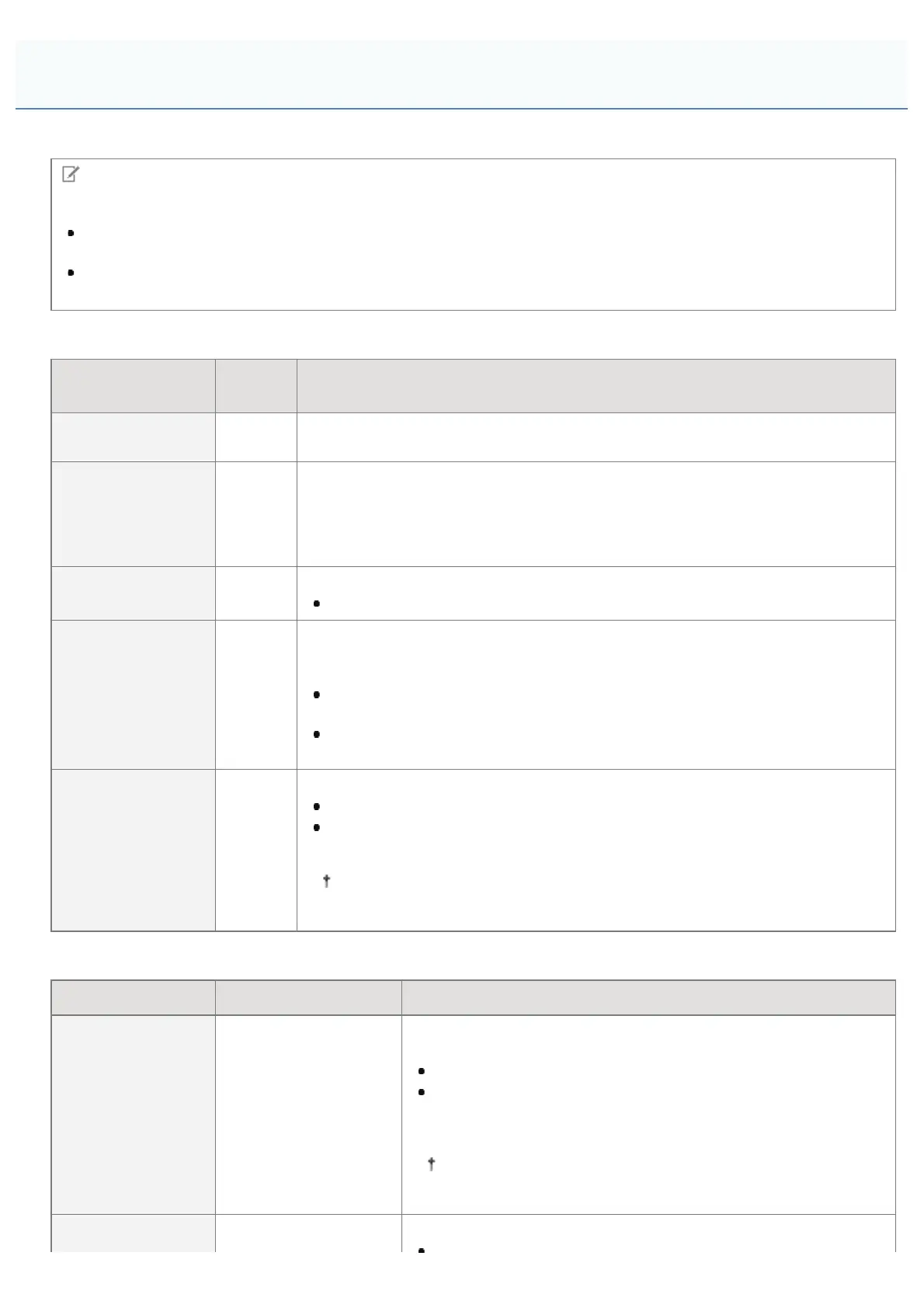
You can set the following items when printing.
NOTE
Viewing the Tables
The default value for each setting is displayed in bold text. To change the default values, see "Changing the Default
Print Settings and File Sorting Criteria."
The items and setting values marked with "*" may or may not be displayed depending on the availability of the
optional accessories or the content of the setting.
Items that can be set for all file formats
Setting Item
Setting
Value
Setting
[No. of Copies]
1 to
9999
Specify the number of copies to be printed. Only the number of copies specified by
the setting value are printed.
[Resolution]
[600
dpi] /
[1200
dpi]
You can specify the resolution before making a print.
[600 dpi]: Prints with 600 dpi resolution. Suitable for printing regular files and tables.
[1200 dpi]: Prints with 1200 dpi resolution. Enables you to clearly print fine text and
diagrams. Particularly suitable for data that includes a lot of small text or fine lines.
[2-Sided Printing]
[Off] /
[On]
Specify whether to print on one side or both sides of the paper.
When it is set to [On], it prints on both sides of the paper.
[Binding Location]
[Long
Edge] /
[Short
Edge]
It sets the binding location on the long side of the paper (long-edged binding) or
the short side of the paper (short-edged binding). During 2-sided printing, the
binding location is automatically adjusted on both the front and back sides.
When it is set to [Long Edge], the binding location is on the long side of the
paper.
When it is set to [Short Edge], the binding location is on the short side of the
paper.
[Enlarge Print Area]
[Off] /
[On]
Specify whether to expand the printable area and print.
When it is set to [On], the printable area is expanded and printed.
When it is set to [Off], the effective print area becomes that area except for 5
mm at the top, bottom right and left edges.
When it is set to [On], images on the edges of the paper may be partially
cut off.
Items that can be set for PDF/XPS formats
Setting Item Setting Value Setting
[Print Range]
[Designation Method] :
[All] / [Specified
Pages]
[Page Range] : [First
Page] / [Last Page]
Specify the print range. Only the range specified by the setting
value is printed.
When [All] is selected, all the pages are printed.
When [Specified Pages] is selected, and the page range is
entered, only the specified page range is printed. If the page
range is selected, select [<Apply>], and then press [OK].
[Page Range] is only displayed when [Specified Pages] is
selected in [Designation Method].
Specify the size of paper to output.
Print Setting Menu List
㻞㻥㻥㻌㻛㻌㻥㻣㻜



 To Next Page