0978-01R
When changing the location of the printer or moving the printer for maintenance, be sure to perform the following
procedure.
For details on the installation site, see "Confirming the Supplied Accessories and Checking the Installation Site."
Before moving the printer, see "Important Safety Instructions."
1
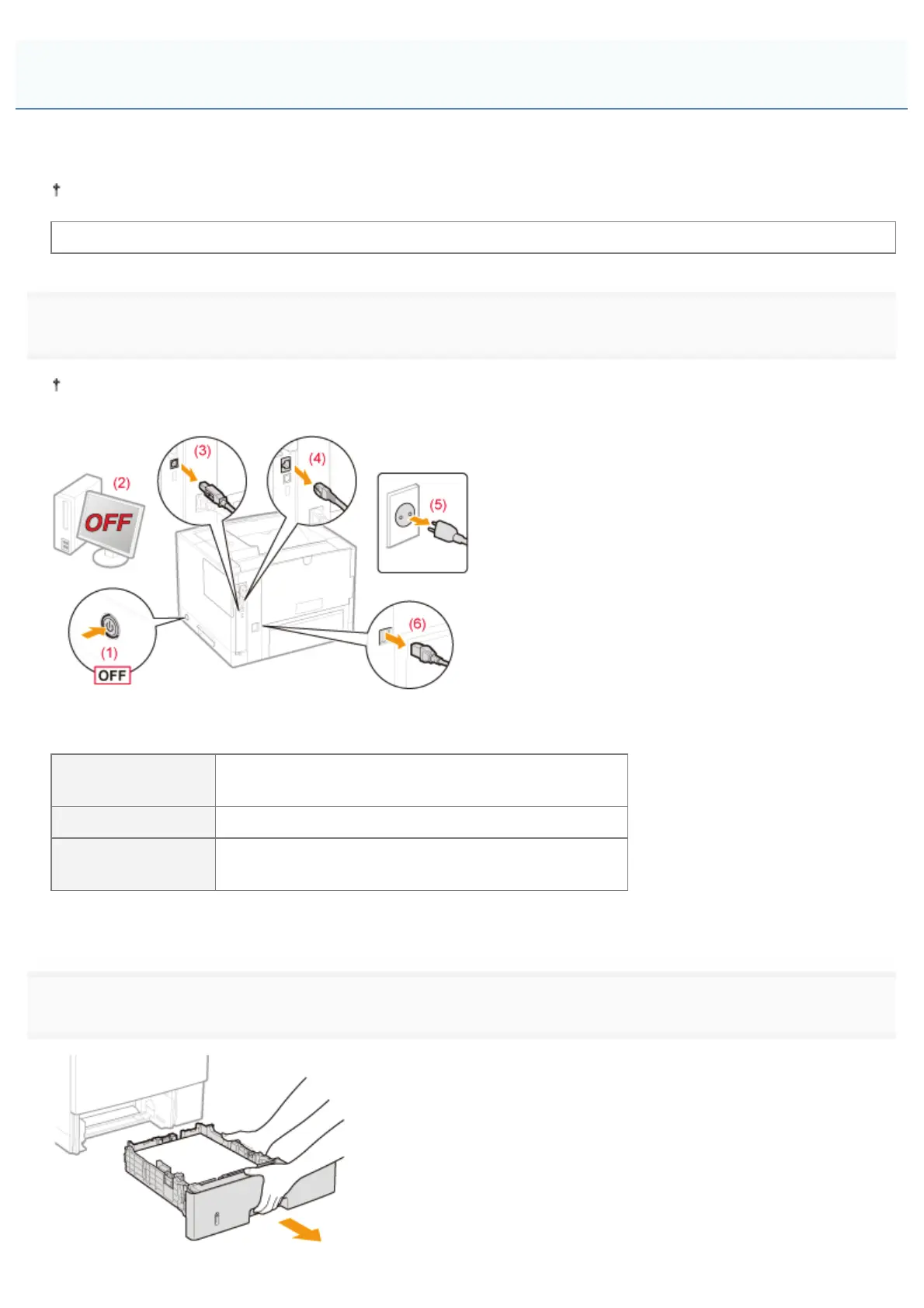
Turn the printer OFF, and then disconnect the cables or cords from the printer.
Shut down the printer before turning it OFF.
For details on the procedure for shutting down the printer, see "Turning the Printer ON/OFF."
<How to disconnect the cable or cord>
USB cable
*
(2) Turn the computer OFF.
(3) Disconnect the cable from the printer.
LAN cable
*
(4) Disconnect the cable from the printer.
Power cord
(5) Disconnect the power plug from the AC power outlet.
(6) Disconnect the cord from the printer.
*
Whether the cable is connected or not varies depending on your environment.
2
Pull out the paper drawer.
Moving the Printer
㻤㻜㻌㻛㻌㻥㻣㻜



 To Next Page