0978-014
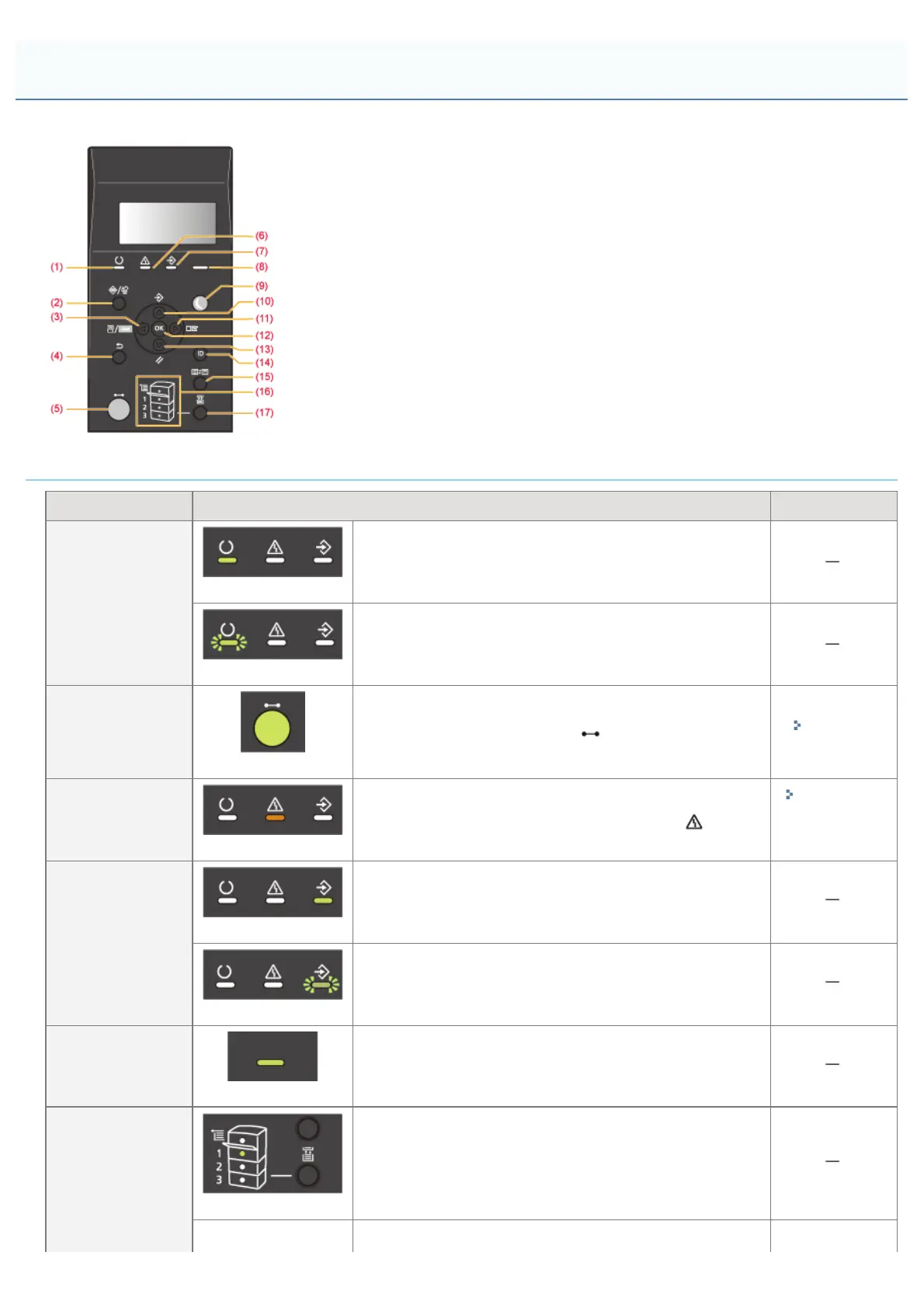
The control panel has the indicators and display which show the printer status and the keys for the printer operation.
Indicators
Name Status Refer to
(1) Ready Indicator
(On)
The printer is ready to print.
(Blinking)
The printer is preparing to print.
(5) Online Indicator
(On)
Online (The printer can receive print data from the computer.)
If the printer enters Sleep Mode, the
(Online) indicator is off
even when the printer is online.
"Online and
Offline"
(6) Message Indicator
(On)
A problem has occurred and printing cannot be performed.
(If the printer enters Sleep Mode when it is offline, the
(Message) indicator comes on even when no problem is occurring.)
"The
Message
Indicator Is
On"
(7) Job Indicator
(On)
The printer is receiving data.
Data remains in the printer memory.
(Blinking)
The printer is processing data.
(8) Main Power
Indicator
(On)
The power of the printer is ON.
(16) Paper Source
Indicators
(On)
A paper source is selected.
Control Panel
㻡㻟㻌㻛㻌㻥㻣㻜



 To Next Page