0978-036
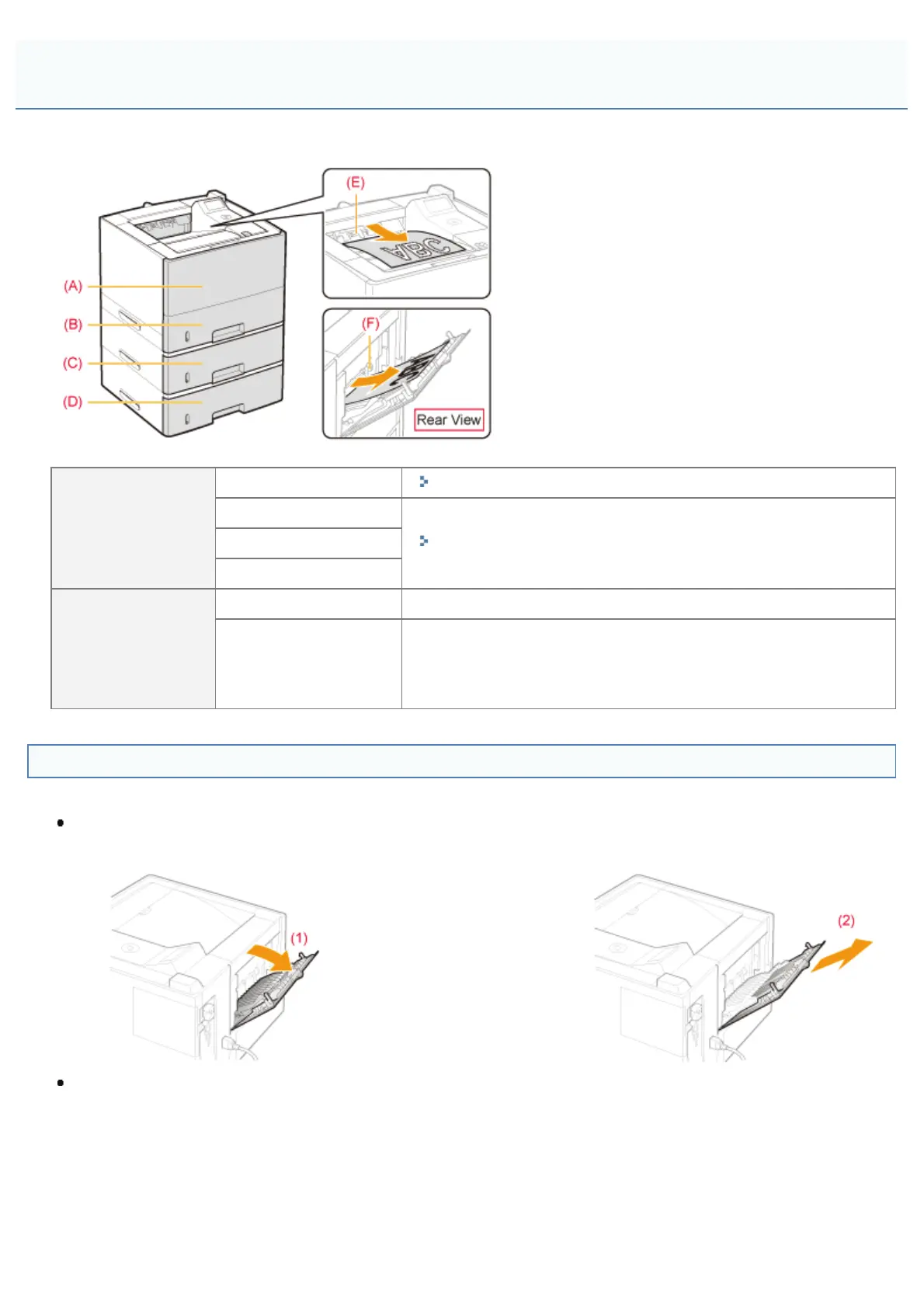
This printer has the following paper sources and output trays.
Paper Source
(A): Multi-purpose tray
"Loading Paper in the Multi-purpose Tray"
(B): Drawer 1
"Loading Paper in the Paper Drawer"
(C): Drawer 2 (optional)
(D): Drawer 3 (optional)
Output Tray
(E): Output tray Outputs paper with the printed side facing down.
(F): Sub-output tray
Outputs paper with the printed side facing up.
The sub-output tray is suitable to print transparencies, labels, or
envelopes which tend to curl, since the printed paper is output
flattened.
How to Switch Output Trays
When switching to the sub-output tray
(1) Open the sub-output tray as shown in the figure. (2) Pull out the tray extension until it stops.
When switching to the output tray
(1) Place the tray extension back into its original position as
shown in the figure.
(2) Close the sub-output tray.
Paper Loading and Output
㻝㻡㻞㻌㻛㻌㻥㻣㻜



 To Next Page