0978-0AS
NOTE
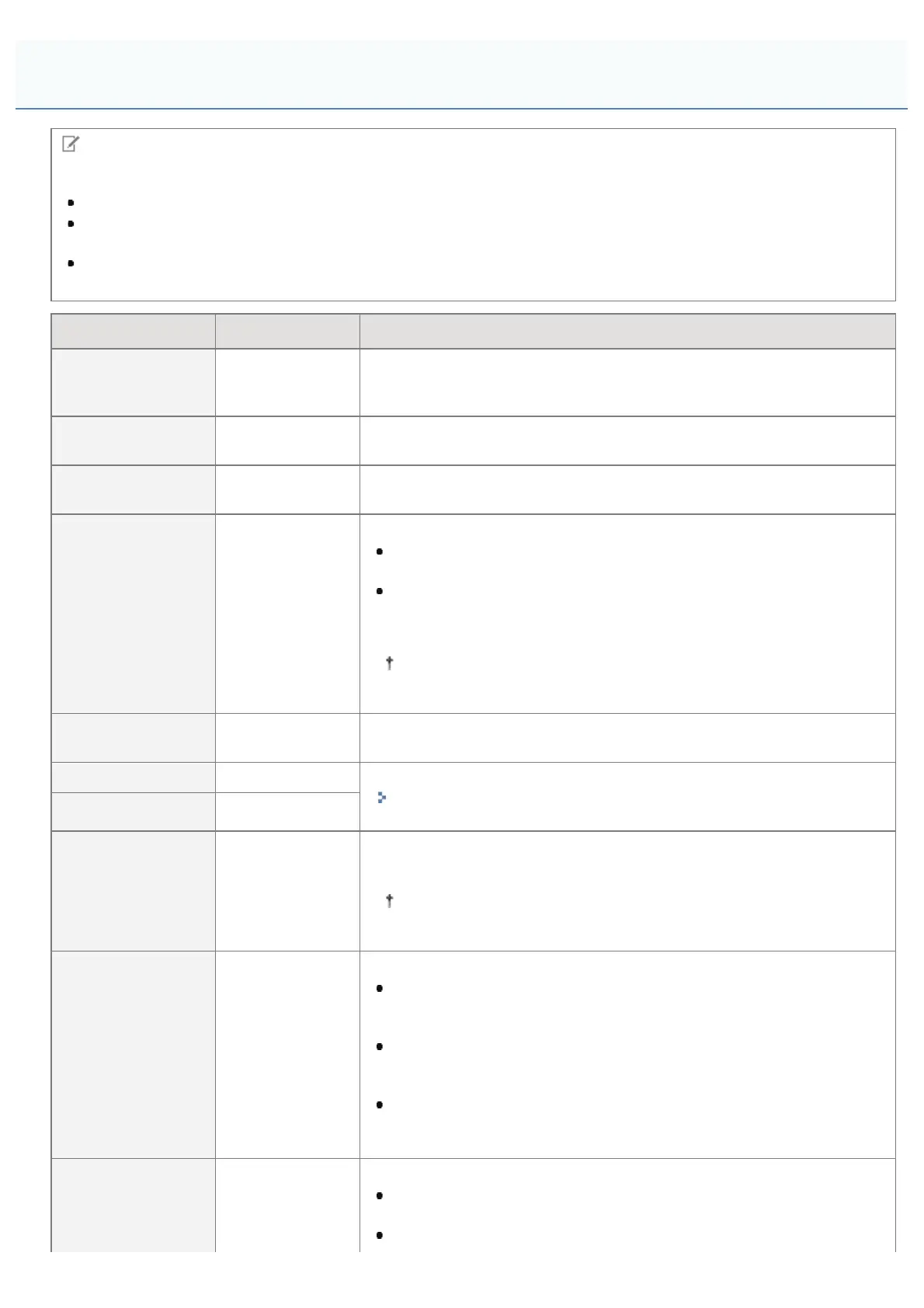
Table description
Bold values in the table indicate the default settings.
After changing the setting items with "*1", cycle the power of the printer or perform a hard reset to make the
settings effective.
The setting items or setting values with "*2" may not be displayed depending on the availability of the optional
accessories and other settings.
Setting Item Setting Value Setting
[Image Orientation]
[Auto],
[Vertical],
[Horizontal]
Specifies whether the printer should print an image in portrait (vertical)
orientation or in landscape (horizontal) orientation.
[Zoom] [Off], [Auto]
Specifies whether the printer should print with scaling outputs according to
the printable area.
[Print Position]
[Auto], [Center],
[Top Left]
Specifies the printing position for an image.
[Print Guarantee]
*1*2
[Off], [On]
Set the processing method for received TIFF data.
When it is set to [Off], the processing time is shortened by processing
received TIFF data sequentially.
When it is set to [On], it is possible to prevent errors from occurring,
since all the TIFF data is received before processing begins.
However, the printing speed will drop.
After specifying, perform a hard reset or restart the printer to
enable the settings.
[Show Warnings]
[Off], [Print],
[Panel]
Specifies the display setting for the error message in case of an error
occurring.
[Print E-Mail Text] [Off], [On] Set e-mail print.
"Receiving E-mail Data on the Mail Server and Printing (E-mail
Print)"
[Limit E-Mail Print]
*2
[Off], [On]
[Enlarge Print Area] [Off], [On]
Specifies whether the printer should print a document with its printable
area expanded.
When [On] is specified, part of the print image may be missing
near the margins of the paper.
[Halftones]
[Resolution],
[Gradation],
[High Resolution]
Specify the halftone display method when printing.
When it is set to [Resolution], you can perform printing that combines
smooth gradation with edge quality. It is suitable for printing graphics
or graphs that use gradation.
When it is set to [Gradation], you can print with a sharp gradation
and well-balanced texture, contrasting light and shade, which is best
suited for printing photo images.
When it is set to [High Resolution], you can print in fine detail so that
the edges of text data can be seen clearly. It is suitable for printing
data containing text and fine lines.
[Grayscale
[sRGB],
[NTSC],
Select the method for converting color print data to grayscale for printing.
When it is set to [sRGB], it calculates the grayscale value using the
sRGB standard color conversion method.
When it is set to [NTSC], it calculates the grayscale value using the
[Setup] Menu ([Imaging] Options)
㻡㻤㻢㻌㻛㻌㻥㻣㻜



 To Next Page