7
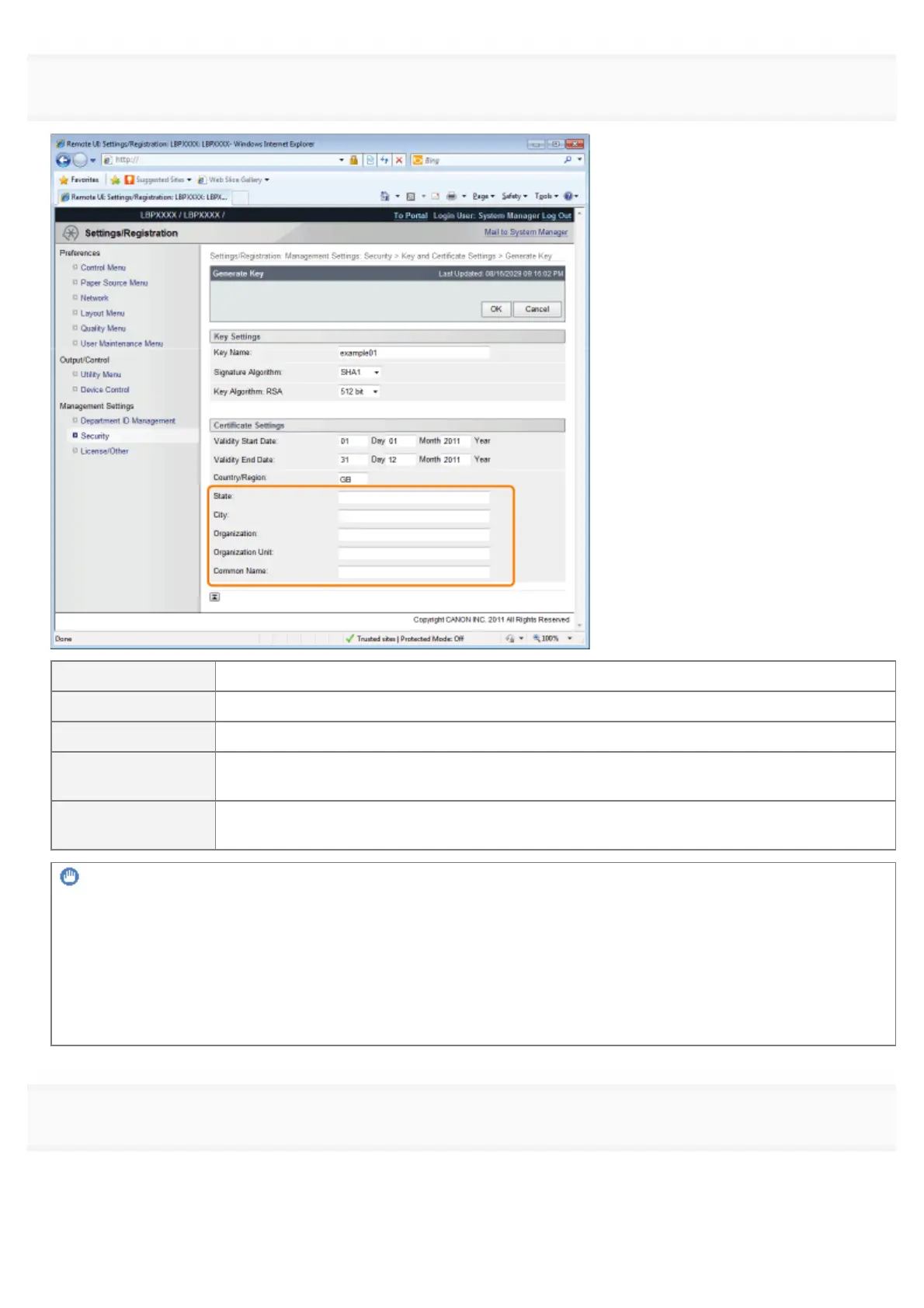
Specify the required information for the self-sign server certificate.
[State]: Enter the name of the state. Up to 24 alphanumeric characters can be entered.
[City]: Enter the name of the city. Up to 24 alphanumeric characters can be entered.
[Organization]: Enter the name of the organization. Up to 24 alphanumeric characters can be entered.
[Organization Unit]:
Enter the organization unit such as a section name. Up to 24 alphanumeric characters can be
entered.
[Common Name]:
Enter the IP address or FQDN (in the style of "xyz.company.com") of this printer. Up to 41
alphanumeric characters can be entered.
IMPORTANT
To issue the self-sign server certificate
Specify the setting for at least one of the options among [Country/Region], [State], [City], [Organization], [Organization
Unit], and [Common Name].
When all the fields are blank, the self-sign server certificate is not issued.
If you are using Windows Vista, 7 or Server 2008
If you want to use IPPS printing, be sure to enter the IP address of this printer in [Common Name].
8
Click [OK].
ĺ The key and certificate creation starts.
㻢㻥㻡㻌㻛㻌㻥㻣㻜


 To Next Page