A53 Z0 9 0020 L En Technical documentation
6 Operating mode
There are 3 main operating modes and 2 special modes to allow you to control your generator.
The standard modes are:
Assisted manual mode.
Automatic mode.
Test mode.
The special modes are:
Semi-automatic mode. This mode must be enabled by setting parameter [E1621] to 0 and
parameter [E1614] to 1.
Manual mode. This mode must be enabled by setting parameter [E1621] to 0.
6.1
Assisted manual mode
Assisted manual mode is a kind of automatic mode where main state transitions are manually
triggered by pressing the desired front panel button. This mode is available from v4.00
software version.
User control:
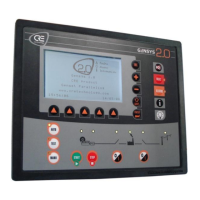
Use [MANU] button to activate this mode. Corresponding LED will light on.
[START] button will launch the complete automatic start sequence of the generating set. Once
ready, the engine will be let running without additional control of the GENSYS 2.0.
If a speed governor is connected to GENSYS 2.0, it is possible to increase the speed with the [+] key, and
decrease it with the [-] key.
If a voltage regulator is connected to GENSYS 2.0, it is possible to increase and decrease the voltage with
the [SHIFT] + [+] keys and [SHIFT] + [-] keys.
Using [STOP] button while generating set breaker is open will stop the engine after the standard
cool down sequence. A second [STOP] request will stop the engine without waiting for the cool down
duration.
Using [STOP] button while generating set breaker is closed will start the standard unload sequence,
open the breaker and stop the engine after the cool down sequence.
GENERATING SET

 To Next Page
 Loading...