A53 Z0 9 0020 L En Technical documentation
Chapter : Dedicated I/O lines
When GENSYS 2.0 tries to open/close a breaker, a maximum is allowed before getting the corresponding
feedback from the breaker. This delay is set to 5 seconds (factory) and can be changed by adjusting
parameter [E1149] in menu “Configuration/Modification by variable n°”.
1/ Working modes
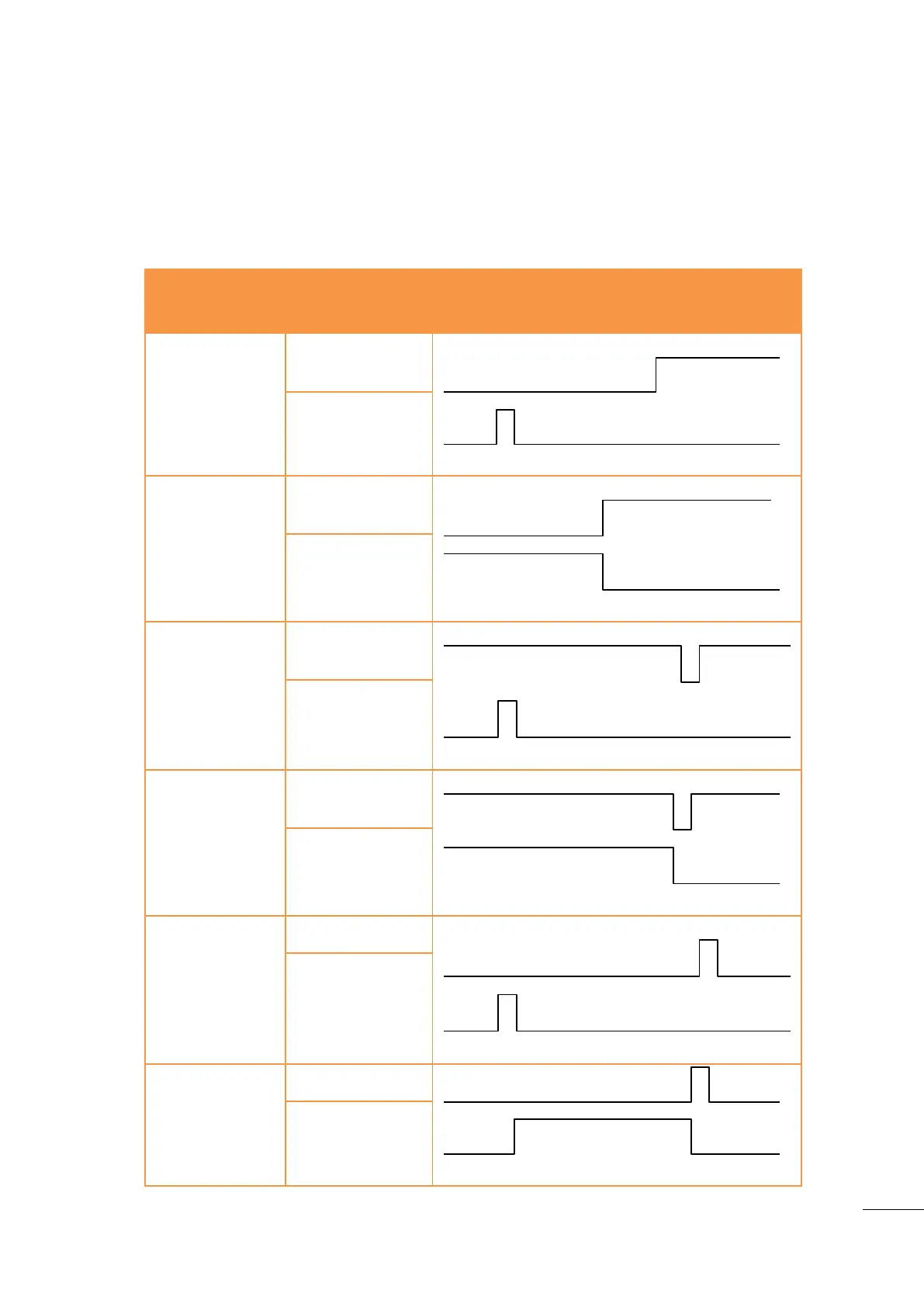
The “Configuration/Outputs/Breakers” menu allows you to choose the working mode of these relays via
parameter [E1992] for the MAINS and [E1993] for the generating set. Table below explains the different
working modes featured by GENSYS 2.0.
E1992 (MAINS)
/
E1993 (GENSET)
Continuous
contact to open
E1 (Mains) / E4 (Genset)
Positive pulse to
close
E2 (Mains) / E5 (Genset)
1
(default setting)
(Contactor)
Continuous
contact to open
E1 (Mains) / E4 (Genset)
Continuous
contact to close
E2 (Mains) / E5 (Genset)
Undervoltage coil
opening
E1 (Mains) / E4 (Genset)
Pulse to close
E2 (Mains) / E5 (Genset)
Undervoltage coil
opening
E1 (Mains) / E4 (Genset)
Continuous
contact to close
E2 (Mains) / E5 (Genset)
4
(Breakers
without
undervoltage
coils)
Pulse to open
E1 (Mains) / E4 (Genset)
Pulse to close
E2 (Mains) / E5 (Genset)
Pulse to open
E1 (Mains) / E4 (Genset)
Continuous
contact to close
E2 (Mains) / E5 (Genset)
Table 24 - Breaker control configuration

 To Next Page
 Loading...