A53 Z0 9 0020 L En Technical documentation
Chapter : Predefined configuration
Table 14 - Typical basic mains paralleling configuration
In all mains paralleling modes, if a "mains electrical fault" is set (via protections or digital inputs), the
generator starts and takes the entire load upon mains loss even if the remote start J3 is off. In all cases, you
have to set a mains protection in order to determine the behaviour of your generator when mains power
disappears.
8.6.2
Mains paralleling mode
Choice of mains paralleling mode is configured through parameter [E1148].
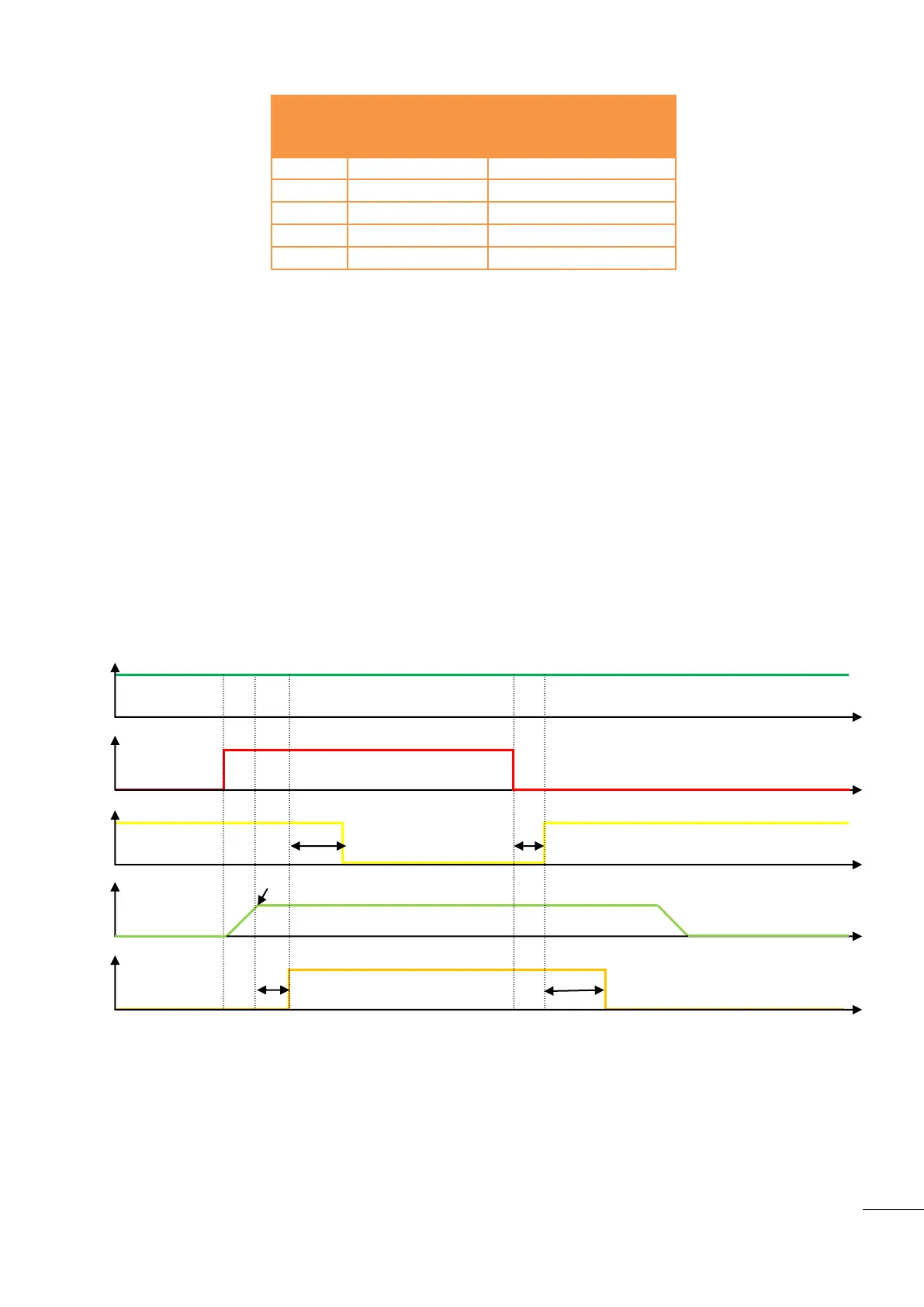
1/ No Break CO (No break change over)
When remote start is on, the generator starts, synchronizes and parallels with the mains, then takes the
load (ramps up). Once the mains are unloaded, GENSYS 2.0 opens the mains breaker. (See Figure 26)
When remote start is off, the mains takes the load in the same way as the generator did previously. If the
generator started for a mains failure, when mains power returns the GENSYS 2.0 synchronizes the load
transfer (ramps down), opens the breaker and then stops the generator. (See Figure 27)
Figure 26 - Typical sequence in No Break CO mode on start request
T1 : Genset ready
T2 : Synchronisation
T3 : Load ramp
T4 : Synchronzation
T5 : Unload ramp
E2201 (Start request on J3)

 To Next Page
 Loading...