A53 Z0 9 0020 L En Technical documentation
6.5
Manual mode
The MANUAL mode is activated by setting the parameter [E1621] to 0 (Menu « Configuration/Modification
by variable n°»). The MANUAL mode replaces the ASSISTED MANUAL mode that is not available anymore.
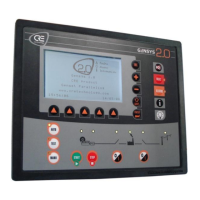
In MANUAL mode, it is possible to control the generator with the front panel of the GENSYS 2.0. All steps
from engine start to paralleling are controlled by pushing keys.
To start the engine push the [START] key and hold down until the oil pressure fault disappears. If a speed
governor is connected to GENSYS 2.0, it is possible to increase the speed with the [+] key, and decrease it
with the [-] key.
If a voltage regulator is connected to GENSYS 2.0, it is possible to increase and decrease the voltage with
the [SHIFT] + [+] keys and [SHIFT] + [-] keys.
As the generator starts, the synchroscope appears on the screen. It is then possible to synchronize using
the [+] and [-] keys and then close the breakers with the [0/I] keys.
Note: The internal synch check relay is always active, i.e. it is impossible to close the breaker if the
conditions for closing are not satisfied.
When the breaker is closed (Mains breaker feedback is connected) the corresponding Led on the front
panel should light up.
As soon as the generator breaker is closed, the GENSYS 2.0 is switched to “DROOP MODE” for speed and
voltage, i.e. the speed and the voltage will decrease when the load increases.
In droop mode, load sharing is controlled by droop but can also be managed with the [+] and [-] keys.
To stop engine push the [STOP] key.


 To Next Page
 Loading...