47
List
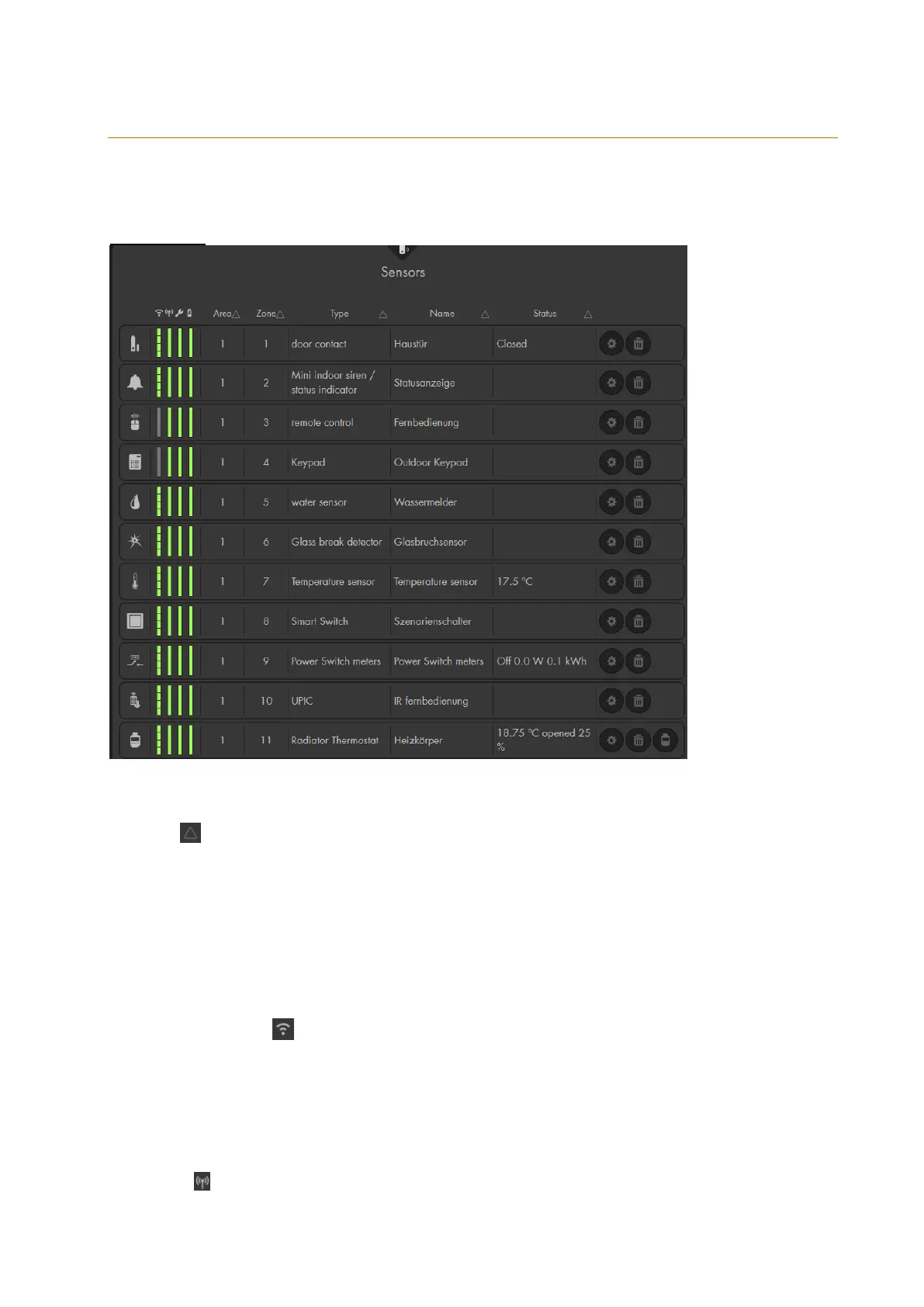
The menu “Sensors” “List” offers the “Sensors” in a list, as well as, the “alarm
overview” list.
Sensor list:
In this menu, you can find all sensors that are connected to your alarm panel. You can
change the sorting of the sensor list by means of the sort symbol at the top of each
column:
The list contains all information about the sensors. The four colored bars at the left of
each sensor indicate the signal strength, status, tampering contact, and battery. If you
move your mouse over one of the bars, you receive additional information.
Symbol
Each sensor type has an individual symbol that allows you quickly identify the sensor
type.
Signal strength
The higher the signal strength, the larger the bar is filled. If the signal strength is equal
or less then 2, a wireless repeater should be used. If the bar is red and displayed as
N/A (not available) when you mouse over there is no value currently available. The
signal strength of all sensors is N/A after a reboot of the alarm panel. This is normal –
the next time the sensors is checked (supervision), the test button is pressed, or the
sensor sends out a signal, the status will be displayed.
Status (indicator bar)
Shows the status of the sensor. A green bar indicates that everything is all right. A red



 To Next Page