120
System menu
This menu contains the system settings and allows you to check the system status, logs,
login information, perform firmware updates, backups, and a reset to default.
Status
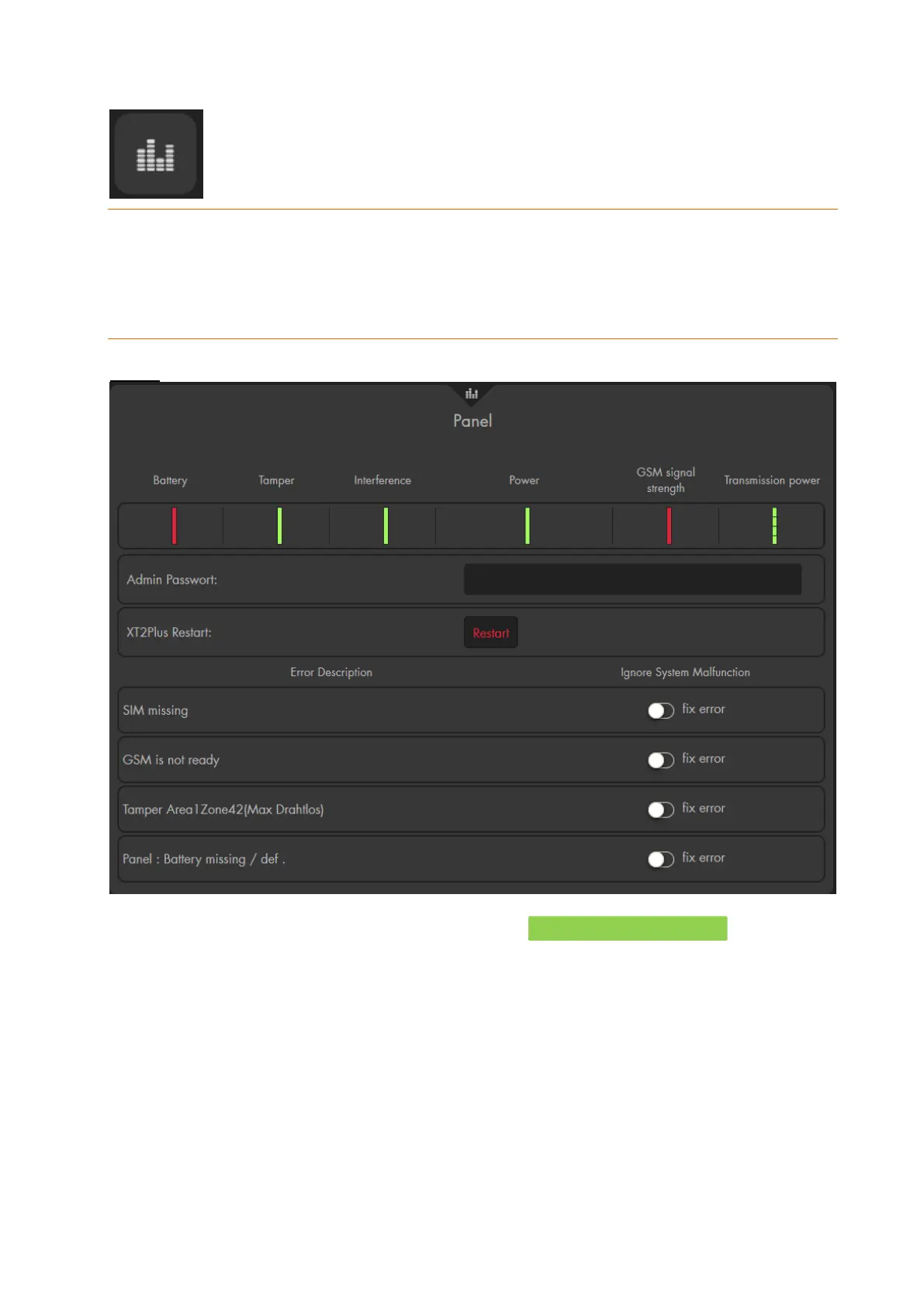
Panel
At the top of the menu, you see the battery status of the alarm panel, the status
of the tampering contact of the alarm panel (only XT1 Plus and XT3), if there are
any radio interferences, the power supply of the alarm panel, the GSM signal
strength, and the signal strength of the alarm panel.
o A green indicator bar shows that everything is all right. A red indicator bar
shows that something is wrong and you also receive a notification. In our
example, The battery switch is turned off and no SIM card is inserted in
the alarm panel. Both “error” could be ignored via the menu below.
Admin password / XT restart:
In order to restart the alarm panel, it is necessary to enter the admin password
and afterwards click on „restart“.
Errors
A table lists each system error (alarm panel, sensors, connections, lacking SIM
card).



 To Next Page