159
1 channel relay
Attention:
This product is not compatible with the XT1 or XT2 without “Upgrade dongle to XT2
Plus.”
ATTENTION:
The installation may only be performed by a person who is trained, certified,
and has a profound knowledge about electronic devices and electrical
engineering
Product description:
The single channel relay allows you to wirelessly (ZigBee S) control a connected power
circuit (24-230V AC). Additionally, it serves as a ZigBee repeater and automatically
enhances the signal of other ZigBee S devices.
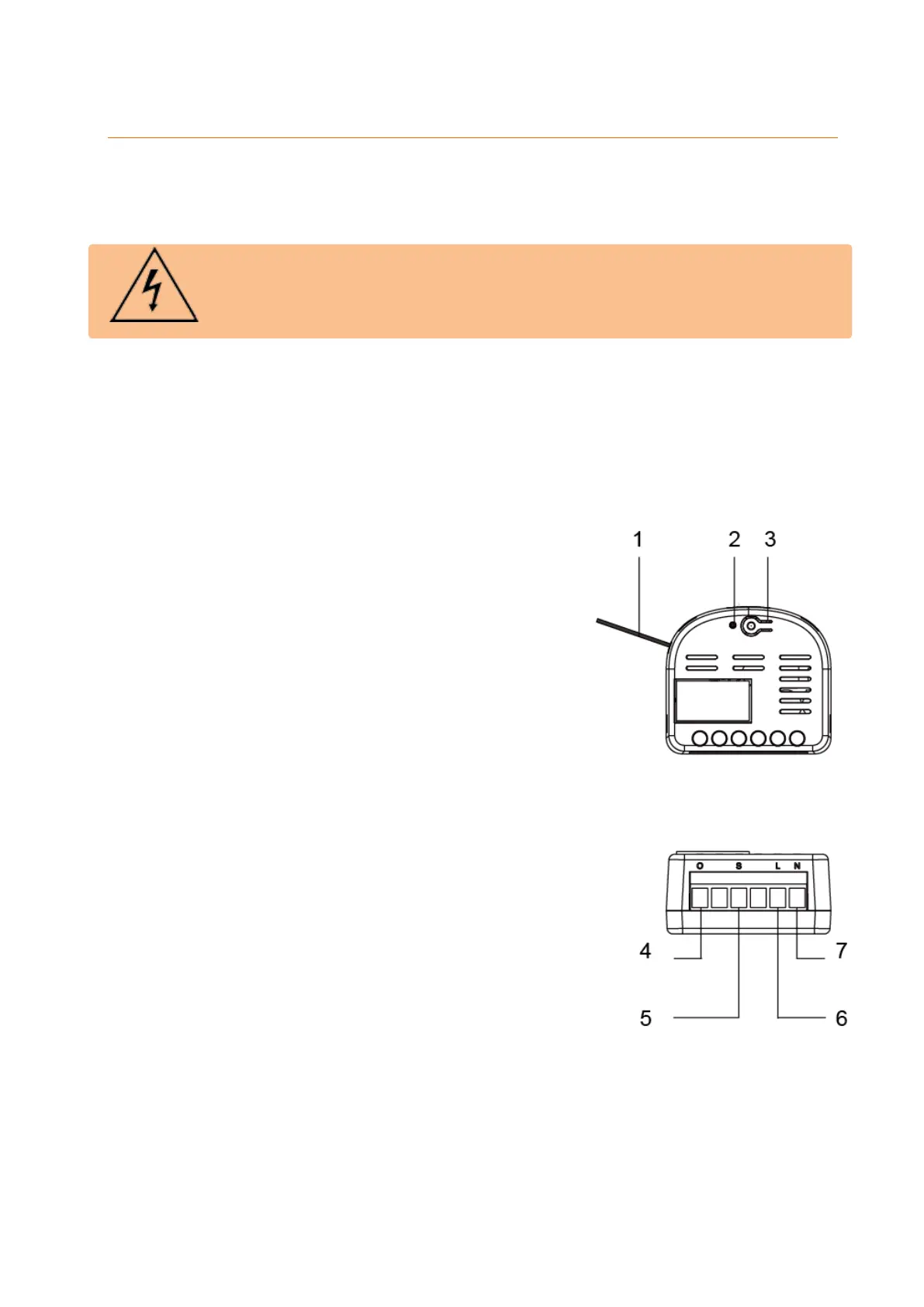
1. Antenna
2. Status LED
On
The single channel relay is on.
Off
The single channel relay is off
Flashes twice
The relay was successfully added to the alarm
panel.
Flashes once every 20 minutes
The relay has lost the connection to the alarm
panel.
3. Learn button
This button allows you to add the single
channel relay to the alarm panel. A details
description of the learn process is given on the
next pages.
Pressing this button briefly switches the single
channel relay on and off.
4. AC output – load
Phase conductor
5. External switch connector
6. AC input (24 - 230V AC)
Phase conductor
7. AC input and output (24 - 230V AC)
Neutral conductor



 To Next Page