50
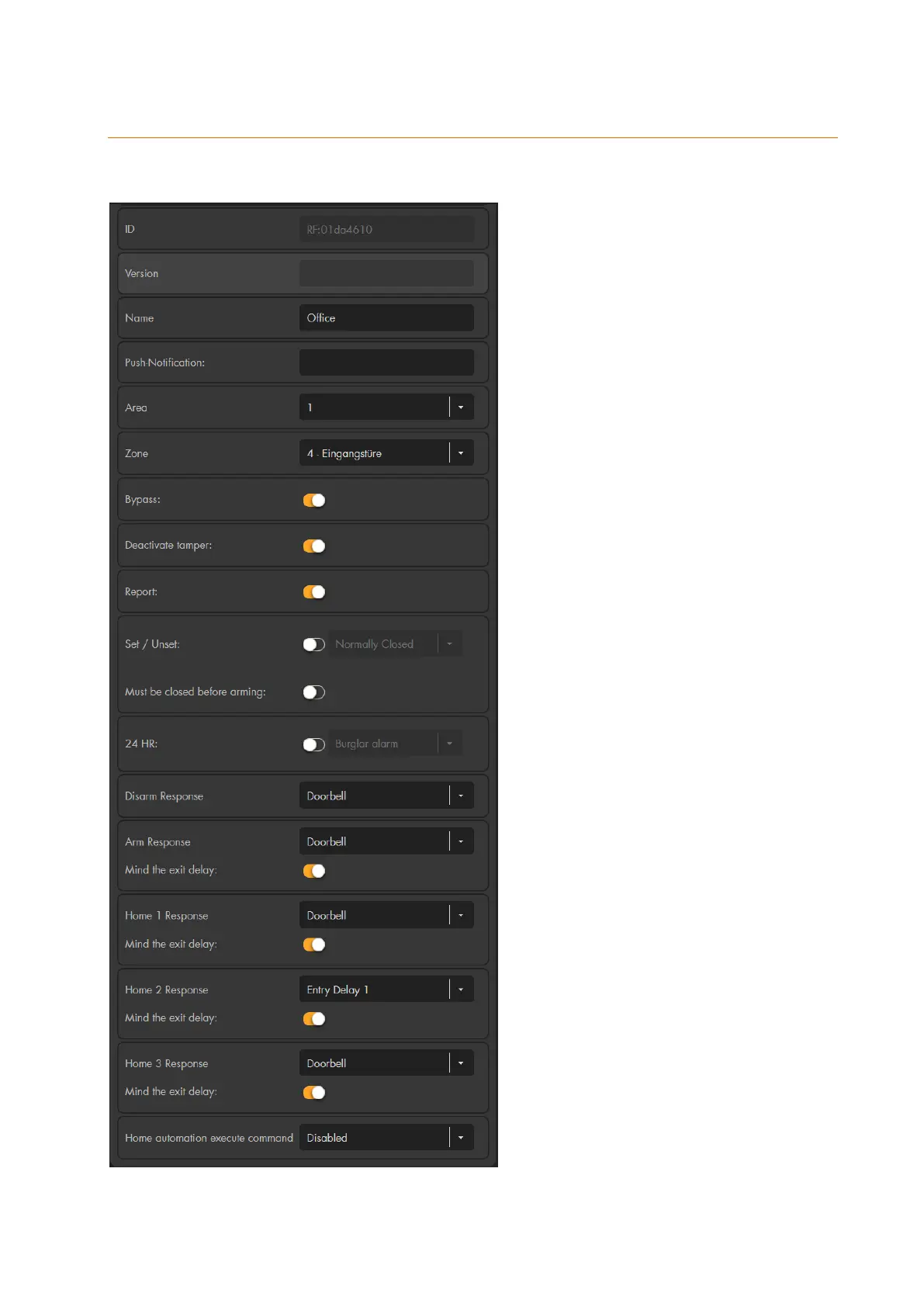
Edit sensor
You can assign different properties and actions to most of the sensors. In case of an
alarm, the sensor reacts according to the set parameters.
Depending on the type of sensor, the
following settings are available:
ID
Shows the sensor-specific ID (not
editable).
Version
Shows the software version (only for
certain sensors)
Name
Assign an individual name of up to 30
characters for the sensor.
Push-Notification
(only door contact, PIR motion
detector, sensor input)
If you have entered a text, a push
notification containing the entered
text is sent to your smartphone by
means of the app ever time the
sensor is triggered (e.g. open/close of
a door contact). The status of the
alarm panel (arm, home, disarm) is
irrelevant in this regard! Only enter a
text in this field if you want to monitor
a certain contact. If you only want to
get notified in case of an alarm, you
need to activate the push notification
in you LUPUS app.
Area
Assign an area to the sensor. The
areas can be armed separately.
Certain sensors (e.g. sirens) require
additional steps in order to change
the area. Please refer to the
corresponding part of the manual to
check if your sensor requires certain
additional steps.
Zone
Assign a zone number to the sensor.
Every zone number may only be
assigned once per area. Each area
has maximally 80 zones.



 To Next Page