11-2
11-1-2. Start method settings and I/O allocation
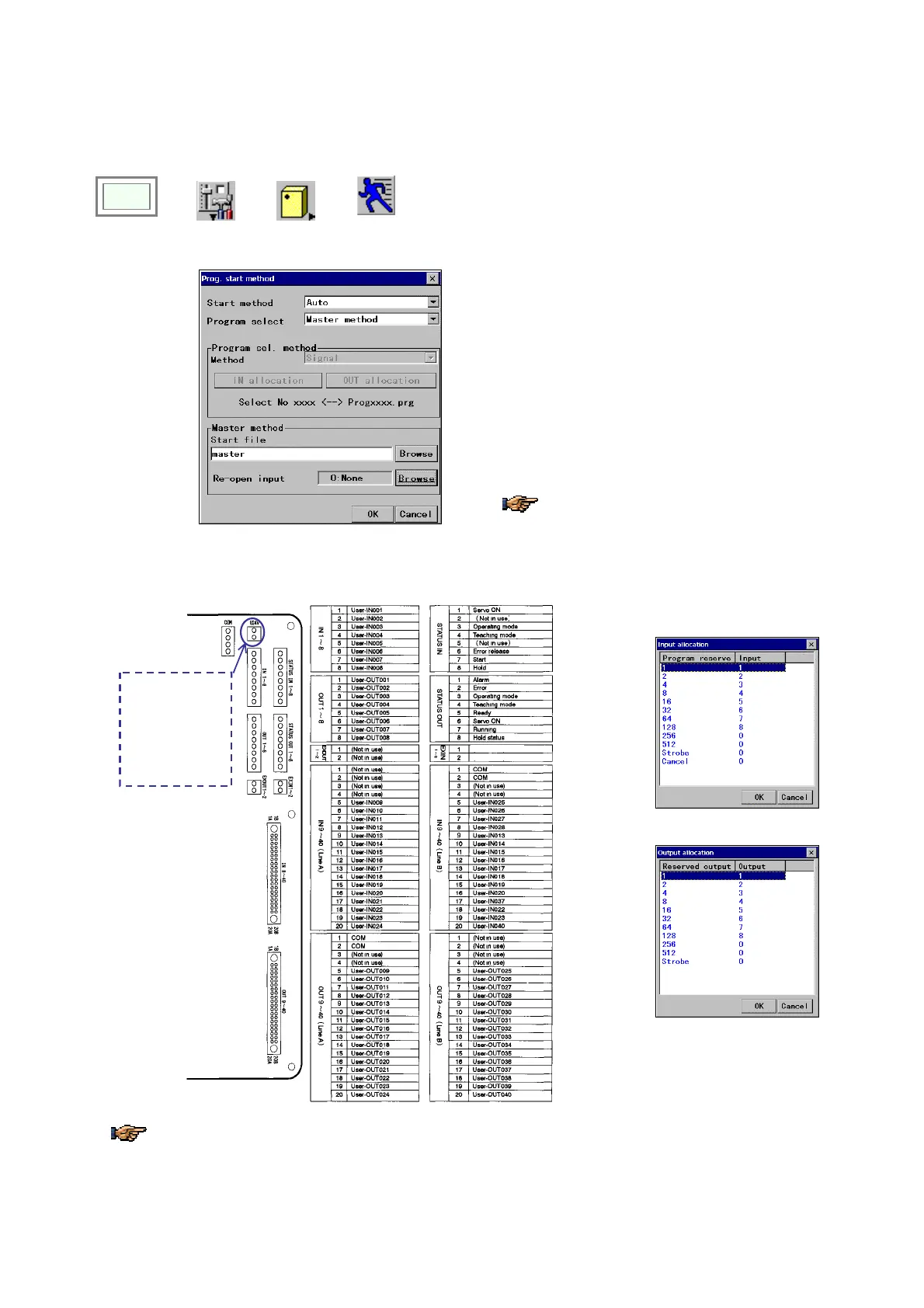
It is a function to specify the start method you want and then allocate user I/O terminals to be used to specify the
program number and to start a program.
Click
>>
Set
>>
Controller
>>
Start
condition
Î
[Start method] Select either Manual or Auto.
[Program select] Select either Program select
method of Master method. (in Auto start method).
[Program sel. Method] Select one method from
Signal, Binary or BCD.
[IN/OUT allocate] Set and edit terminal allocation.
[Start file] Specifies the master program.
[Re-open input] Select an input terminal to bring the
master program in the ready state in case of forced
termination of the master program.
* Click the Browse button to refer to the list of input
terminals.
・The re-open input executes the master
program from the beginning. It does not
take it from the last operation.
・Re-call input accepts the OFF to ON change.
<INPUT Allocation box>
<Terminal layout of the sequencer card>
This User 24 V
terminal is only for
maintenance use.
Use this for other
purposes will
damage/destroy the
sequencer card.
*
*
(High speed input)
(High speed input)
<OUTPUT allocation box>
Status I/O terminals marked with (
*) are connected to wires drawn from the operation box if provided.
Configuration of user I/O terminals varies with applied start method. See the next section for details.








 To Next Page