15-5
15-1-5. Weaving settings
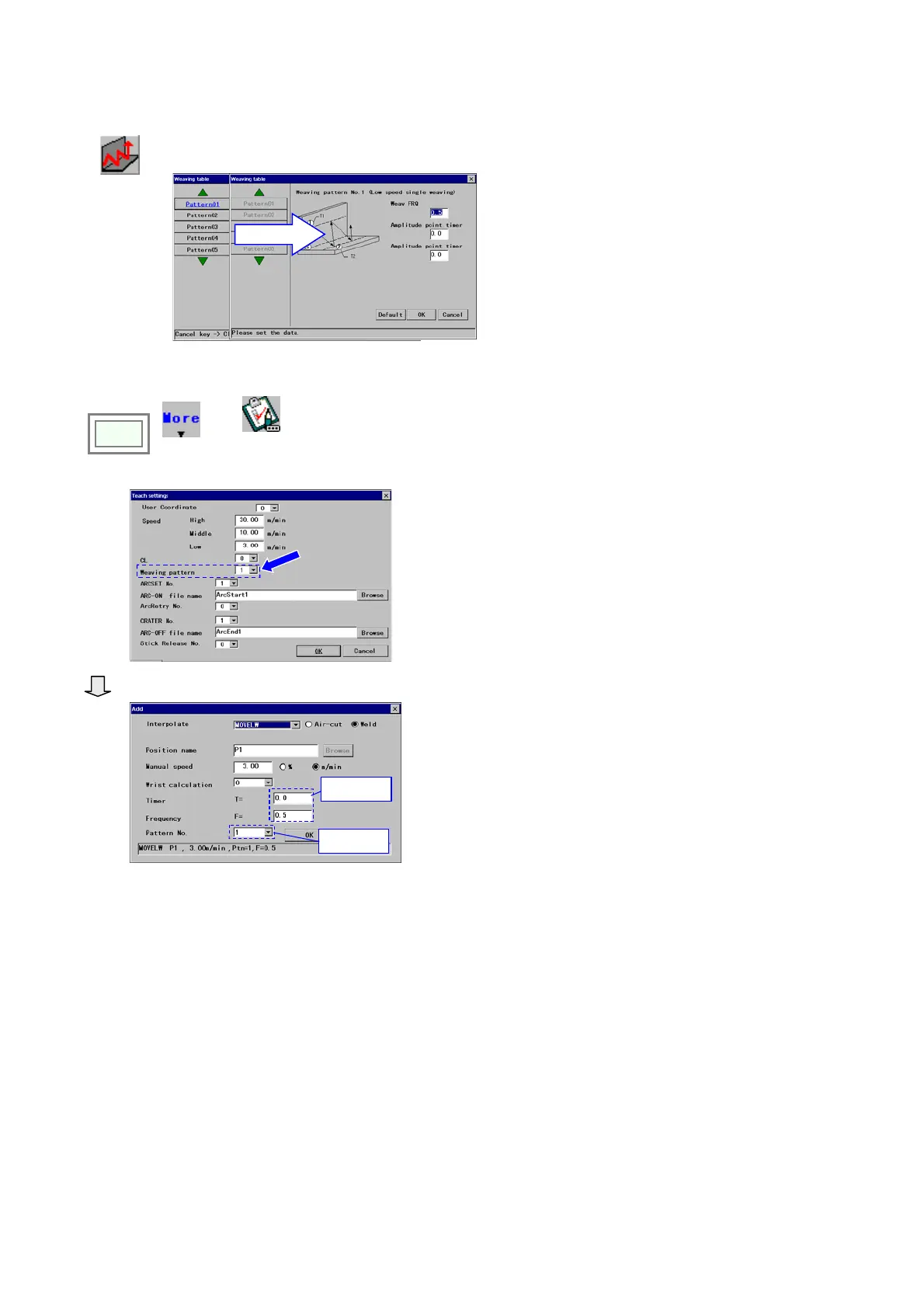
It is to set the initial weaving parameters when a weaving teaching point is added.
Weaving
Select a Pattern
Set parameters and click the
OK button.
[Weave FRQ]
Set the weaving frequency. (Unit: Hz)
[Amplitude timer (T1, T2)] Set how long the robot
to move parallel to the main trace at each amplitude
point. (Unit: second)
Then, do the following settings:
Click
>>
MORE
>>
Teac h
settings
Set a weaving pattern number to register, and then
click the
OK button.
◆ When a weaving point (MOVELW) is newly registered.
Value set in
teaching.
Values set in the
“Weaving table”
Those preset parameters - amplitude timer (as
“Timer”), weaving FRQ (as “Frequency”) and
weaving pattern (as “Pattern No.”) – are
automatically set.








 To Next Page