6-3
6-5. Replace
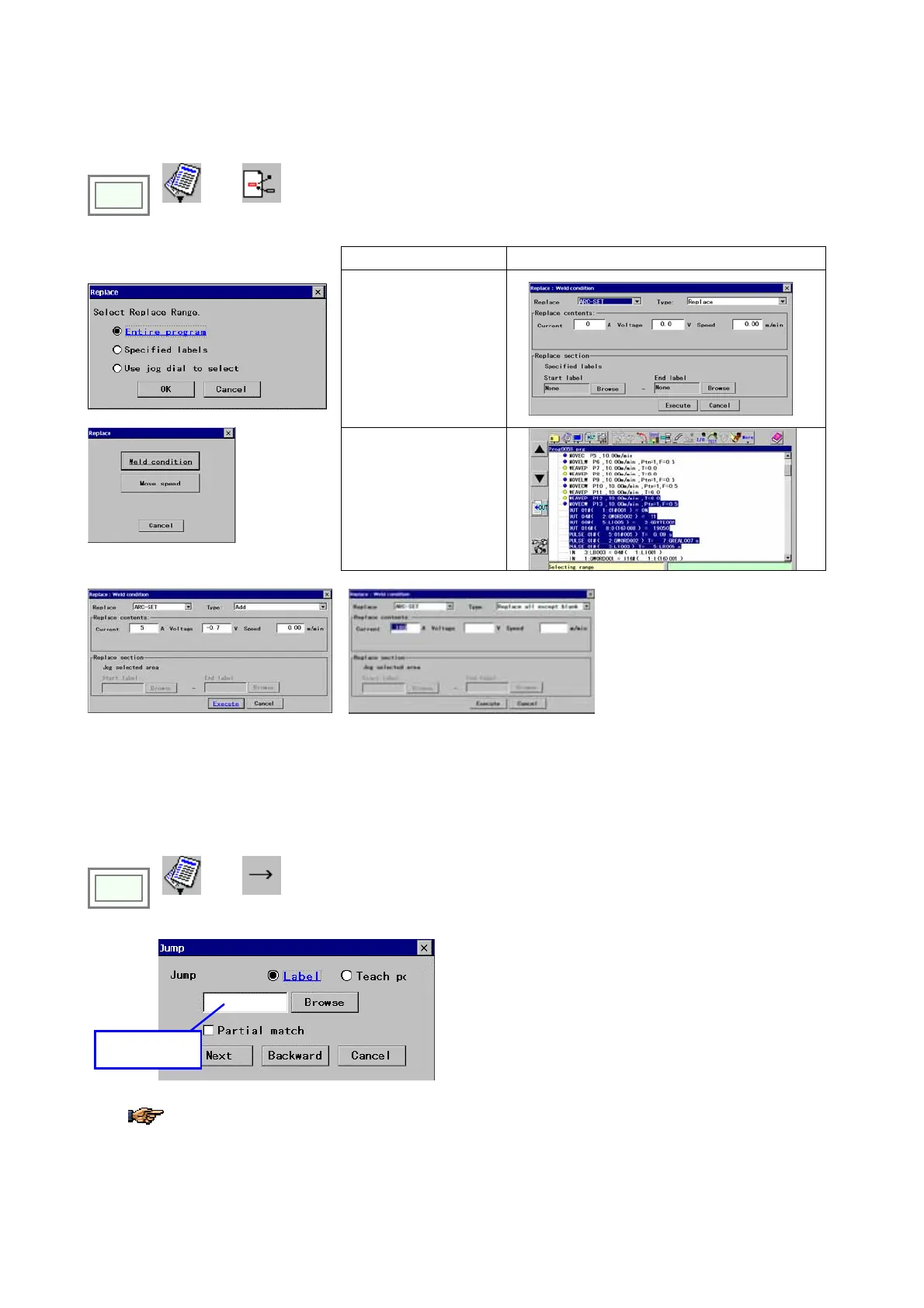
It replaces the data in the program with other data. Two kinds of deta input method are prepared.
Click
>>
Edit
>>
Replace
[Entire program]
Replace the entire program.
[Specified labels]
Î
Set the select replace range and
thenspecify the replacing item.
[Use jog dial to select]
Î
“Add” method
“Replace all” method
[Type]
Data input method
Add: Inrement or decrement input for
registered data.
Replae all: Entirely Replaced with
specified data except blank.
6-6. Jump
It searches for the next instance of the label or teaching point name you specified and jumps the cursor to the location if
found.
Click
>>
Edit
>>
Jump
Î
Type the text you
want to jump to.
[Label] Finds a label in the program.
[Teach pt] Finds a teach point in the program.
[Partial match] Check the check box to find data that has
partially matches the text you specified.
[Next] Search forward, from the cursor position toward
the end of the file.
[Backward] Search backward, from the cursor position
toward the beginning of the file.
If you select the Label, you can specify the label of the character-string specified to the file.
Then the cursor jumps to the same label you specified.








 To Next Page