6-6
6-9. Option
A function for advanced edit such as “Program shift”, “Tool compensation” and so on.
The settings in Option are for advanced operation.
Click
>>
Edit
>>
Option
Î
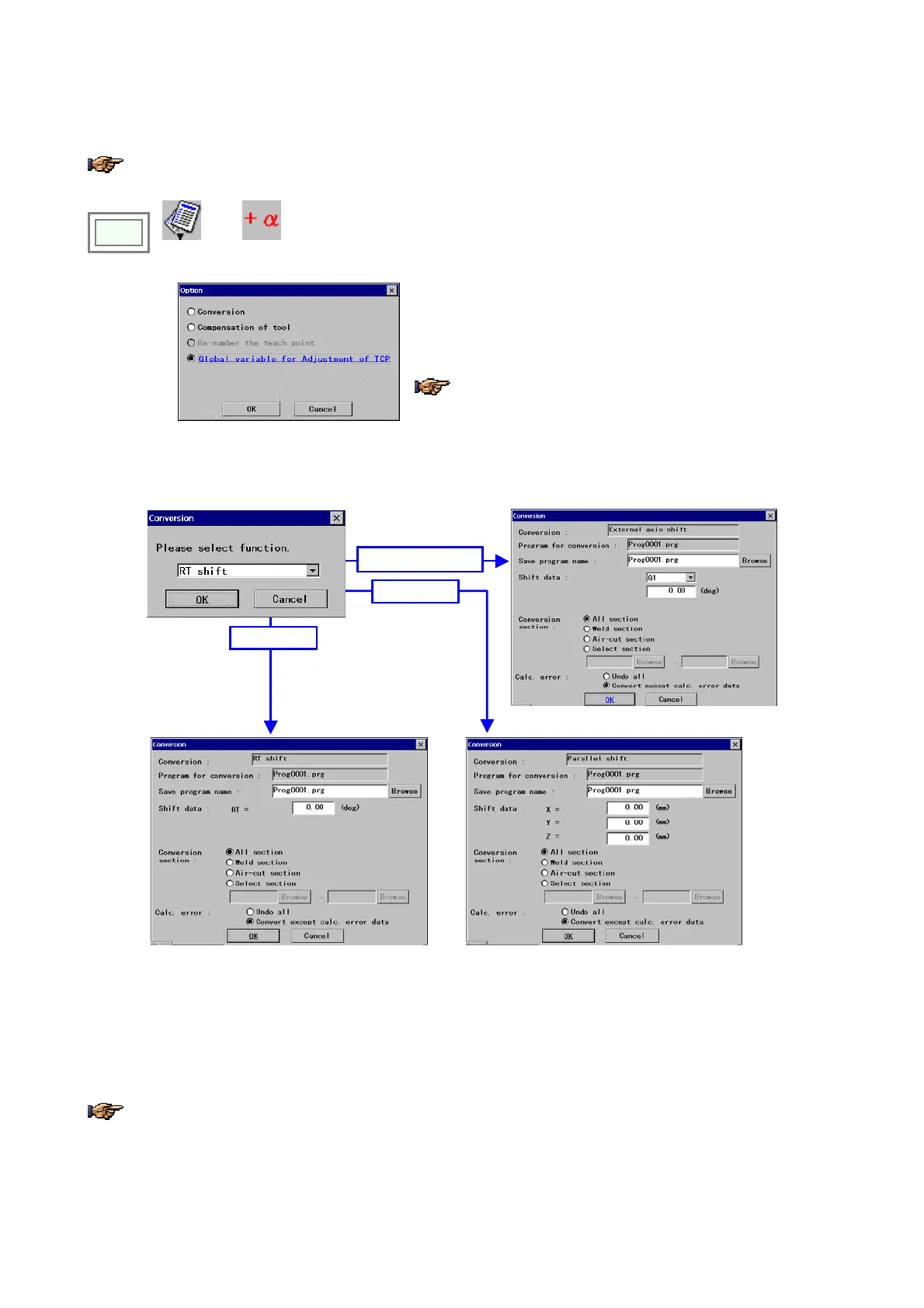
[Conversion] to shift teaching points of the program.
[Compensation of tool]: change to compensation of tool setting mode.
[Global variable for Adjustment..]: Change to global variable setting mode
for tool center point (TCP) adjustment.
Refer to the manual for advanced operation for options other
than [Conversion].
6-9-1. Conversion
When you select [Conversion]:
RT shift
Parallel shift
External axis shift
[Conversion] Specified conversion type
[Program for conversion] Program to work on.
[Save program name] Specifies the file the converted
program is saved to. *Change the file name if you want to
save the converted program in a different file.
[Shift data] Specifies the shift amount
[Conversion section] Specifies the section to be
converted.
[Calc. error] Specifies a process to be applied if the
calculation error occurs. If the teaching point will be out
of operation range, an error occurs.
If there is no file is open when you selected the “Conversion”, a dialog box to specify the file you would like to work
on appears prior to setting dialog box. Specify the target program file name and click the
OK
button.








 To Next Page