12-1
12. Teach pendant (TP) settings
12-1. Coordinate system settings
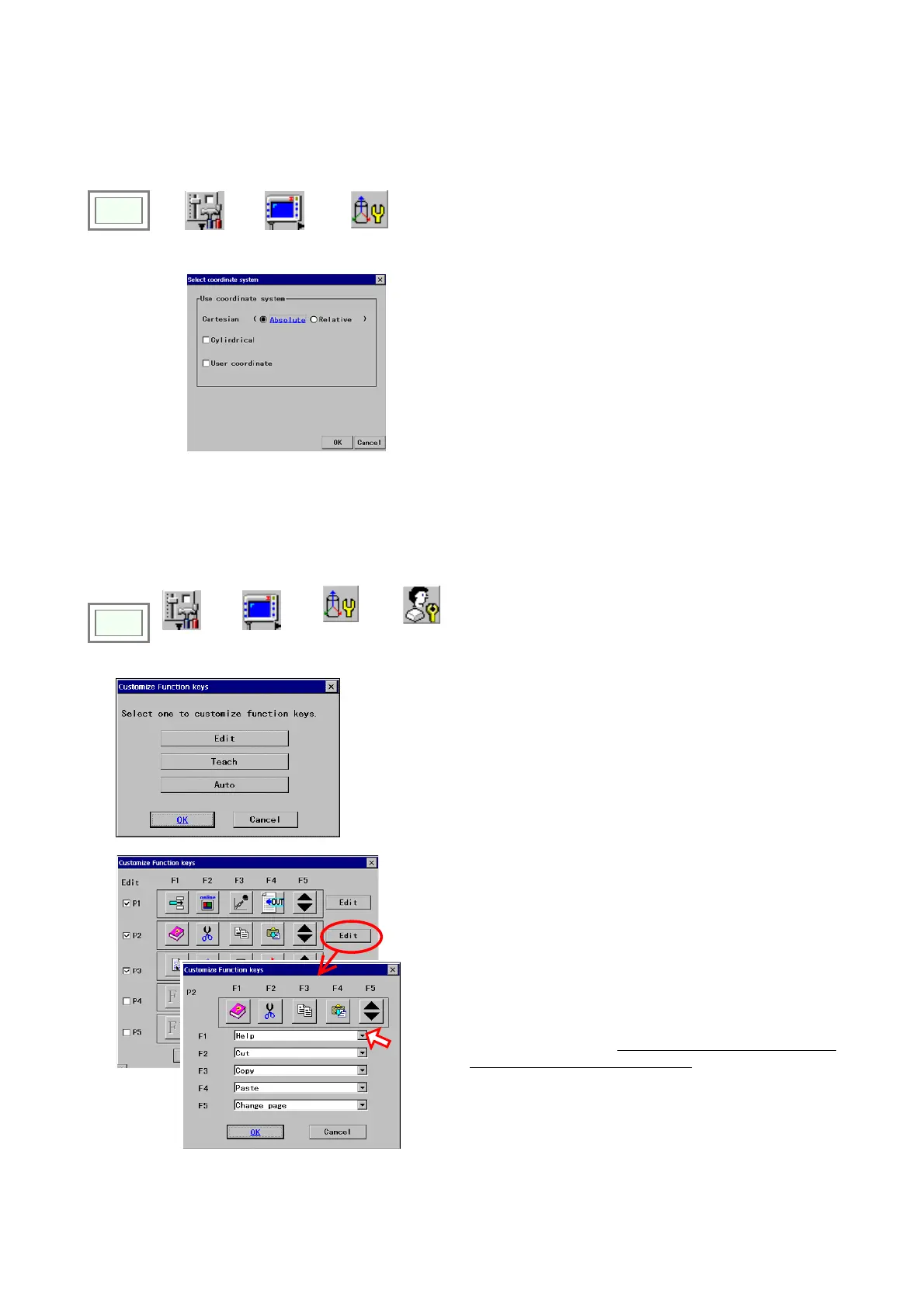
It is a function to specify a coordinate system to be used when operating the robot with the teach pendant.
Click
>>
Set
>>
TP
>>
Select coordinate
system
Î
[Cartesian] Switches motions of the Cartesian
coordinate system.
Absolute: Absolute coordinate system.
Relative: Direction of X-Y is relative to RT direction.
[Cylindrical] Click to enable the cylindrical coordinate
system.
[User coordinate] Click to enable the user coordinate
system.
12-2. Customize function keys
12-2-1. User function keys
It is a function that allows you to arrange the function keys settings.
Click
>>
Set
>>
TP
>>
Key
customize
>>
User function
key
[Edit] Select to customize User function keys to be used in
edit operation (Robot motion icon is OFF in TEACH mode.)
[Teach] Select to customize User function keys to be used
in teachings operation (Robot motion icon is ON in TEACH
mode.)
[Auto] Select to customize User function keys to be used in
AUTO operation.
[P1 – P5] Click the check box(es) to display the current
User function keys of the selected page(s).
[Edit] Click to display the dialog box to customize the User
function keys of the page.
Click the
Edit button of the page you want to edit.
(Figure on the left: an example in case of editing P2.)
Select a function to be assigned to each function key as
you want from the list. (Press on the triangle to display the
list. Please refer to the “List of functions applicable as User
function keys in each operation type” for details.)
Click the
OK button to end the edit and display the previous
dialog box.
<Note>
If you want to make more than one page of
customized function keys, make sure to assign
“Change page” to one of the function keys (“F5” in
the figure).








 To Next Page