6-5
6-8. Global data
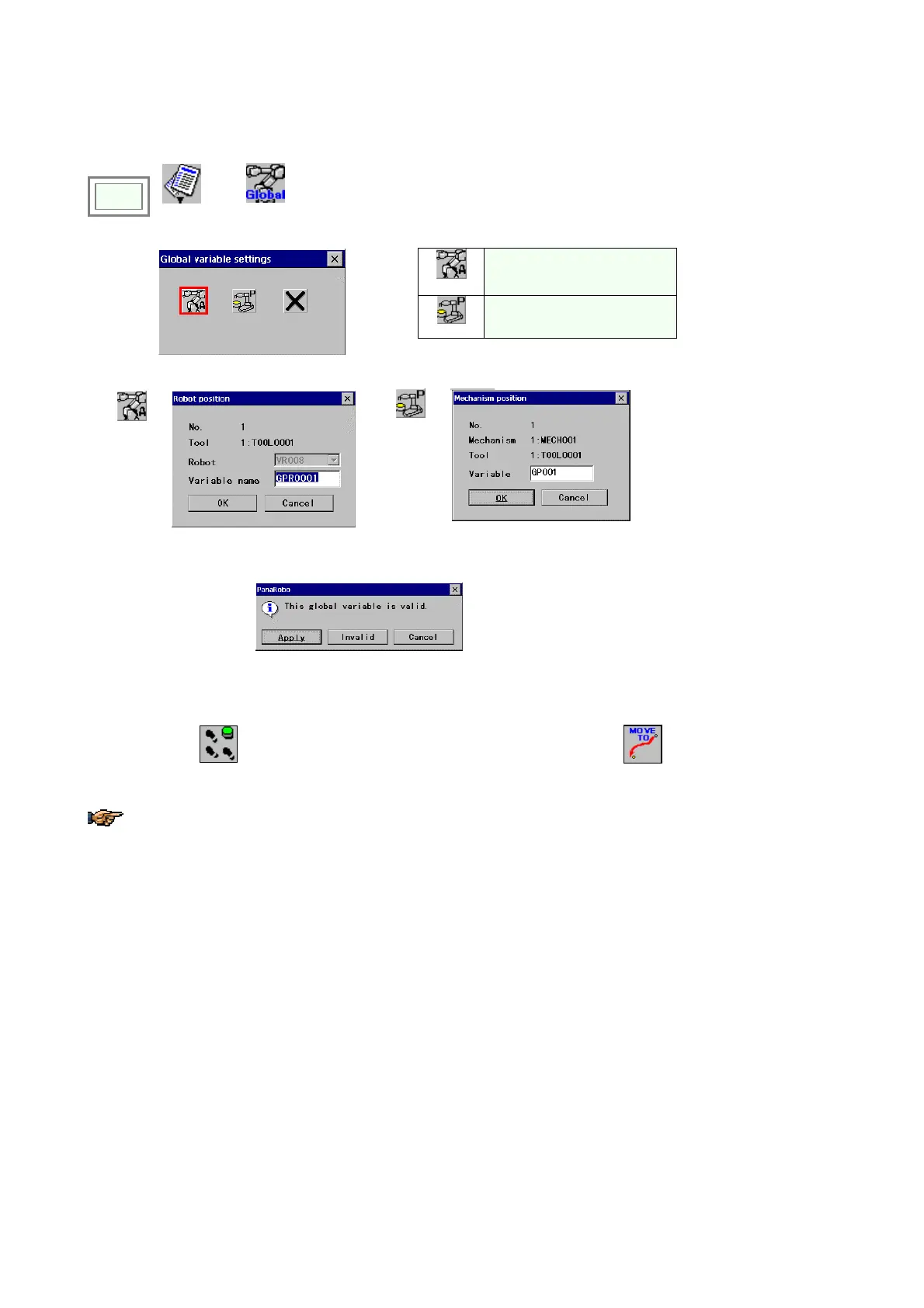
Global data is common to all programs. This section explains how to teach “Robot” variable and “Position” variable.
Click
>>
Edit
>>
Global variable
settings
Robot
Robot
Position
Mechanism
Î
Robot
Î
Position
Î
[Variable name] Specifies
name of the global data.
[OK]: Register as global data.
If the selected variable has been specified as valid variable, the following dialog box
appears.
[Apply] To change data.
[Invalid] To invalidate the data.
[Cancel] To cancel the action
and close the dialog box.
<How to check the setting>
You can check the settings by moving the robot to the registered position in trace operation.
1. Move the cursor to the number.
2. Turn ON the
(trace)
icon lamp and jog the jog dial while holding down the (Function key).
Then the robot stops at the registered position.
About “Mechanism” and “global variable”, please refer to section “Global variable settings” of “Advanced
operation”








 To Next Page