11-15
11-8-2. Preliminary settings
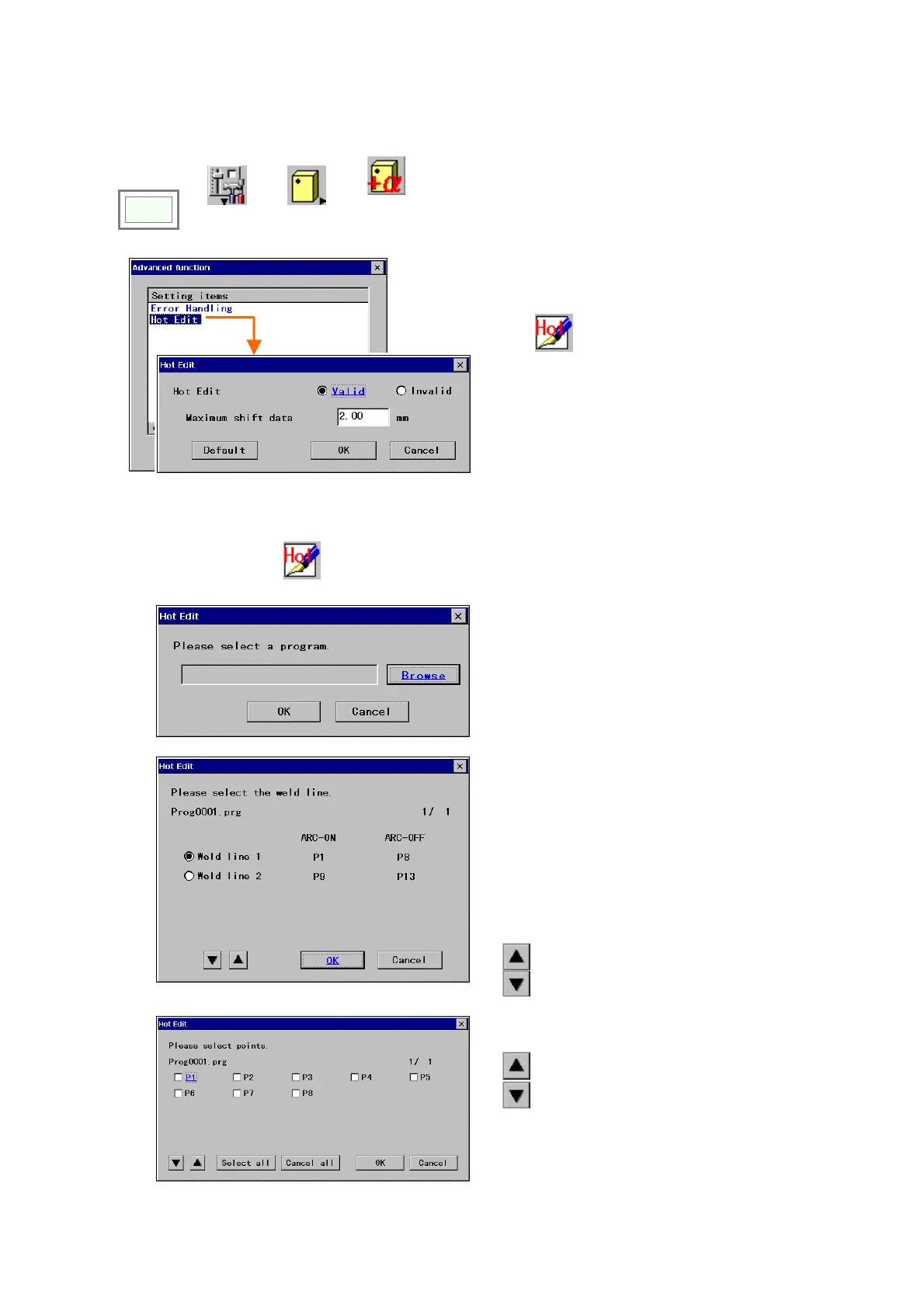
Please set validity of this Hot Edit function and the maximum shift amount at each shift can be set
Click
>>
>>
Set
>>
Controller
>>
Advance
setting
Select “Hot Edit”.
[Valid/Invalid]:
When the “Invalid” is selected,
the
Hot edit
icon won’t be displayed in Auto mode.
[Maximum shift data]: Set range: 0.01 - 9.99 (mm).
[Default]: sets the default value which is 2.00.
11-8-3. Operation procedure
In Auto mode, select
Hot edit
.
Select a desired program to be shifted.
The program to be selected can be either a
running program or a stored one.
Select a weld line (including points) to be shifted.
*Please note the following are not in the
choice.
- Weld line with a move command that uses
global variables to specify its teach point
- Weld lines taught in the harmonic movement
section.
*It is possible to set only one weld line at a time.
: Displays the previous page.
: Displays the next page
Select the point(s) to be shifted.
: Displays the previous page.
: Displays the next page
[Select all]: Selects all teaching points.
[Cancel all]: Deselects all teaching points.
Click the
OK button to move on to the next dialog
box.








 To Next Page