4-33
4-20-3. File protect
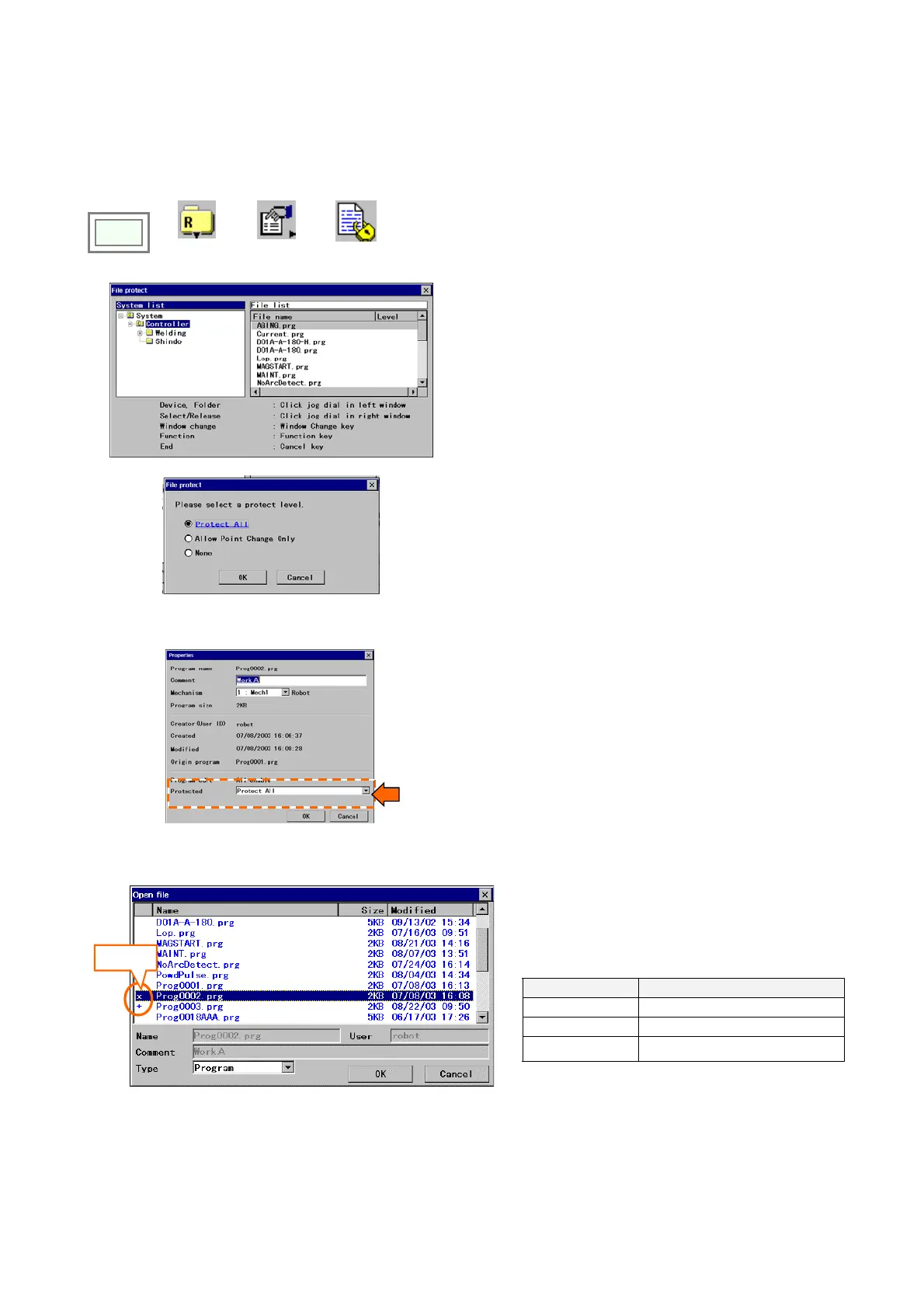
It is a function that allosw you to protect on a file basis.
You can also set a file protection using the “Properties” dialog box.
(1) Setting procedure using “Protect” dialog box
Click
>>
>>
File
>>
Properties
>>
Protect
Select a file you want to set/change the protect level.
Then click the [F3 (NEXT)] key.
Set the desired protect level and click OK.
[Protect All]: The file is protected from any edit operation.
[Allow Point Change Only]: It allows to change position of
teaching points, but not possible to change any commands.
[None]: The file is fully editable. (No protection.)
(2) Setting procedure using “Properties” dialog box
[Protected]: Protect level.
<Display>
Depending on the protect level, a symbol is
added to before the file name of each protected
file on the file list screen.
Symbol Description
x
Protect All
+
Allow Point Change Only
(Blank)
None
Symbol
<Note>
・ For a file the “All disable” of the “Disable program editing” is applied, it is not possible to change its protect level.
・ It is not possible to change the file name of the protected file.








 To Next Page