4-24
4-15-6. Weaving
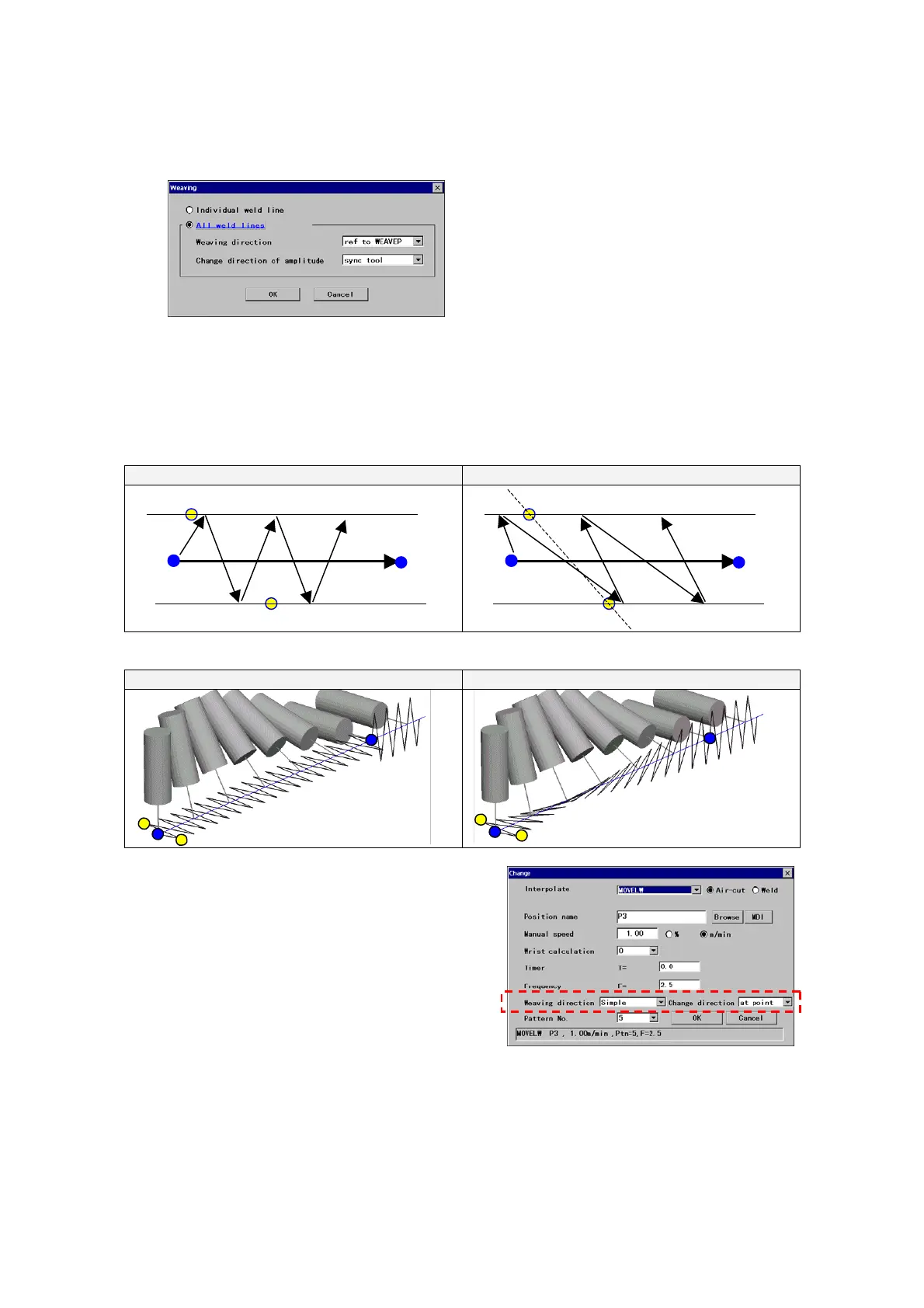
In this dialog box, it is also possible to specify weaving direction to be determined based on the vector created by two
amplitude points (WEAVP)
[Individual weld line]
Select to specify the weaving direction settings toward the next
teaching point individually.
[All weld lines]
Apply weaving direction settings set in this dialog box to all teaching
points.
<Supplement>
• As for weaving patterns 6 and 16, this function is not available as they are special weaving patterns.
• As for weaving patterns 11 to 15, the “Weaving direction” is automatically set to “Reference to amplitude points” as
the robot movements of those patterns are based on the external axis.
◎ Movements of “Direction of weaving amplitude”
Simpleweaving
Reference to amplitude points
S
E
B2
B1
S
E
B2
B1
◎ Movements of “Change direction of weaving amplitude”
Changeatteachpoint
In sync with the tool
Vectorial weaving toward the
next teaching point.
Turn direction in sync
with the tool.
When “Individual weld line” is selected, the setting
items “Welding direction” and “Change direction”
appears on the weaving setting dialog box.








 To Next Page