11-16
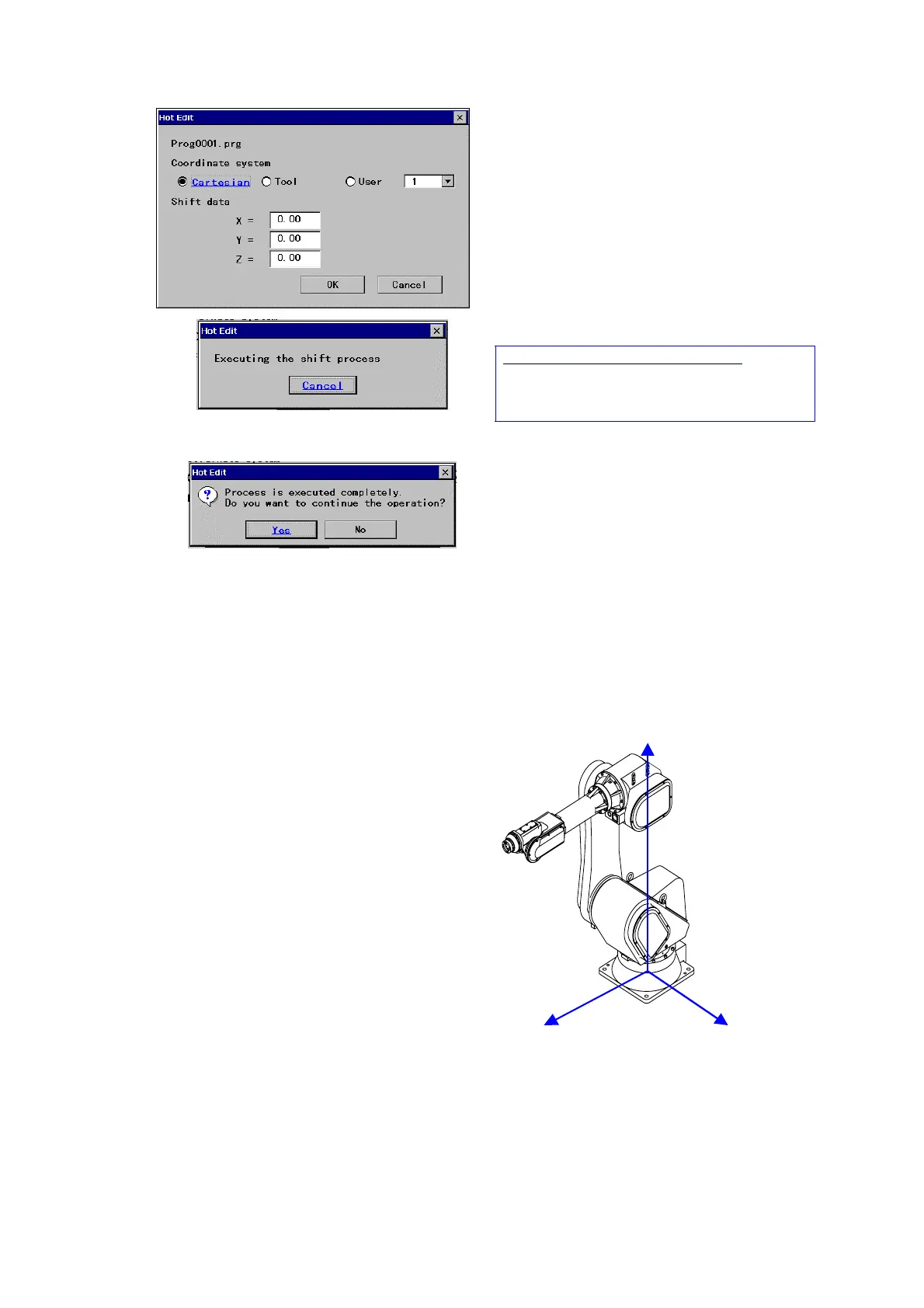
Select a desired shift coordinate system to be
applied and input shift data.
*See the <Definition of the shift coordinate
system>.
* Only the preset User’s coordinate system
numbers are displayed on the screen.
[OK] executes the shift processing
Then the screen on the right appears.
In case of setting the running program:
The robot resumes the operation and stops at the
first arc start point, and then start executing the
shift process.
After the shift process is completed the screen on
the right appears.
[Yes]: Selects another weld line of the same
program. (Then the dialog box shown in the
previous procedure (3) appears.)
[No]: Ends the Hot edit function settings.
11-8-4. Definition of shift coordinate system
(1) [Cartesian]
When “Cartesian” is selected, teaching points are
shifted along the X-axis, Y-axis and Z-axis on the
Cartesian coordinate system of the robot as per shown
in the figure on the right.
[Robot coordinate system]
Z direction
X direction
Y direction








 To Next Page