9-1
9. Input/Output settings
9-1. User Input/Output settings
Settings of terminals to be connected to other system equipment to receive signals to the robot (Input terminals or “Input”)
or send signals from the robot (Output terminals or “Output”).
User Input or User output terminals are terminals users can freely connect to external equipment to receive to or send
signals from programs.
Another type of input/output terminals is called “Status Input/Output terminal”, where task of each terminal is fixed.
9-1-1. User I/O terminal type
Terminal type Description Terminal type Description
I1# 1-bit input O1# 1-bit output
I4# 4-bit input O4# 4-bit output
I8# 8-bit input O8# 8-bit output
User Input/Output terminals are classified into
1, 4, 8 and 16-bit Input/Output (multi-terminal)
types.
I16# 16-bit input O16# 16-bit output
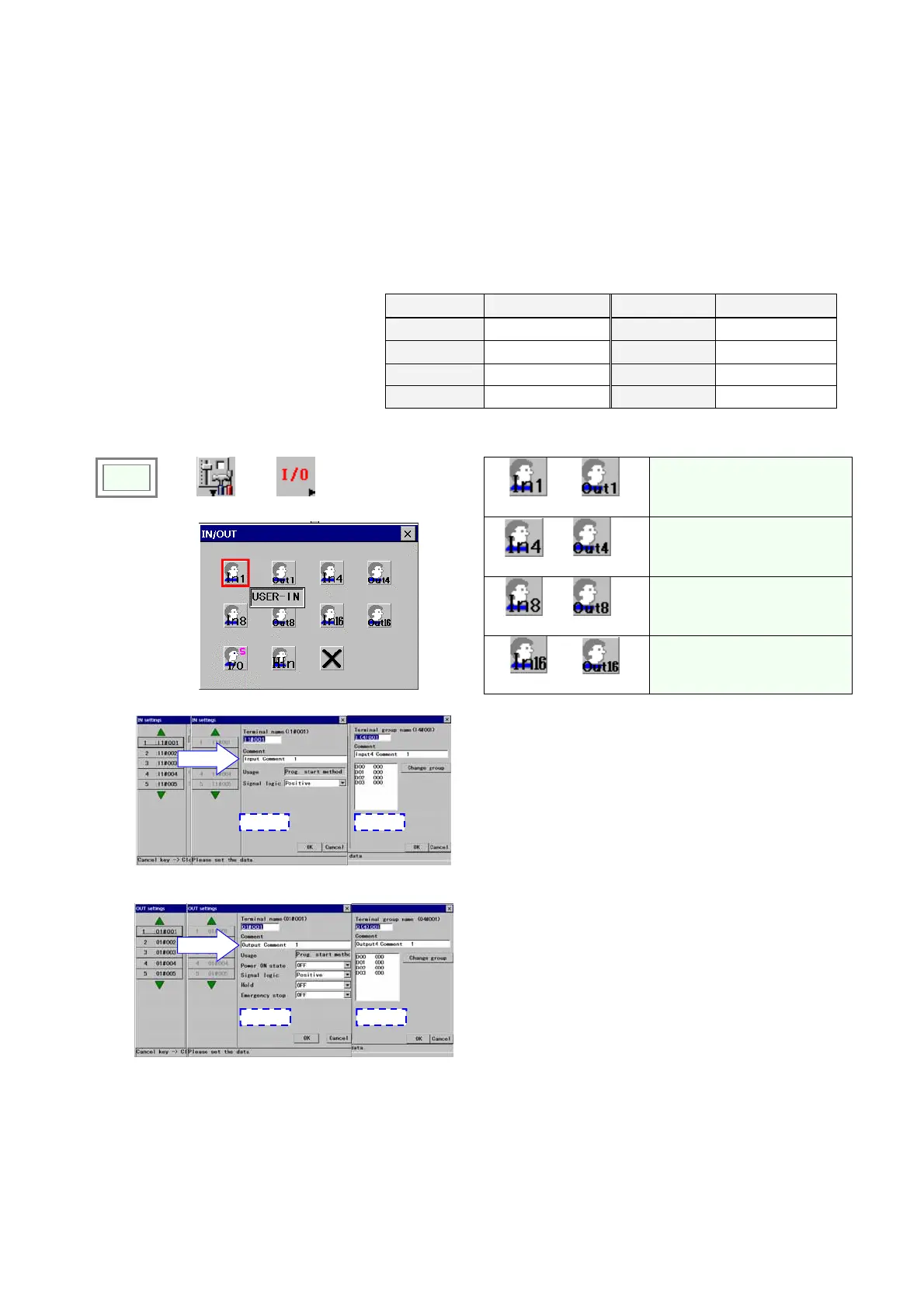
9-1-2. User INPUT - Setting procedure
USER-IN
USER-OUT
Sets one-bit input terminal (In)
and output terminal (Out).
USER-IN(4)
USER-OUT
(4)
Sets 4-bit group input terminal
(In) and output terminal (Out).
USER-IN (8)
USER-OUT
(8)
Sets 8-bit group input terminal
(In) and output terminal (Out).
Click
>>
Set
>>
IN/OUT
Î
USER-IN(16)
USER-OUT (16)
Sets 16-bit group input
terminal (In) and output
terminal (Out).
(1) User input
Î
Select a name
1 bit input 4-bit input
[Terminal name] Displays the selected terminal name.
[Comment] Provides a space for you to add comment
about the terminal. Comments can have up to 20
characters.
[Usage] Displays the function allocated to the terminal.
[Signal logic] Specifies whether the signal should be
positive logic [Positive] or negative logic [Negative].
[Change terminal group] Click it to look for and specify
a terminal group you want to change to.
(2) User output
Î
Select a name
1 bit output 4-bit output
[Terminal name] Displays the selected terminal name.
[Comment] Provides a space for you to add comment
about the terminal. Comments can have up to 20
characters.
[Usage] Displays the function allocated to the terminal.
[Power-ON state] Specifies whether the initial state of
the output terminal at power-ON should be [ON] or
[OFF].
[Signal logic] Specifies whether the signal should be
positive logic [Positive] or negative logic [Negative].
[Hold] Specifies whether the output terminal should
retain the ON state at Hold
[Emergency stop] Specifies whether the output terminal
should retain the ON state at Emergency stop
[Change terminal group] Click it to look for and specify
a terminal group you want to change to.








 To Next Page