10-7
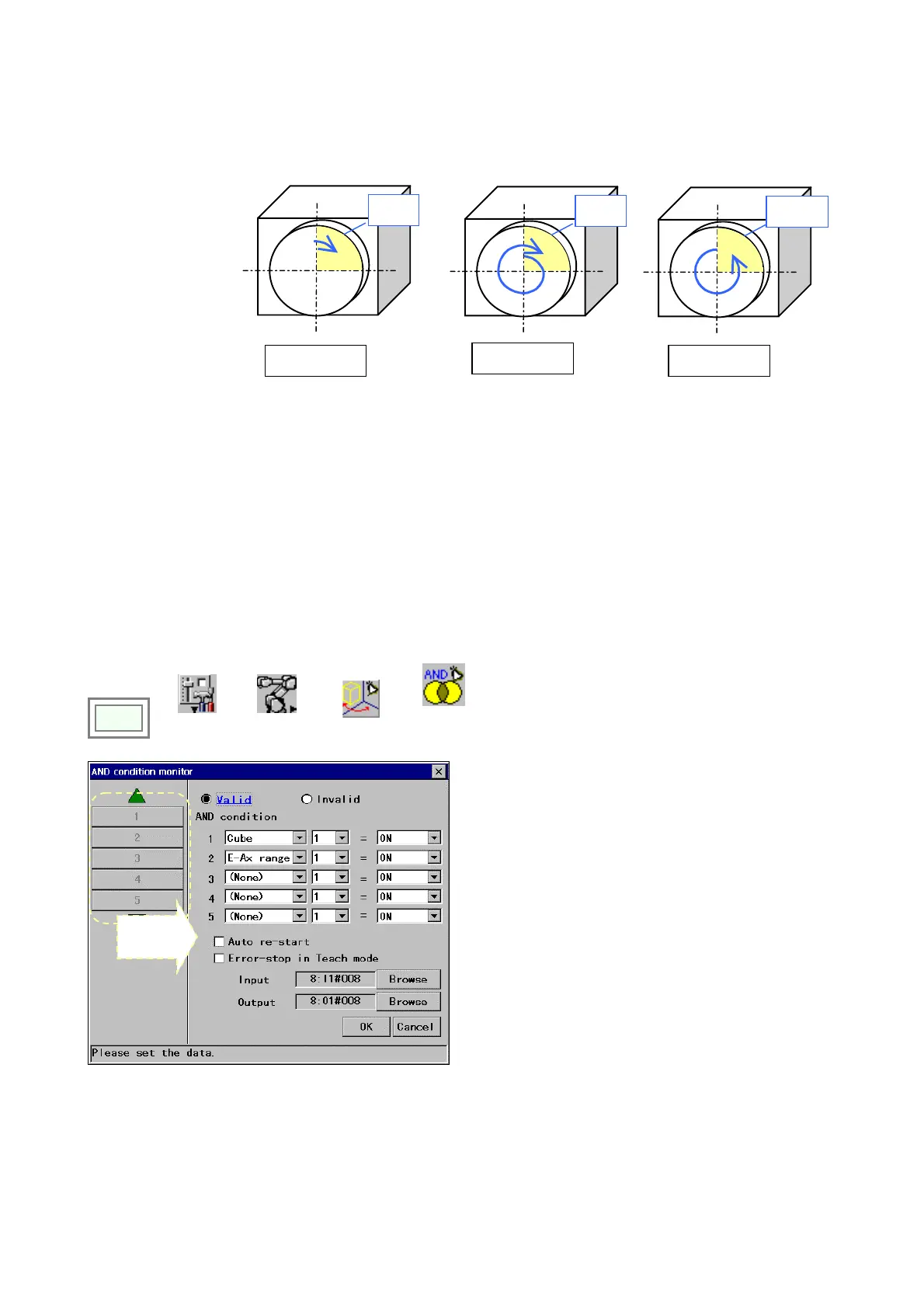
*Multi rotation:
Click in the box so that the angle from the zero (0) degree point to the current position (not the actual
angle of rotation) is used to check whether or not the external axis is in the range.
[In case the monitor range is set to “from 0 to 90 degrees”.]
0
°
45
°
90
°
270
°
180
°
0
°
405
°
90
°
270
°
180
°
0
°
−
315
°
90
°
270
°
180
°
In the range In the range
In the range
<Note>
・ This function is not applicable in case that no external axis is connected.
・ If [Error-stop in Teach mode] is applied and the robot is brought to an error stop, the “Error output (status output)”
goes ON in Teach mode.
10-5-4. AND condition monitor
It is a function to turn ON an output when preset conditions are satisfied in an “Area monitor” functions (RT monitor, Cube
monitor or E-Axis Range Monitor),
It is also possible to bring the robot into an error stop when all conditions are satisfied.
<Note> This function is available to a person with the
“programmer” or higher level.
Click
>>
>>
Set
>>
Robot
>>
rea monito
>>
AND
condition
monitor
Select
a number
[Valid/Invalid]: Whether to enable this setting.
[AND condition]: Specify [Type of area monitor], [Area
number] and [ON/OFF (Within/Out of the area)]
[Auto re-start]: Click in the box to restart operation
automatically if the input signal goes OFF when the robot is in
wait state as conditions are satisfied.
[Error-stop in Teach mode]: Click in the box to turn ON the
Input and also bring the robot to an error stop when conditions
are satisfied in Teach mode.
[Input]: An input terminal to bring the robot to an error stop
when the conditions are satisfied.
[Output]: An output terminal that goes ON while the conditions
are satisfied.
Maximum monitoring objects: 10
<Remarks>
If [Error-stop in Teach mode] is applied and the robot is brought to an error stop, the “Error output (status output)” goes
ON in Teach mode.








 To Next Page