14-7
14-5-2. Add optional functions
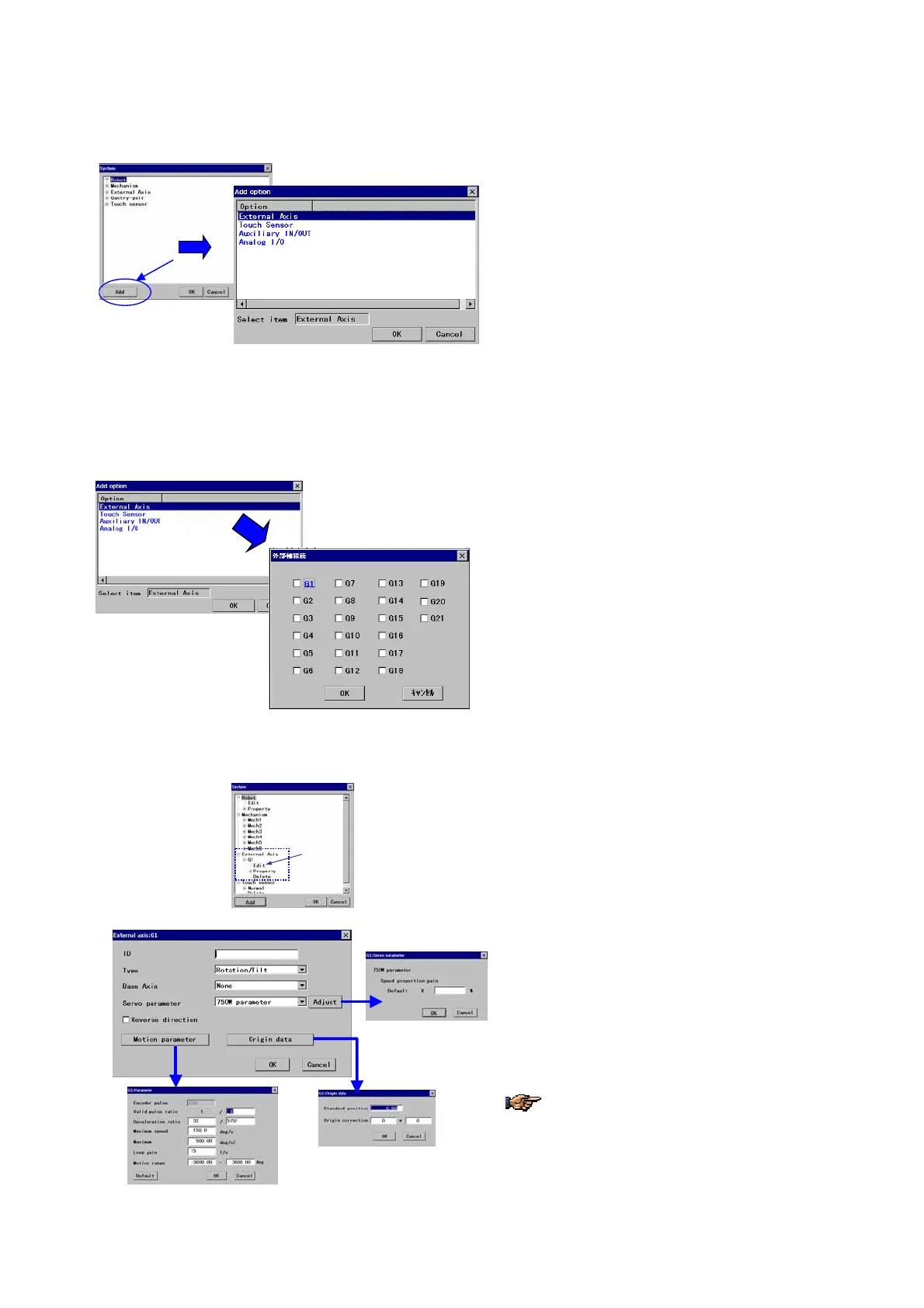
It is a function for the settings necessary when you add an optional unit.
<System settings screen>
Click on the
Add button to display the “Add option”
dialog box.
Specify an item you would like to add, and then click
the
OK button to register.
14-5-3. External axis
(1) Add an external axis
It is to define the external axis (to specify an external axis number and register its parameters) whenever it is additionally
connected to the robot.
On the “Add option” dialog box,
specify the [
External axis] and click the OK button.
Check the external axis No. added and then click the
OK button.
(2) Set parameters
<System settings screen>
On the
System settings screen, click the External
axis, and Edit.
Î
[ID] Specifies the external axis identification name.
[Type] Specifies the external axis type
[Base Axis] The external axis on which this external
axis is mounted.
[Servo parameter] Sets parameter of the servo
motor of the external axis.
[Reverse direction] Reverses the travel direction of
the external axis (+/-).
Set parameters appropriate for the connected
external axis. Refer to the manual of the
external axis for details of the parameters.








 To Next Page