2-10
2-6. Input numerical values and characters
2-6-1. Input numerical values
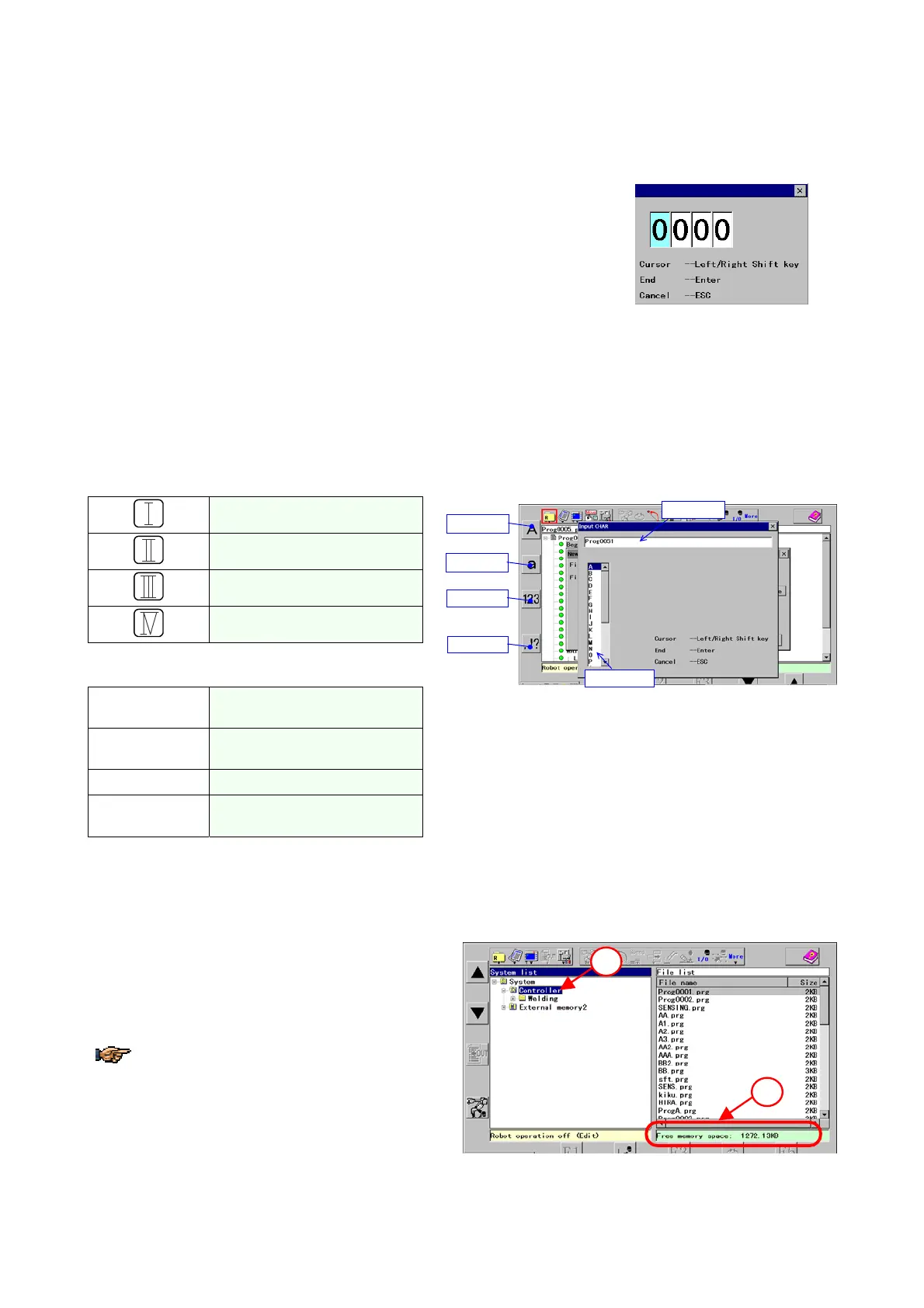
The number input box appears to input a numerical value.
· Use the L-shift key or R-shift key to switch the digit of the value.
· Use the jog dial to change the numerical value.
· Press the Enter key to close the window and save the number you have
changed.
· Press the Cancel key to close the window without saving the number you
have changed
2-6-2. Input characters
The character input box appears to enter characters.
Character input icons appear to the right of the
Function keys.
To display upper case letters.
To display lower case letters.
To display numbers.
To display symbols
Other keys to input characters.
Jog click
To enter the selected character
into the box.
Shift keys (L/R)
To move cursor left (L) and
right(R) in the box.
Enter key
To specify the entry.
Cancel key
To cancel and close the dialog
box.
Upper case
Lower case
Numbers
Symbols
Entry box
Character
2-7. Memory check
Please refer to the following procedure to check the available memory space in the controller.
1. With the “System list” screen, move the cursor to
Controller and then click the jog dial.
2. Then the free memory space appears in the bottom
of the right pane.
To check the memory space of the External
memory, click on the “External memory 2 or 3”.
1
2








 To Next Page