7-3
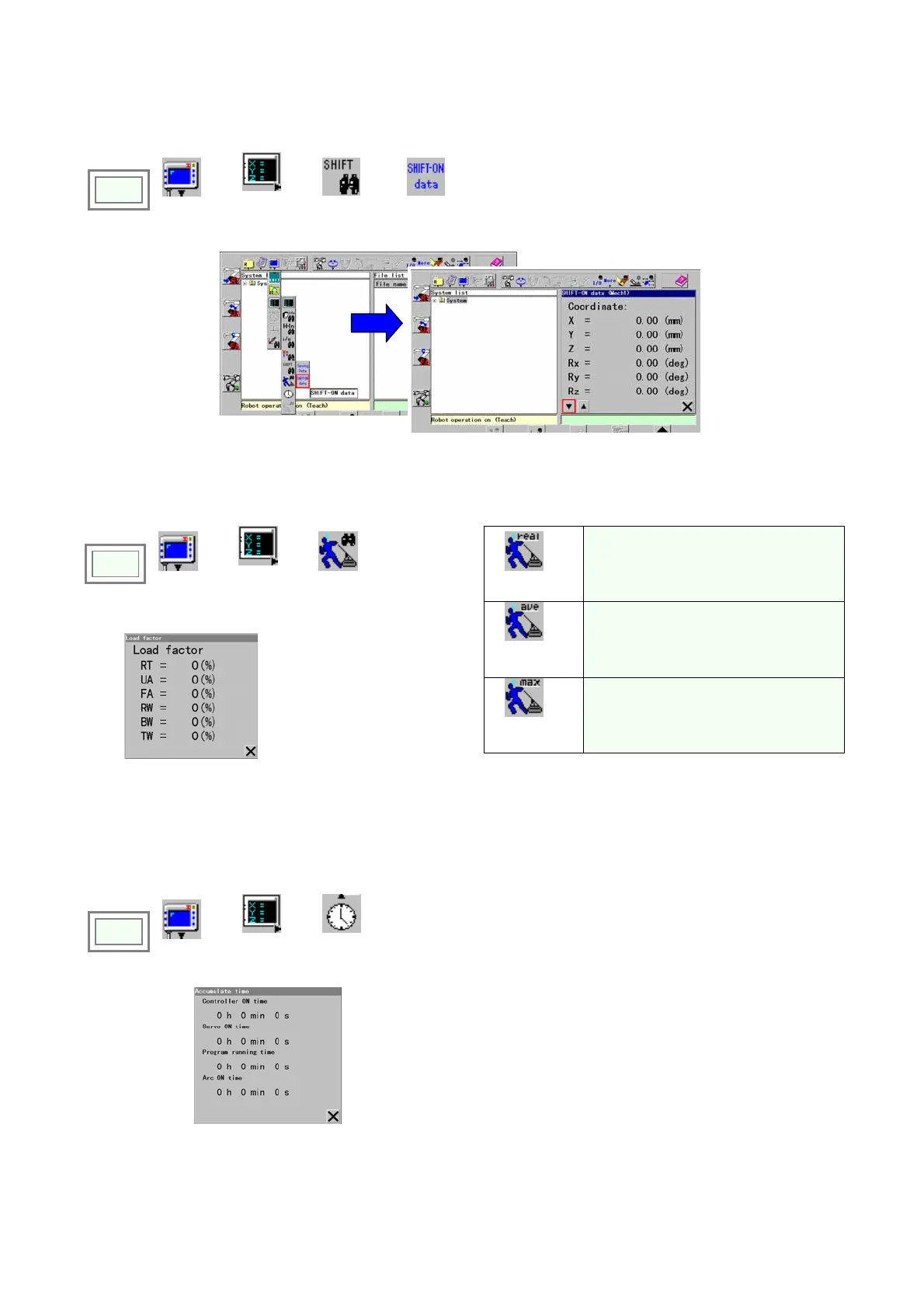
7-2-6. Display SHIFT-ON data
It displays the shift amount of the SHIFT-ON command in execution.
Click
>>
View
>>
Display
change
>>
Shift data
>>
SHIFT-ON
data
7-2-7. Load factor
It displays the load factor of each axis at the current robot orientation to the rated value in percentage.
Click
>>
View
>>
Display
change
>>
Load factor
>>
Load factor
Load factor of each axis at the current
orientation.
Average
load factor
The average load factor of each axis of
the program executed.
Peak
load factor
The maximum load factor of each axis
of the program executed.
When “Load factor” is selected.
Î
Load factor for each
axis is displayed to the
right of the colon (:).
<Note> For handling robot, make sure to position each axis so that its load factor does not exceeds 100%.
7-2-8. Accumulated time
It displays accumulated times.
Click
>>
View
>>
Display
change
>>
Accumulate
time
Î
[Controller ON time] Period of time power to the controller has
been ON.
[Servo ON time] Period of time the servo power has been ON.
[Program running time] Period of time the robot has been
running a program.
[Arc ON time] Period of time the welding arc has been on in a
program
.








 To Next Page