BRAKES
M6040, M7040, WSM
5-S13
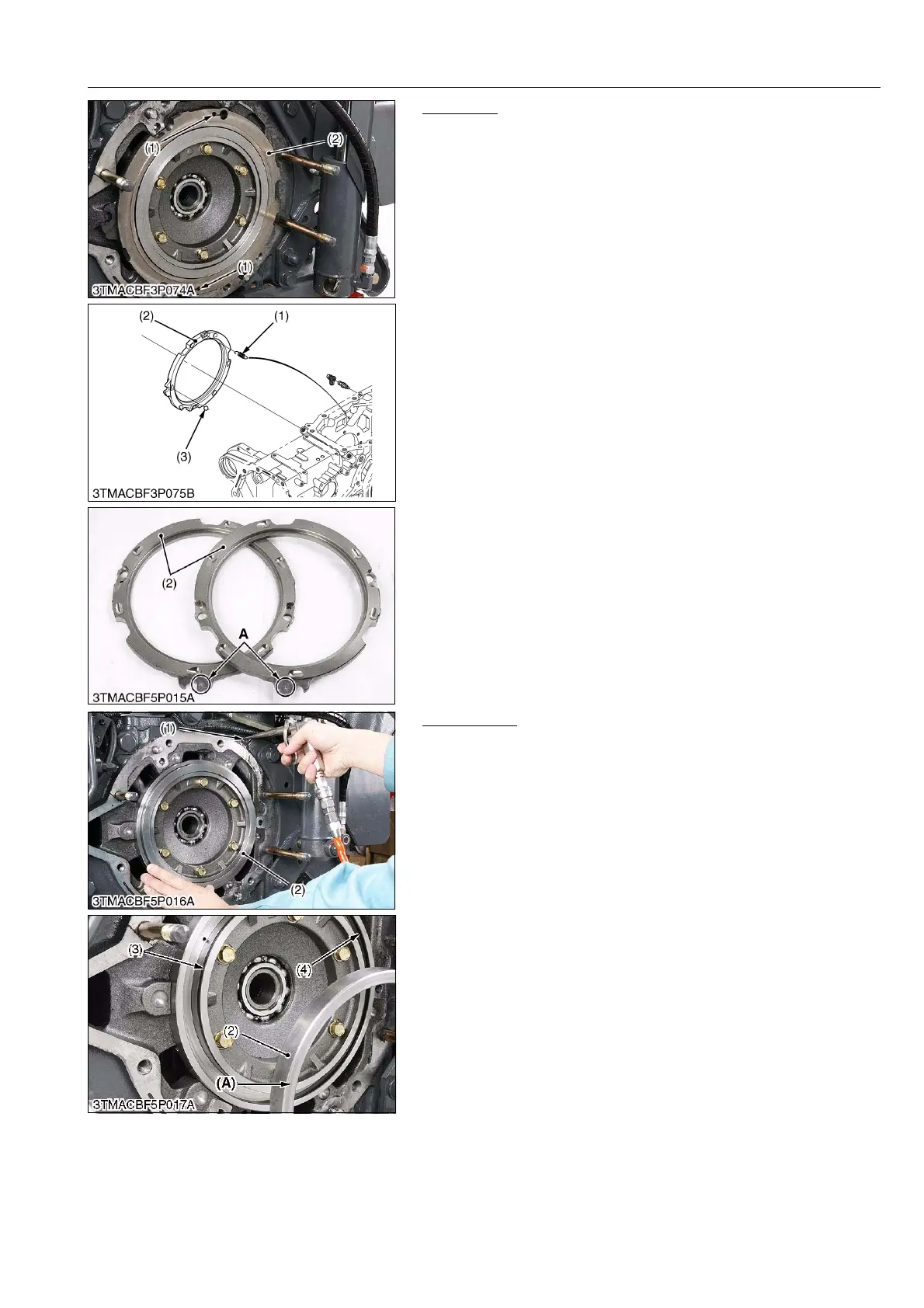
Cam Plate
1. Remove the spring (1).
2. Remove the cam plate (2) and ball (3).
(When reassembling)
• Be sure to assemble the spring (1).
• Be sure to assemble the cam plate to the original position, refer
to the I.D. mark "A".
9Y1210143BRS0022US0
Brake Piston
1. Remove the bleeder.
2. Remove the brake piston with compressed air. (Slowly inject an
air from bleeder hole (1).)
(When reassembling)
• Replace the brake seal 1 and 2 with new one.
• Install the brake seal so as not to twist.
• Take care not to enter the foreign matter into the seal groove of
inside brake case.
• When installing the brake piston, apply silicon grease to the
brake seals, and tap it in evenly and lightly using a soft hammer.
• Install the brake piston, toward the flat surface (A) side to the out
side.
9Y1210143BRS0023US0
(1) Spring
(2) Cam Plate
(3) Ball
A: Positioning I.D. (R) (L)
(1) Bleeder Hole
(2) Brake Piston
(3) Brake Seal 1
(4) Brake Seal 2
(A) Flat Surface



 To Next Page