BRAKES
M6040, M7040, WSM
5-S14
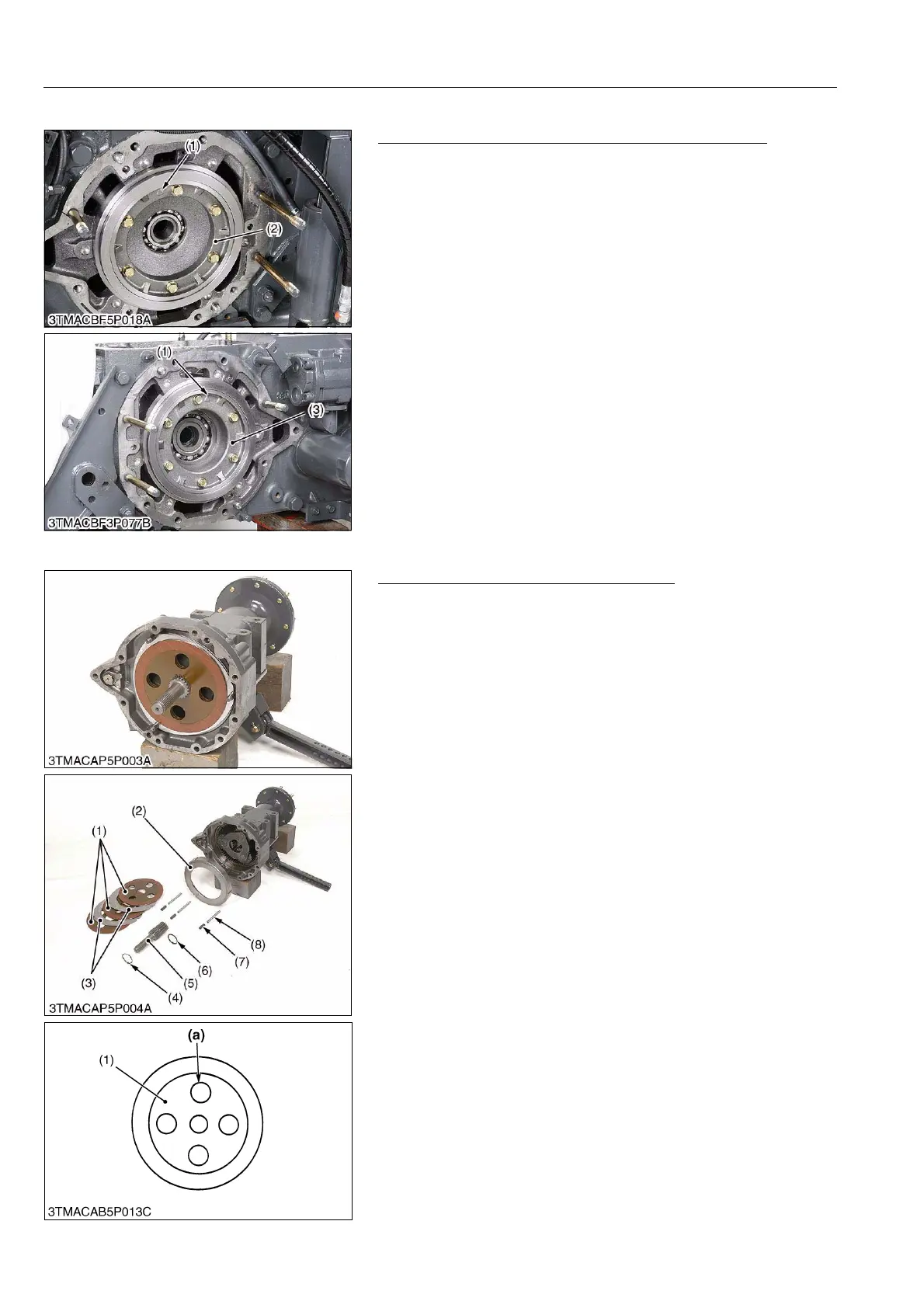
(5) Differential Support and Cam Plate Support
Differential Support R.H. and Cam Plate Support L.H.
1. Remove the differential support R.H. (3).
2. Remove the cam plate support L.H. (2).
(When reassembling)
• Assemble the mark (1) toward the top side.
• Be sure to assemble the O-rings.
9Y1210143BRS0024US0
(6) Removing Brake Disc and Plate
Brake Shaft, Brake Disc and Brake Plate
1. Draw out the brake shaft (5) with brake disc (1) and steel plate
(3).
2. Remove the external circlip (4).
3. Remove the brake plate (2), collars (7) and pins (8).
(When reassembling)
• Place the brake discs (1) so that the hole (a) of the second disc
should be overlapped.
9Y1210143BRS0025US0
(1) Mark
(2) Cam Plate Support L.H.
(3) Differential Support R.H.
(1) Brake Disc
(2) Brake Plate
(3) Steel Plate
(4) External Circlip
(5) Brake Shaft
(6) O-ring
(7) Collar
(8) Pin
(a) Hole



 To Next Page