ELECTRICAL SYSTEM
M6040, M7040, WSM
9-S14
(4) Connector
Checking Connector
1. When inspect the circuit line, check the related connectors.
2. Disconnect the connectors and check their terminals for
contamination and deformation.
3. Check to see that cable does not broken or terminals are not
shelled off.
4. If any defective parts are found, repair or replace them.
• Connect connector surely after checked.
9Y1210143ELS0013US0
[2] MAIN SWITCH
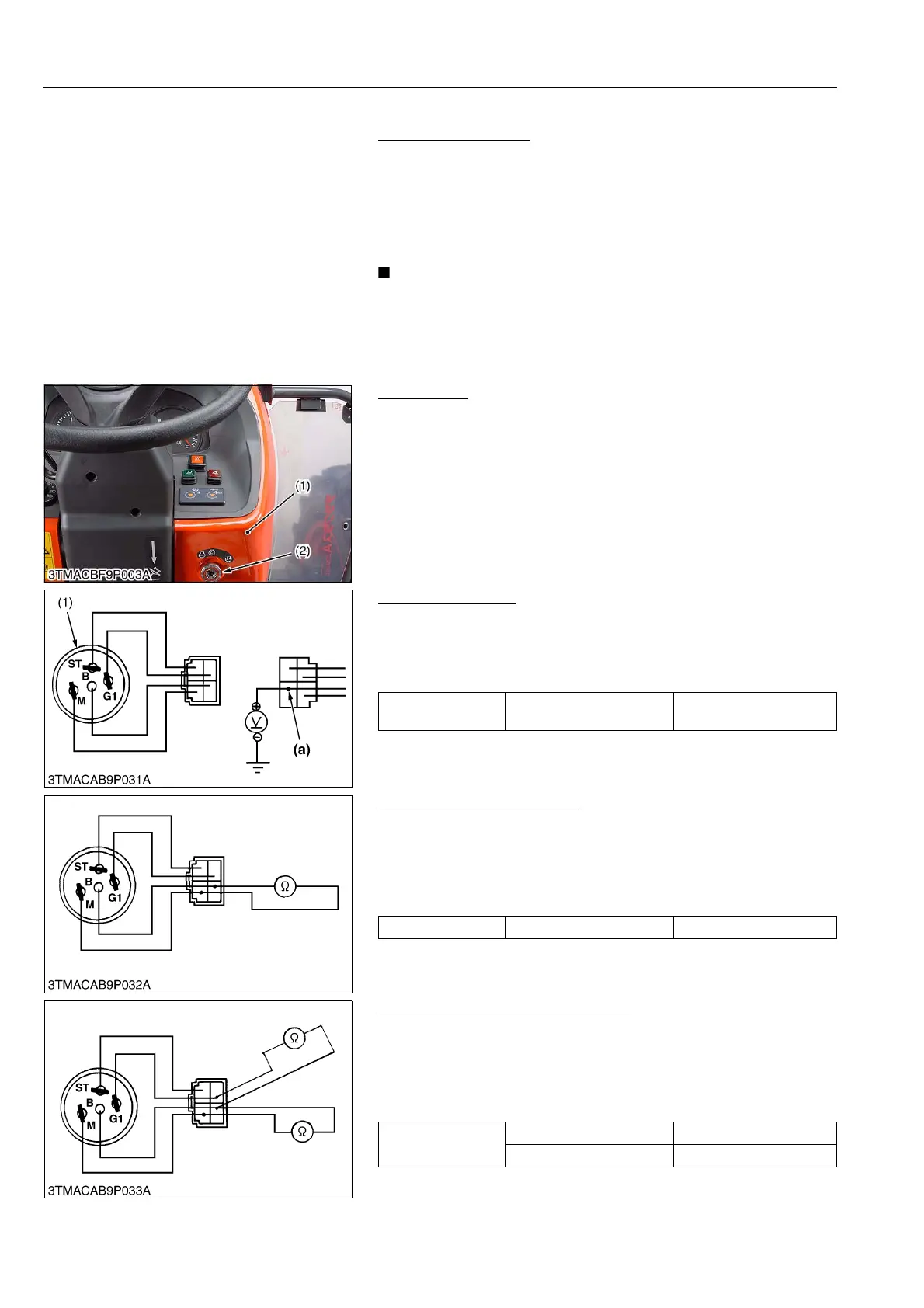
(1) Main Switch (ROPS Model)
Main Switch
1. Remove the rear bonnet (1).
2. Disconnect the meter panel and the main switch connectors
after turning the main switch off.
3. Perform the following checking.
9Y1210143ELS0014US0
Connector Voltage
1. Measure the voltage with a voltmeter across the connector
terminal B and chassis.
2. If the voltage differs from the battery voltage (11 to 14 V), the
wiring harness is faulty.
9Y1210143ELS0015US0
Main Switch at ON Position
1. Turn the main switch to ON position.
2. Measure the resistance with an ohmmeter across the terminal
B and the terminal M.
3. If 0 ohm is not indicated, the B – M contacts of the main switch
are faulty.
9Y1210143ELS0016US0
Main Switch at PREHEAT Position
1. Turn and hold the main switch at the PREHEAT position.
2. Measure the resistances with an ohmmeter across the terminal
B and the terminal G1 and across terminal B and terminal M.
3. If 0 ohm is not indicated, these contacts of the main switch are
faulty.
9Y1210143ELS0017US0
(1) Rear Bonnet (2) Main Switch
Voltage
Connector terminal B –
Chassis
Approx. battery voltage
(1) Main Switch (a) From Battery Positive Terminal
Resistance Terminal B – Terminal M 0 Ω
Resistance
Terminal B – Terminal G1 0 Ω
Terminal B – Terminal M 0 Ω



 To Next Page