ELECTRICAL SYSTEM
M6040, M7040, WSM
9-S9
4. CHECKING AND ADJUSTING
• To avoid accidental short circuit, be sure to attach the positive cable to the positive terminal before the
negative cable is attached to the negative terminal.
• Never remove the battery cap while the engine is running.
• Keep electrolyte away from eyes, hands and clothes. If you are spattered with it, wash it away completely
with water immediately.
• Keep open sparks and flames away from the battery at all times. Hydrogen gas mixed with oxygen
becomes very explosive.
• If the machine is to be operated for a short time without battery (using a slave battery for starting), use
additional current (lights) while engine is running and insulate terminal of battery. If this advice is
disregarded, damage to alternator and regulator may result.
9Y1210143ELS0004US0
[1] BATTERY, FUSE, GROUNDING AND CONNECTOR
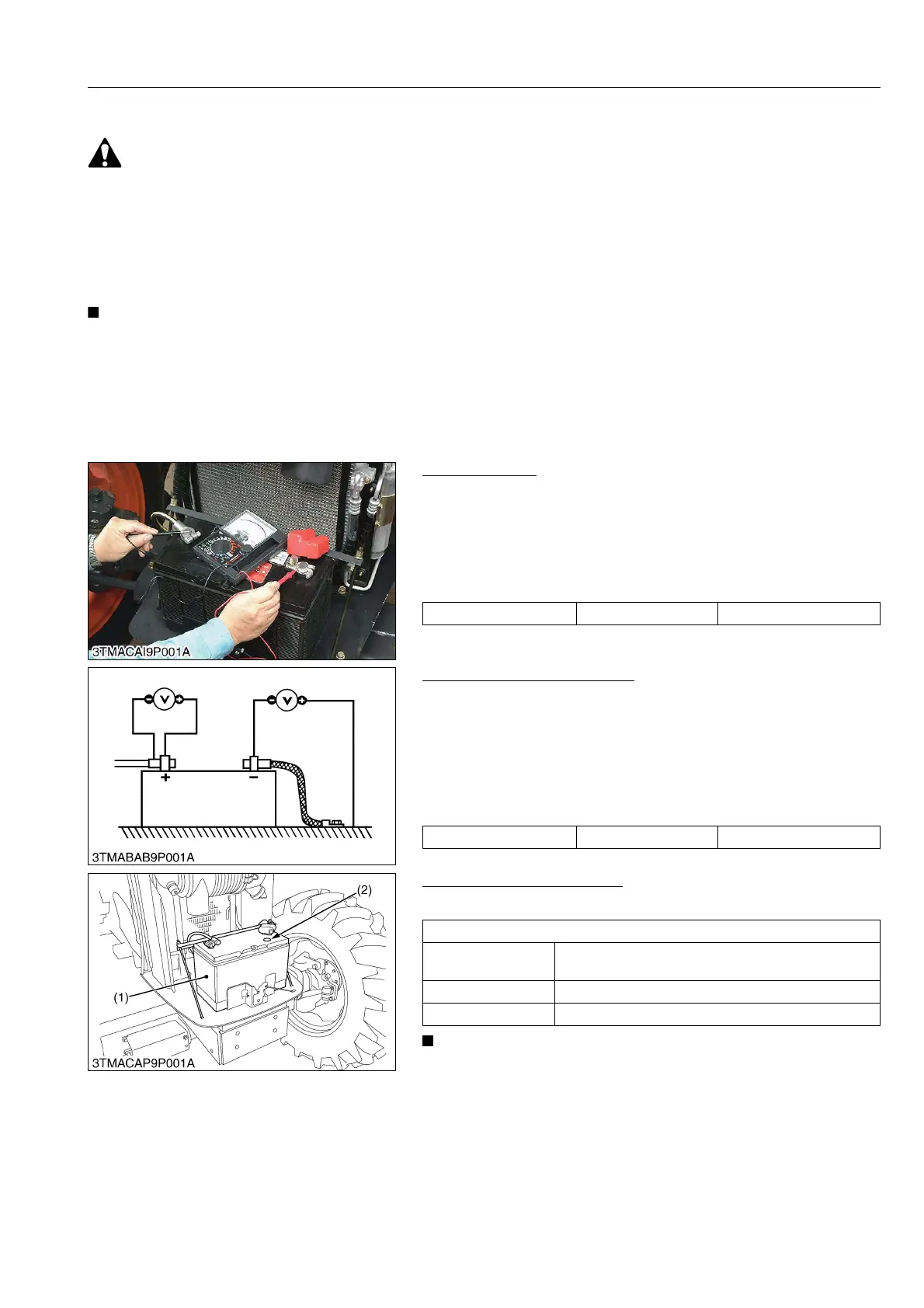
(1) Battery
Battery Voltage
1. Stop the engine and turn the main switch off.
2. Connect the COM (−) lead of the voltmeter to the battery's
negative terminal post and the (+) lead to the positive terminal
post, and measure the battery voltage.
3. If the battery voltage is less than the factory specification, check
the battery specific gravity and recharge the battery.
9Y1210143ELS0005US0
Battery Terminal Connection
1. Turn the main switch on, and turn on the head light.
2. Measure the voltage with a voltmeter across the battery's
positive terminal post and the cable terminal, and the voltage
across the battery's negative terminal post and the chassis.
3. If the measurement exceeds the factory specification, clean the
battery terminal posts and cable clamps, and tighten them
firmly.
9Y1210143ELS0006US0
Battery Condition Indicator
1. Check the battery condition by reading the indicator (2).
• The factory installed battery is of non-refillable type. If the
indicator turns white, do not charge the battery but replace
it with new one.
9Y1210143ELS0007US0
Battery voltage Factory specification More than 12 V
Potential difference Factory specification Less than 0.1 V
State of indicator display
Green
Specific gravity of electrolyte and quality of electrolyte
are both in good condition.
Black Needs charging battery
White Needs changing battery
(1) Battery (2) Indicator



 To Next Page