ELECTRICAL SYSTEM
M6040, M7040, WSM
9-S24
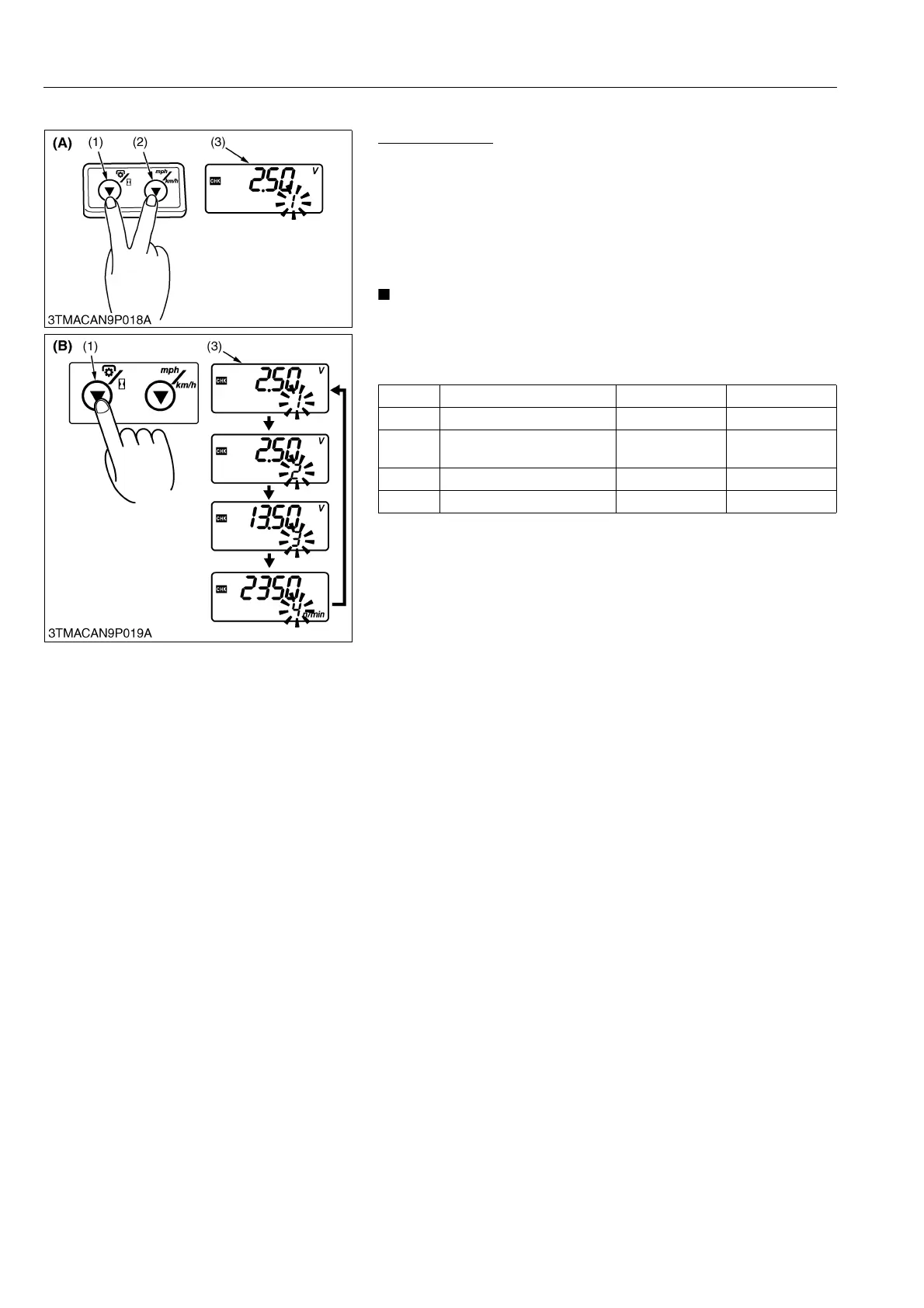
(2) Checking Mode
Checking Mode
1. Turn the key switch to "ON" position.
2. Press the PTO/Hour meter select switch (1) and traveling speed
select switch (2) more than 2 seconds.
3. Each time the PTO/Hour meter select switch (1) is pressed, the
code number changes in order of [1] → [2] → [3] → [4] → [1]
with flashing. The code number display as a table below.
4. Turn the key switch to "OFF" position to exit.
• To check the engine revolution, enter the checking mode
under running the engine.
• When enter the checking mode under running the engine,
code 3 display the generating voltage of alternator.
9Y1210143ELS0038US0
No. Contents Condition Displayed unit
1 Fuel sensor voltage F to E V
2
Coolant temperature sensor
voltage
−30 to 120 °C
(−4 to 248 °F)
V
3 Battery voltage – V
4 Engine revolution Idling to max. n/min
(1) PTO/Hour Meter Select Switch
(2) Traveling Speed Select Switch
(3) LCD Monitor
(A) Procedure to enter checking
mode
(B) Procedure to select code number
of checking contents


 To Next Page
 Loading...
