108
Accutome A-Scan Plus User’s Guide
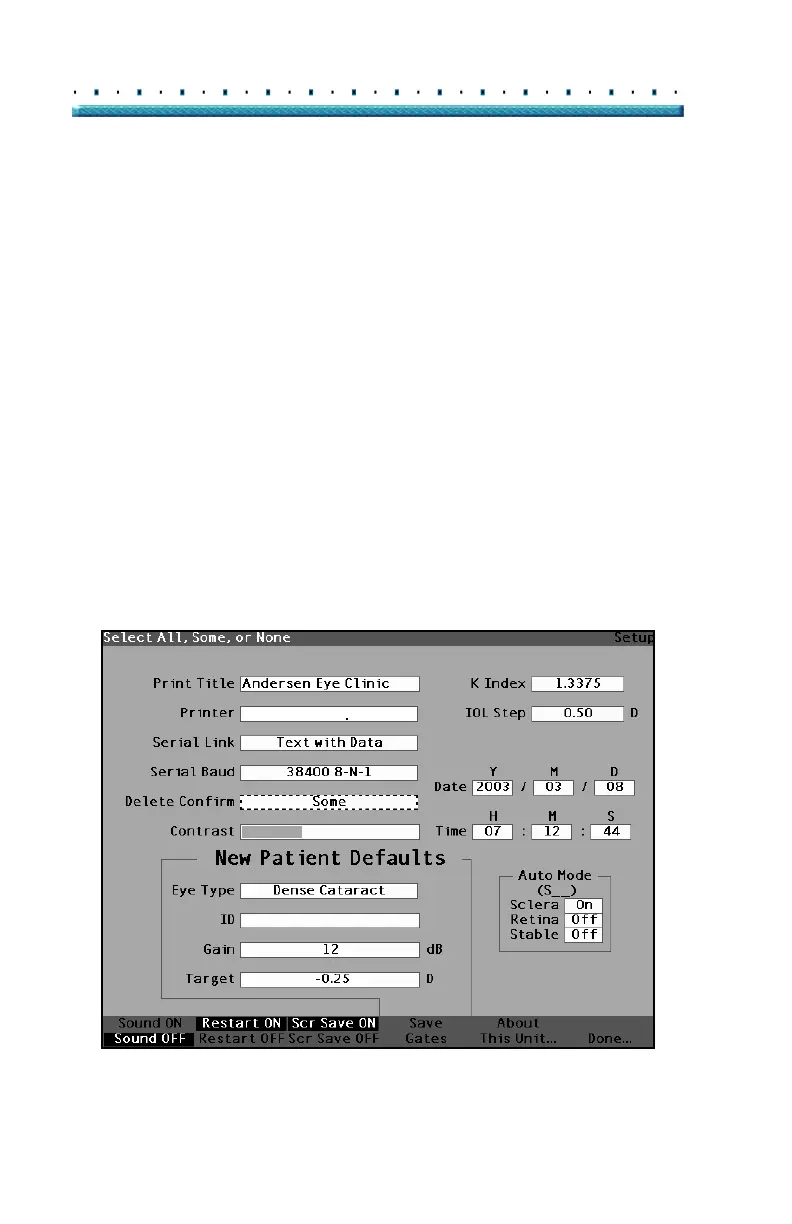
3. Within the Delete Confirm field, rotate the knob to
select one of the pre-entered options; All, Some, or
None (all of the time, some of the time, or none of
the time).
When Delete Confirm is set to All or Some (unless
confirm set to None) the Accustome A-Scan Plus will ask
for delete confirmation for the following situations:
Start New Patient
Reset All to Factory (Eye Types Screen)
Delete All Results (IOL Personalization
Screen)
Reset Gates/Threshold to Factory (Setup
Screen)
In addition, when Delete Confirm is set to All (unless
confirm is set to None or Some) confirmation is required:
Reset Field to Factory (Eye Types Screen)
Delete IOL (IOL Groups Screen)
Delete Result (IOL Personalization Screen)
Delete Patient (Patient Records Screen)
HP LaserJet Compatible
Figure 71 Selecting the Delete Confirm Value



 To Next Page