72
Accutome A-Scan Plus User’s Guide
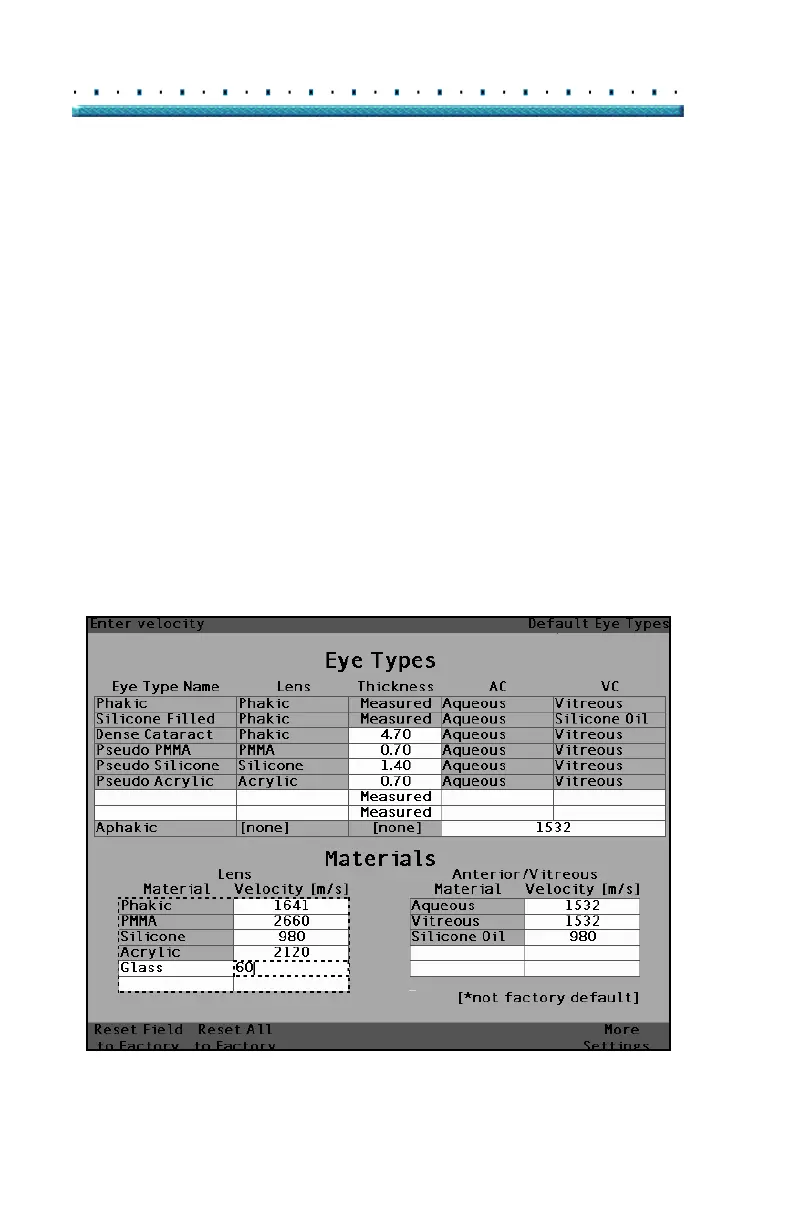
Assigning a Velocity to the New Lens Material
The Accutome A-Scan Plus is set up at the factory with
default sonic velocities for the most common types of
lens materials. For every eye type the Accutome A-Scan
Plus knows which velocity to use. Whenever possible
you should use one of the default lens materials and
velocities.
If you need to modify the velocity of a new lens material:
1. Rotate the knob and select the Velocity cell for the
newly added Lens Material, indicated by the solid
black border.
2. Press the knob or the √ button, to activate the
Velocity cell, indicated by the dashed border.
3. Enter the value of the new Velocity.
4. Press the knob or the √ button, to save the Veloc-
ity value and to deactivate the cell.
5. Press the knob or the √ button, a second time to
deactivate the Lens Materials table.
[All eye types include an assumed cornea]
Figure 38 Adding New Material Velocity



 To Next Page