80
Accutome A-Scan Plus User’s Guide
Eye Type
Screen Menu
Selections
There are three menu selections available for execution
at the bottom of the Eye Types Screen. Two of the
selections, "Reset Field to Factory" and "Reset All to
Factory" can be used to restore eye type information.
Any information that is displayed in a white field on the
Eye Type screen can be changed. Most of these fields
(excluding the empty fields for adding eye type
information) contain default values for that have been
pre-entered at the factory.
Reset Field to Factory
The Reset Field to Factory selection provides you with
the ability to return any pre-entered field on the Eye
Types Screen to its default factory value.
If you have already changed, or are editing a pre-entered
field on the Eye Type screen, and you would like to reset
it:
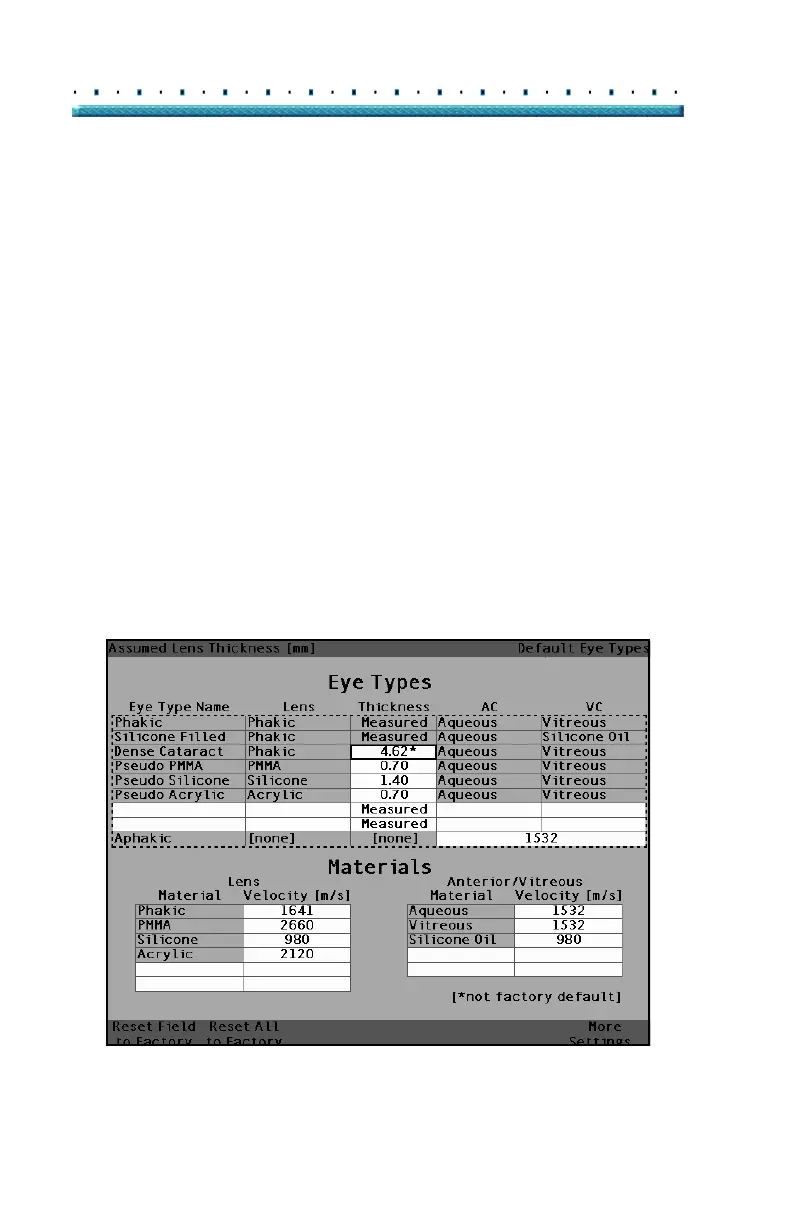
1. Rotate the knob until the field you would like to
reset is selected with a solid black border as
shown in
Figure 46 below.
[All eye types include an assumed cornea]
Figure 46 Non-Factory Field



 To Next Page