Chapter 7 Transmission Operation
Changing the frequency settings
9102 Handheld Spectrum Analyzer Software version 5.31
119
Changing the frequency settings
There are different methods to set the frequency range to be
measured; the range can be expressed by either the start and stop
frequencies (i.e. first and last frequencies on the display), or by center
frequency and span (i.e. the center and the frequency range), or by
other combinations of center frequency, span, start and stop frequen-
cies.
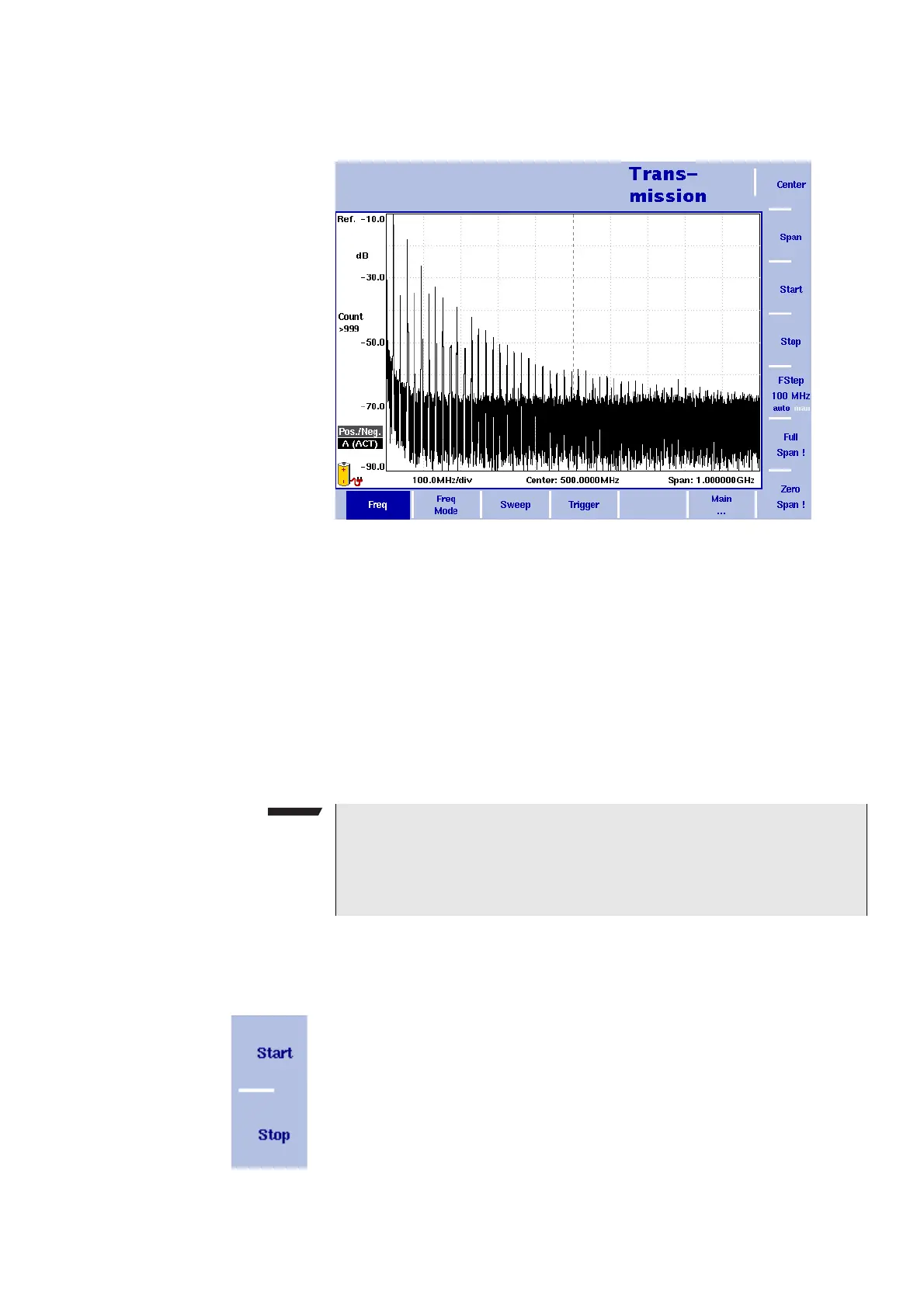
All four parameters are accessible in the Freq
menu. On the main
menu, however, only one of the combinations mentioned above is
shown, depending on the parameter last entered.
Setting start and stop
frequency
1 Push the CENT function key (or the Freq softkey in the Transmission
mainmenu).
The vertical softkeys include Start and Stop softkeys.
2 Push the
Start softkey.
An entry field appears, indicating the start frequency currently set
and the step size for the U
P/DOWN cursor keys.
3 Enter a new frequency using the numeric keys, the cursor keys and
the B
ACKSPACE key.
Figure 34 Frequency menu
NOTE
Changing a frequency parameter may affect an associated parame-
ter.
Example: If you change the span to the maximum of 4 GHz, the start
and stop frequencies are changed to 0 and 4 GHz, respectively.



 To Next Page