Chapter 2 General Operation
Checking general settings
50 9102 Handheld Spectrum Analyzer Software version 5.31
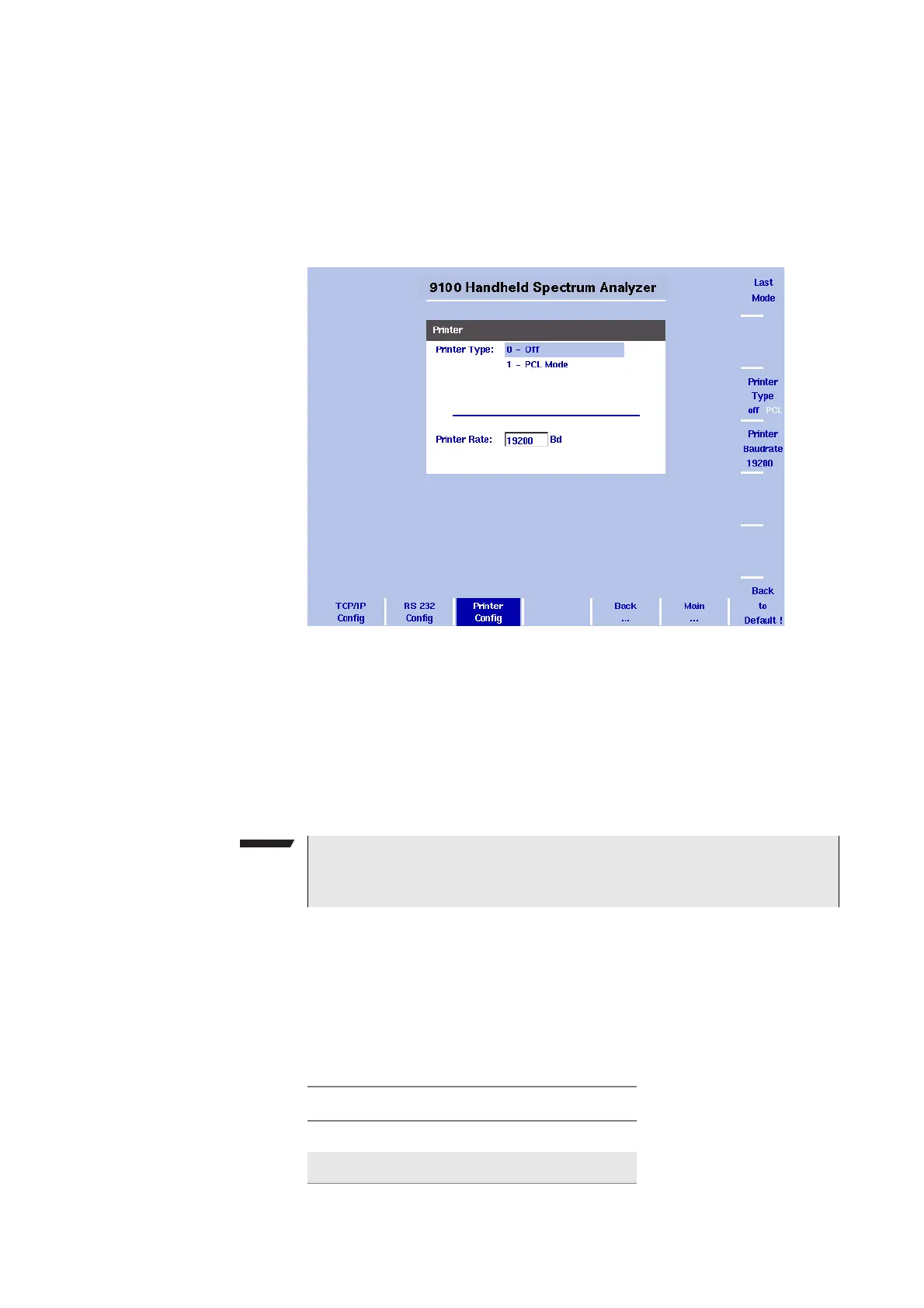
Configuring a printer You can connect a printer for direct printing via the ± key on the 9102’s
front panel.
1 Push the M
ODE function key.
2 Select
System > I/O Config > Printer Config
The printer settings are displayed.
3 In order to configure a connected PCL 5 printer for direct printing
press the softkey
Printer Type and toggle it to PCL by pressing it
until this option is highlighted.
4 In order to specify the baud rate of the printer press the
Printer
Baudrate
softkey. The Printer Rate input field is highlighted. The
default is 19200.
Selecting user interface
colors
You can change the colors of some of the user interface elements in
the Color Scheme menu. The available colors are shown in the color
palette at the top of the display and in Table 12.
Figure 14 Printer Configuration menu
NOTE
Direct printing works with PCL 5 printers with integrated drivers.
Pure GDI printers are not supported.
Table 12 Color palette in the 9102 user interface
Color number Color
1black
2 grey



 To Next Page