NOTE
Changing Settings
You can only change settings when you are logged on in system manager mode.
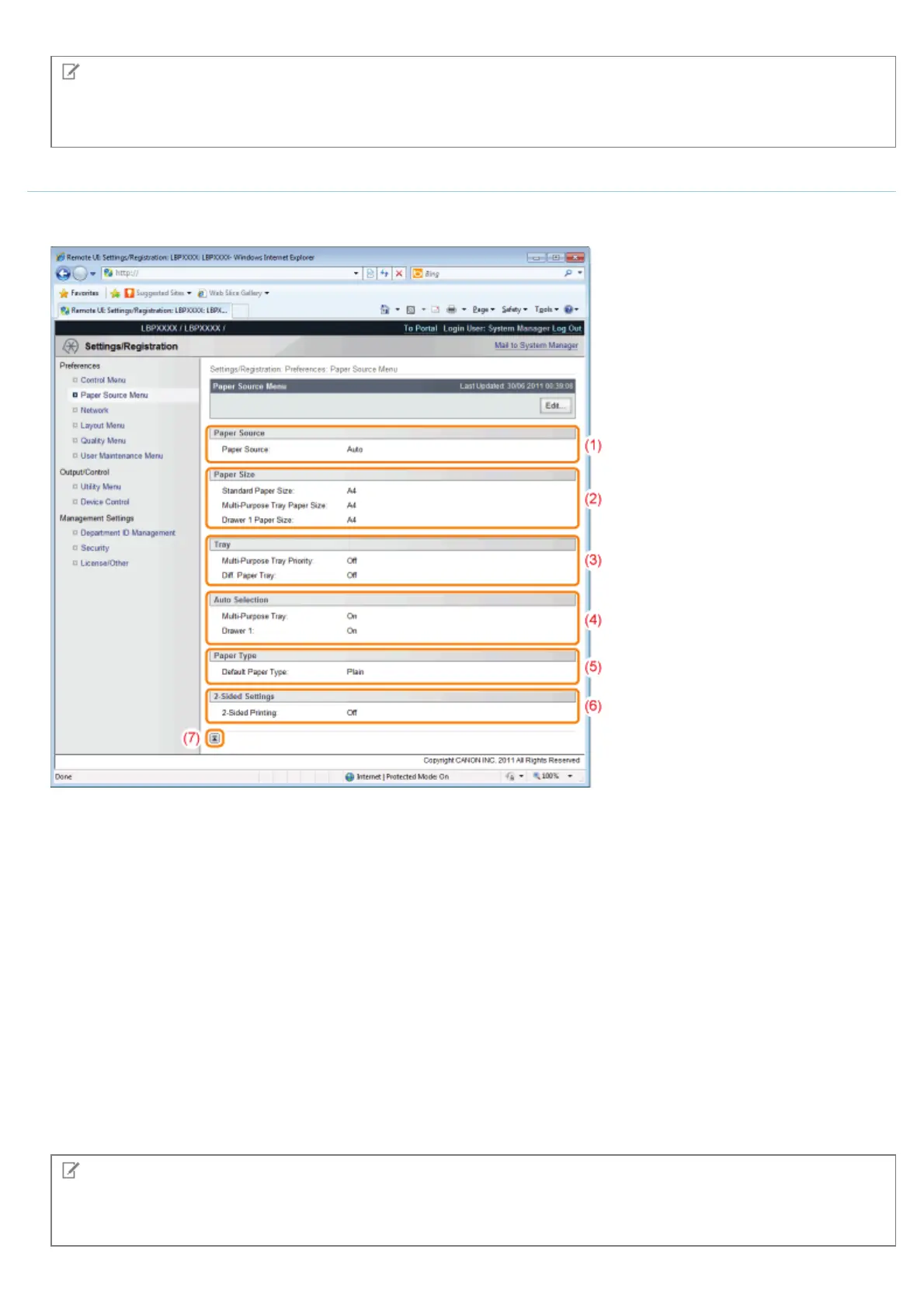
[Paper Source Menu] Page
It displays the settings for paper size, etc. when printing from the multi-purpose tray or paper drawer.
For details on the settings, see "[Setup] Menu ([Paper Source] Options)" or "[Select Feeder] Menu."
(1) [Paper Source]
The currently selected paper source is displayed.
(2) [Paper Size]
The paper size selected for each paper source is displayed.
(3) [Tray]
The operation settings related to the multi-purpose tray are displayed.
(4) [Auto Selection]
It displays whether to recognize the paper source for auto selection when [Auto] is set for [Paper Source] for each
paper source.
(5) [Paper Type]
The paper type selected for each paper source is displayed
(6) [2-Sided Settings]
The settings related to 2-sided printing are displayed.
(7) [Back to Page Top]
It moves the scroll box up to the top of the page.
NOTE
Changing Settings
You can only change settings when you are logged on in system manager mode.
㻡㻠㻜㻌㻛㻌㻥㻣㻜



 To Next Page