If you select [Reject], you will only be able to transmit or print from users (clients) entered in the [Exception Addresses]
field.
If you select [Allow], you will not be able to transmit or print from users (clients) entered in the [Exception Addresses]
field.
If you clear the [Use Filter] check box, you will be able to transmit and print from all users (clients).
7
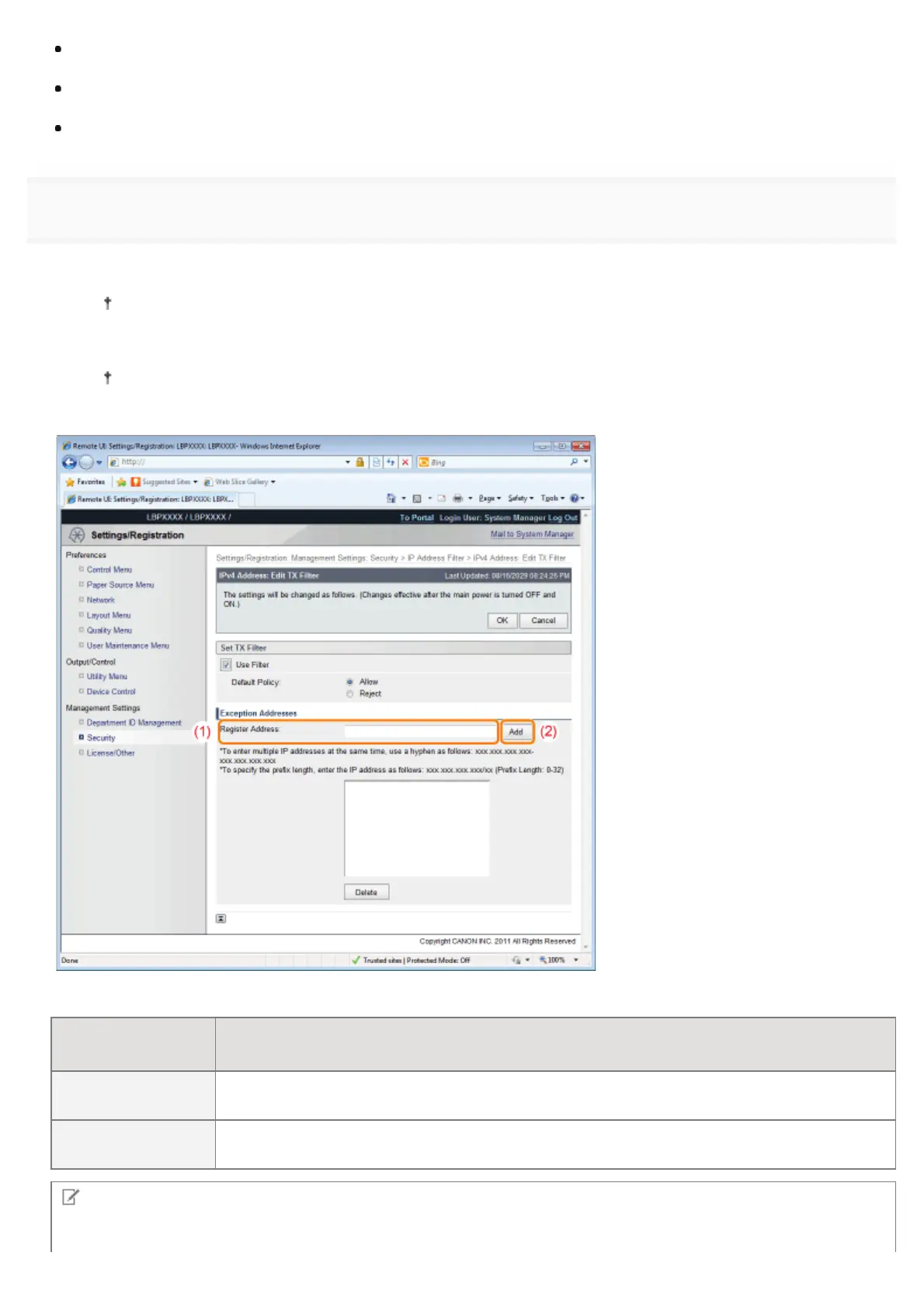
Set the IP address.
(1) Enter the IP address for which you want to reject or permit to print.
Enter the IPv4 address, which is a decimal value, by adding "." (periods) as delimiters.
(2) Click [Add].
You can set up to 16 IP addresses (16 sets of IP addresses for when you have specified with [Register
Address]).
You can also enter IP addresses as follows.
Input example of
the IP addresses
Method for entering IP addresses
192.168.0.1-
192.168.0.10
If you want to enter the IP addresses of consecutive numbers, place "-" (hyphen) between the
address of the smallest number and that of the largest number.
192.168.0.0/16
In order to specify the subnet range (prefix length), enter a "/" (slash) after the normal IP
address symbol, and then enter another prefix length (maximum 32).
NOTE
When "0" is entered in [Prefix Length]
㻢㻡㻥㻌㻛㻌㻥㻣㻜



 To Next Page