OPERATOR’S MANUAL
CMA-9000 FLIGHT MANAGEMENT SYSTEM
T
.
y changes to the CLB page.
n of the engine-out mode.
lected altitude
• The VNAV page title automatically changes to E/O CRZ.
RC speed depending on crew selection.
mode and
access to the PROFILE page is forbidden from all pages where it is normally
The FMS uses the FGCP-selected CAS or MACH to calculate ETAs, while assuming the crew will revert to
FMS-computed speed when:
• Sequencing the next speed-constrained waypoint, or
• Aircraft is at or above the departure airport speed restriction altitude,
• Switching to Cruise, or
• Entering or exiting a hold other than an altitude-constrained hold, or
• Reaching the FMS crossover altitude.
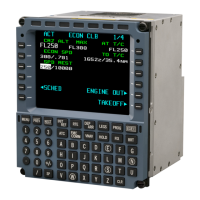
ACT E/O CLB 1/5
CRZ ALT G-DOT CEILING
FL350 FL298
G-DOT SPD LRC CEILING
215 FL263
{CANCEL E/O
NO PROFILE
o de-activate an FMS E/O in CLIMB:
1. Press the CANCEL E/O prompt [4L] from the E/O CLB page
The displayed VNAV page automaticall
No change in vertical guidance occurs until the FMS E/O mode is de-activated by pressing the [EXEC] key.
2. Press the EXEC key to confirm the cancellatio
All-engines operative Cruise guidance resumes.
A transition from E/O in CLIMB to Engine-Out Cruise mode occurs upon capturing the se
• The FMS commands Green Dot or L
NOTE: “NO PROFILE” indicates no vertical profile is computed during FMS engine-out climb
consequently,
permitted.
1.6.6 FGCP Speed Intervention in Climb
Page F-23
August 17, 2010


 To Next Page