59
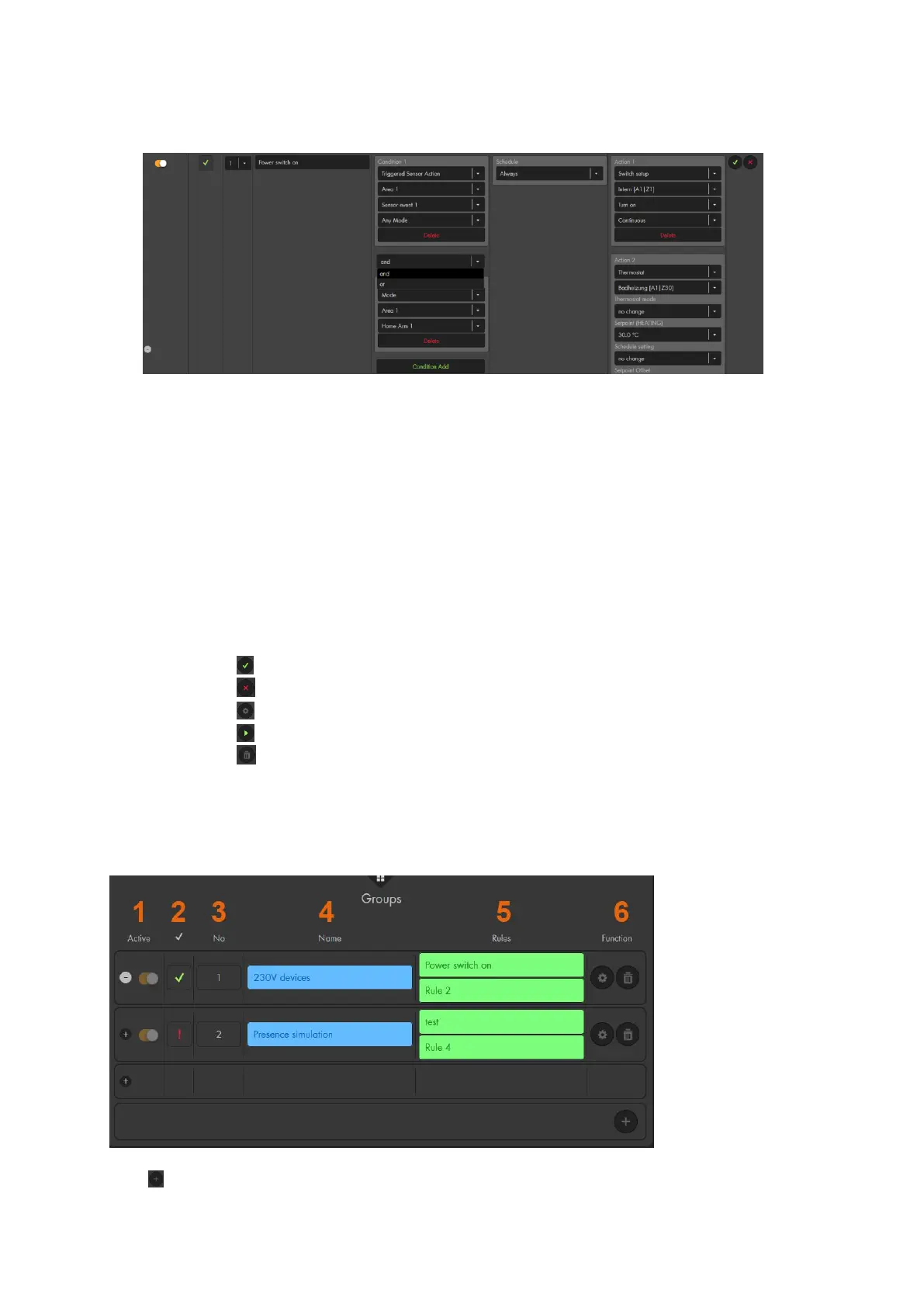
5. Condition: Shows which condition triggers the rule. Each rule can consist up to ten
conditions which can be connected via “and” or “or”.
If you connect two or more rules via “and”, all the conditions need to be met in
order to trigger the home automation rule.
An “or” condition (alongside other “and” conditions) is an alternative condition
to trigger this home automation rule.
6. Schedule: Define a schedule for the rule. The section “Examples of schedules”
explains this in detail.
7. Action: Specify the action to happen when the condition and schedule are met.
Sample applications are given on the following pages. You can combine up to ten
actions in a single home automation rule. Additional actions are added via “Action
Add” and can be deleted with “Delete”.
8. Functions:
Use to save automations.
Use to cancel any changes.
Use to edit exiting automations.
Use to trigger an automation manually (e.g. to test the automation).
Use to delete an automation.
Groups
This is an optional function to unite rules in groups. Groups are used for clarity, e.g. to
unite certain automations that belong together. However, you do not need to use groups
if you do not want to. In that case, forward to “Profiles”.
Use to add new groups.



 To Next Page