215575 142 Revision B
$
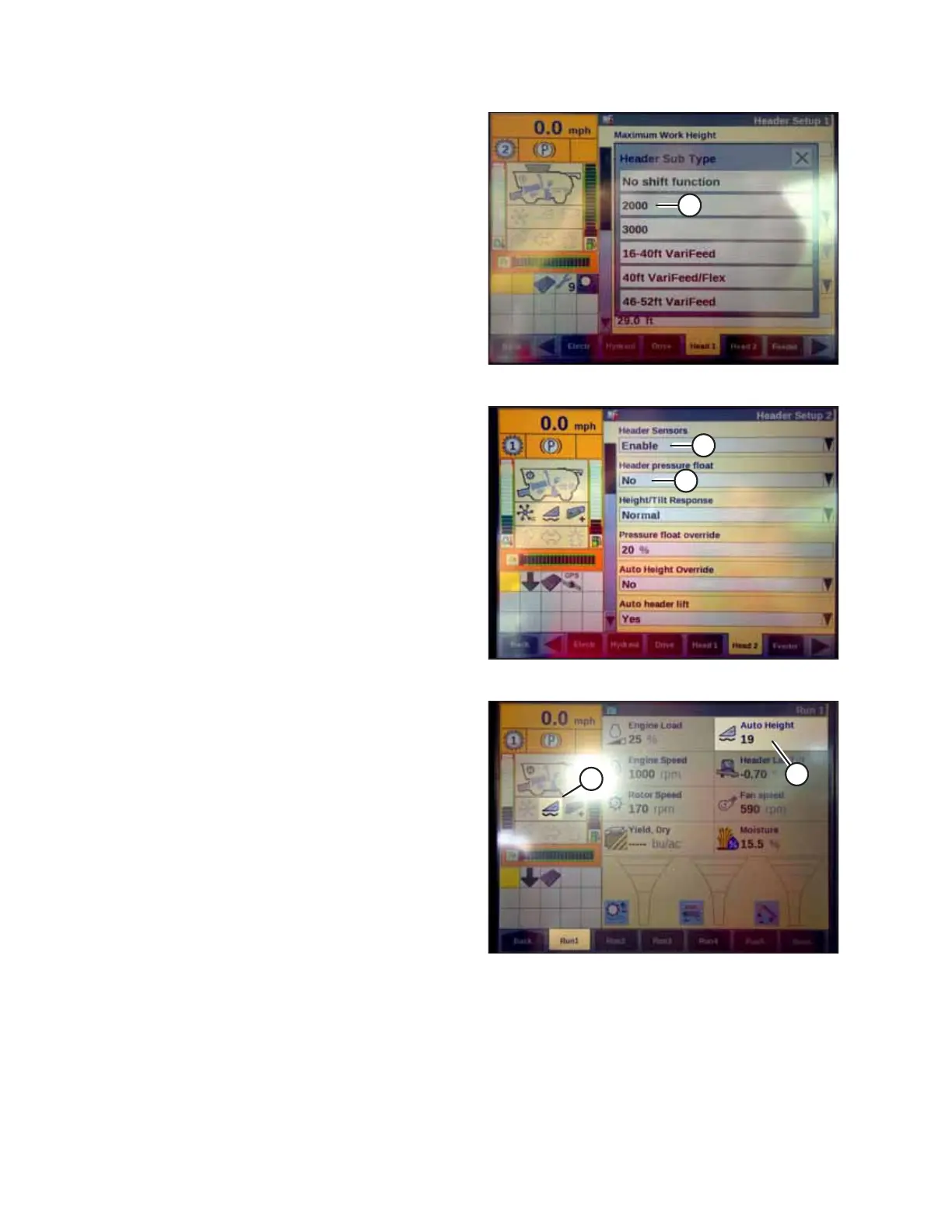
Figure 4.81: Case IH Combine Display
1. Select TOOLBOX on the MAIN page and then select
HEADER SETUP.
2. Locate the HEADER SUB TYPE field. It will be located on
either the HEAD 1 or HEAD 2 tab found at the bottom of
the display.
3. Select 2000 (A).
$
%
Figure 4.82: Case IH Combine Display
4. Locate the HEADER SENSORS and HEADER PRESSURE FLOAT
fields. They will be located on either the HEAD 1 or the
HEAD 2 tab found at the bottom of the display.
5. Select ENABLE (A) in the HEADER SENSORS field.
6. Select NO (B) in the HEADER PRESSURE FLOAT field.
$
%
Figure 4.83: Case IH Combine Display
7. Engage the separator and the header and press preset 1 or
preset 2.
8. Ensure that AUTO HEIGHT icon (A) appears on the display
and can be seen at location (B) as shown. When the header
is set for cutting on the ground, this step verifies that the
combine is using the potentiometers on the header
correctly to sense the ground pressure.
NOTE:
AUTO HEIGHT field (B) may appear on any of the RUN tabs
and not necessarily on the RUN 1 tab.
AUTO HEADER HEIGHT CONTROL



 To Next Page