215575 200 Revision B
4.14.2 Engaging Auto Header Height Control (New Holland CR/CX Series)
Set these initial configuration options on your New Holland CR or CX Series combine when setting up the auto header
height control (AHHC) system.
NOTE:
Changes may have been made to the combine controls or the display since this document was published. For instructions,
refer to the combine operator’s manual for updated information.
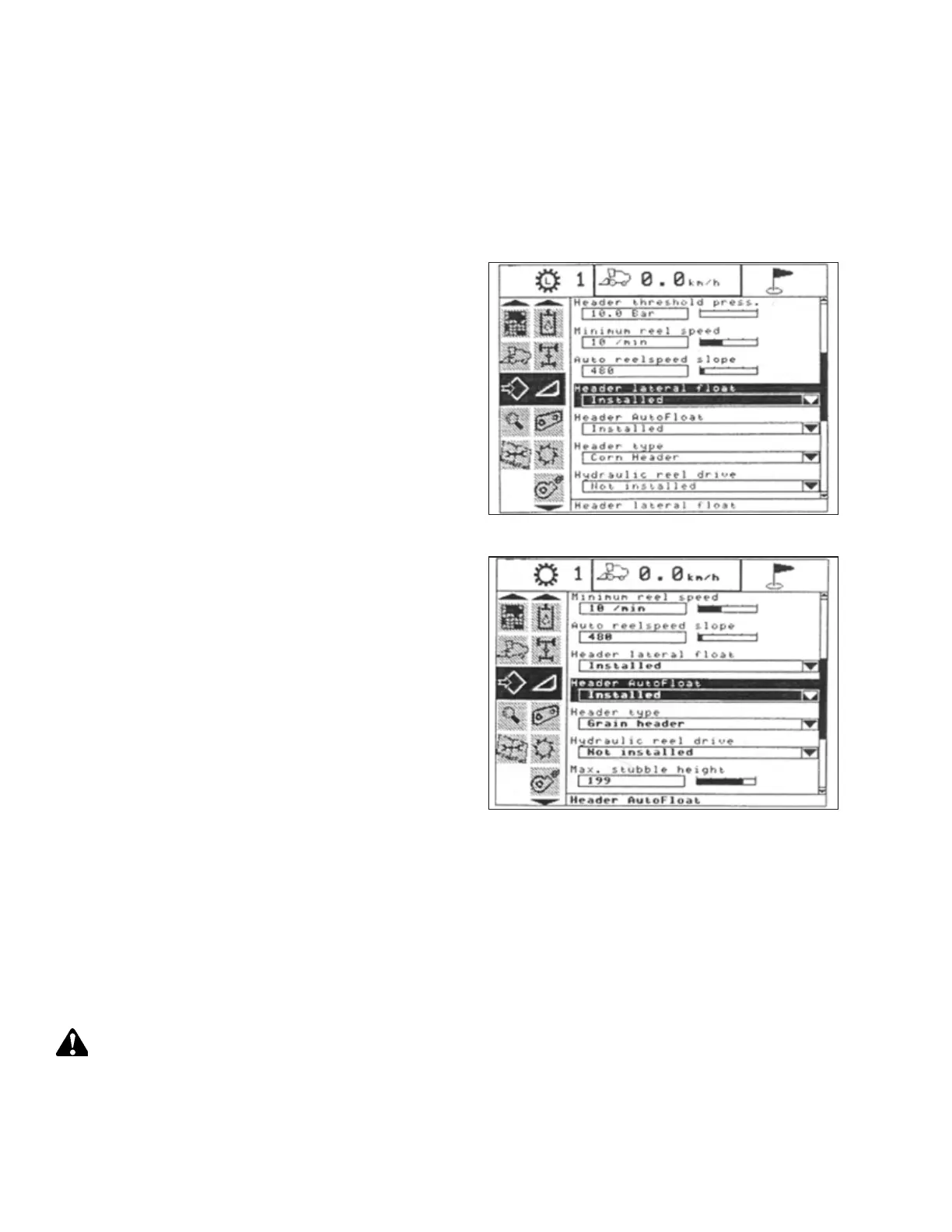
Figure 4.198: New Holland Combine Display
1. Select HEADER LATERAL FLOAT on the combine display and
press ENTER.
2. Use the up and down navigation keys to move between the
options and select INSTALLED.
Figure 4.199: New Holland Combine Display
3. Select HEADER AUTOFLOAT and press ENTER.
4. Select INSTALLED.
4.14.3 Calibrating Auto Header Height Control (New Holland CR/CX Series)
The auto header height control (AHHC) sensor output must be calibrated for New Holland CR and CX series combines, or
the AHHC feature will not work properly.
NOTE:
Changes may have been made to the combine controls or the display since this document was published. For instructions,
refer to the combine operator’s manual for updated information.
DANGER
Check to be sure all bystanders have cleared the area.
Check the following conditions before starting the header calibration procedure:
• The header is attached to the combine.
AUTO HEADER HEIGHT CONTROL



 To Next Page