215575 257 Revision B
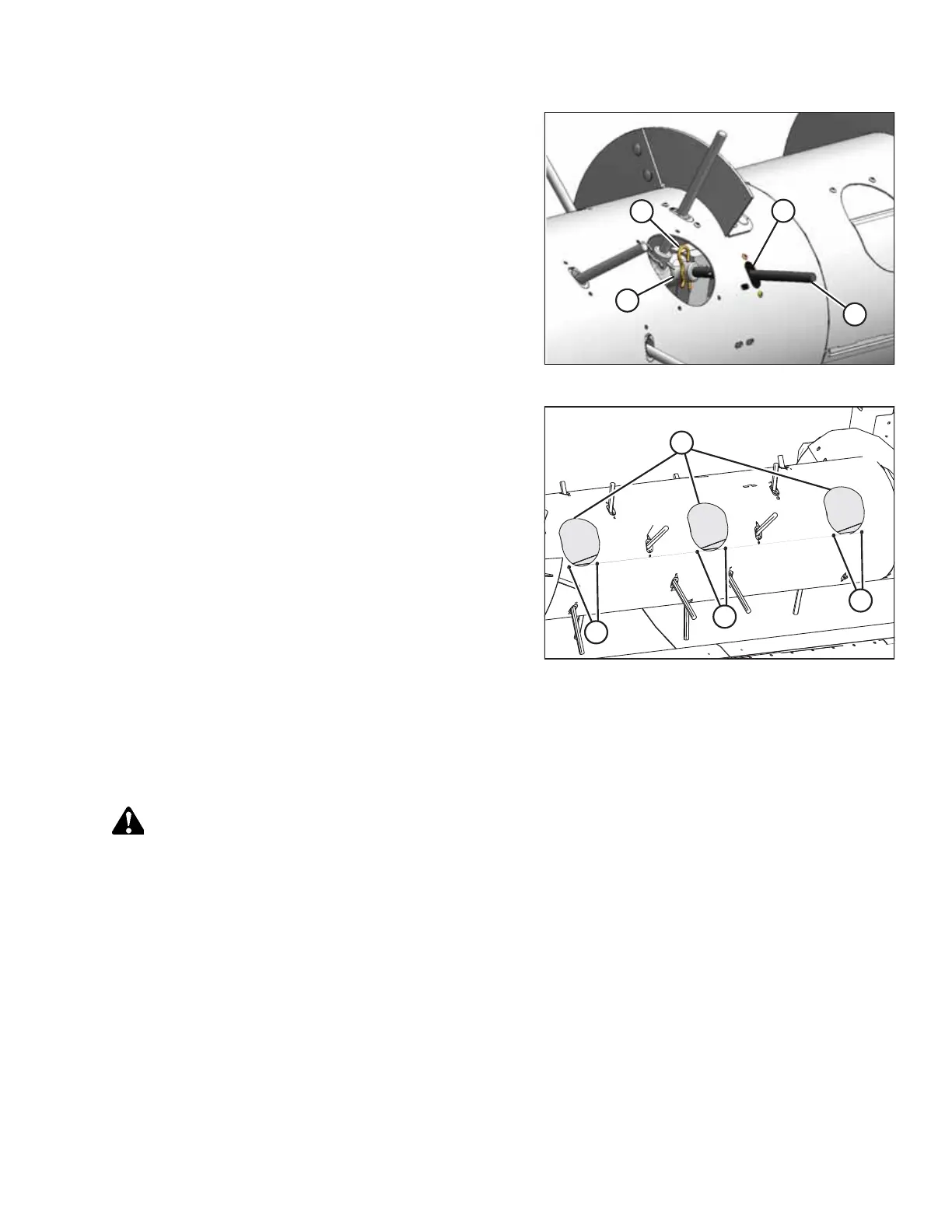
Figure 5.86: Auger Fingers
14. Reach inside the auger and reinstall auger fingers (B)
through plastic guides (D) from the inside.
NOTE:
Replace any worn or damaged auger fingers.
15. Insert auger fingers (B) into finger holders (C). Secure the
auger fingers in their finger holders with hairpins (A). Install
the hairpins with the closed end leading with respect to
auger forward rotation.
Figure 5.87: Access Covers
16. Install access covers (A) using two screws (B) coated with
medium-strength threadlocker (Loctite
®
243 or equivalent).
Torque the screws to 9 Nm (80 lbf∙in).
NOTE:
If reusing any hardware, apply medium-strength
threadlocker (Loctite
®
243 or equivalent) to the threads of
the bolts or screws.
5.6.4 Replacing Stripper Plates
Replace any stripper plates and missing or damaged fasteners if the specified clearance between the stripper plate and the
auger flighting cannot be maintained.
WARNING
To avoid bodily injury or death from unexpected startup of machine, always stop the engine and remove the key from
the ignition before leaving the operator’s seat for any reason.
1. Lower the header to the ground.
2. Shut down the header and remove the key from the ignition.
MAINTENANCE AND SERVICING



 To Next Page