215575 312 Revision B
$
%
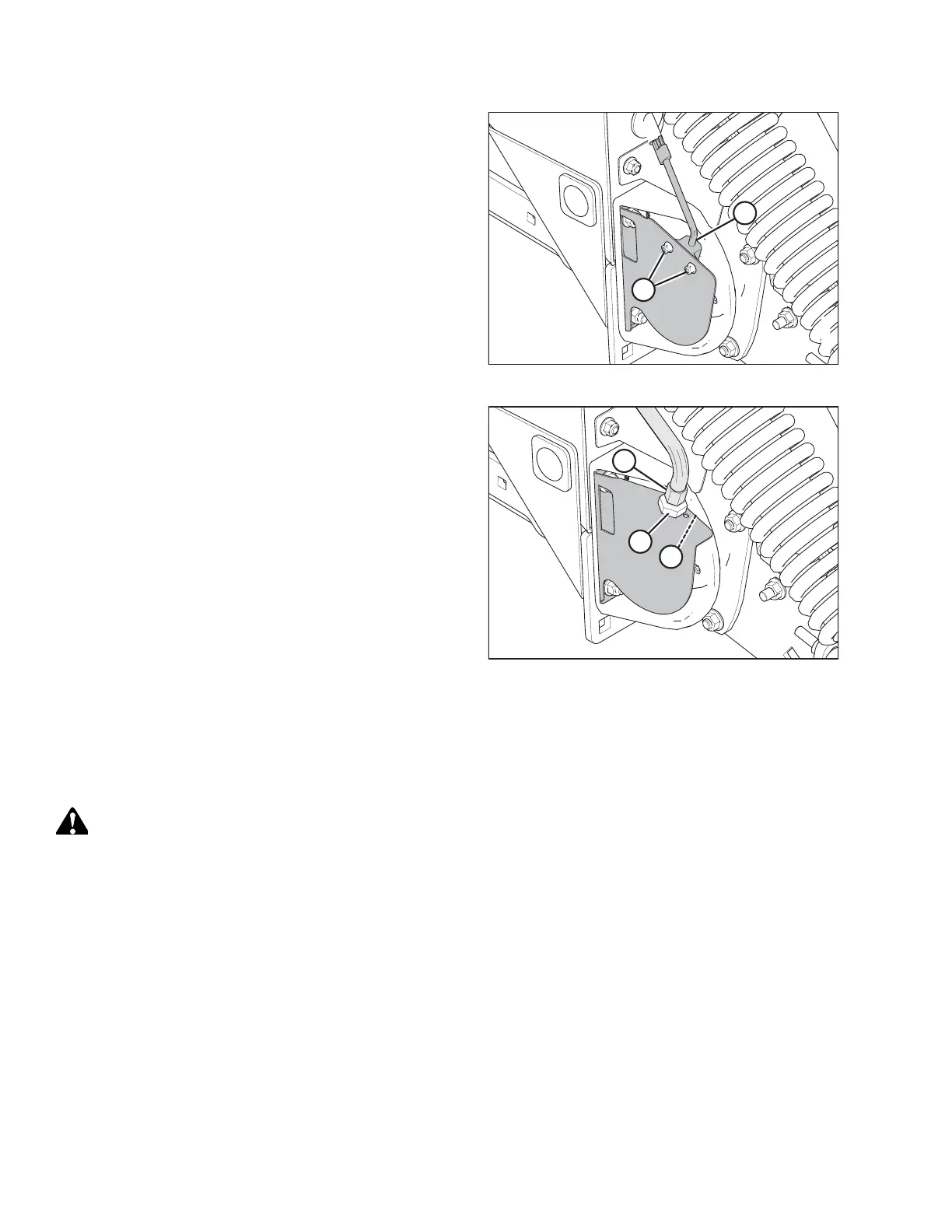
Figure 5.212: Draper Speed Sensor – AGCO Combines
4. If your pick-up header is configured for an AGCO combine:
Loosen nuts (A) and adjust sensor (B) to reach the required
clearance.
5. Tighten nuts (A).
$
%
&
Figure 5.213: Draper Speed Sensor – Non-AGCO
Combines
6. If your pick-up header is configured for a non-AGCO
combine: Hold sensor (B) with a wrench and loosen jam
nut (C).
7. Turn jam nuts (C) and (A) to reach the required sensor-to-
disc clearance.
8. Tighten jam nuts (C) and (A).
9. Install the right endshield. For instructions, refer to 3.3.6
Installing Right Endshield, page 30.
5.10.3 Replacing Draper Speed Sensor
The speed sensor may require replacement if it is malfunctioning or if service is being performed to adjacent components.
WARNING
To avoid bodily injury or death from unexpected startup of machine, always stop the engine and remove the key from
the ignition before leaving the operator’s seat for any reason.
1. Lower the header to the ground, and lower the hold-down completely.
2. Shut down the engine, and remove the key from the ignition.
3. Remove the right endshield. For instructions, refer to 3.3.5 Removing Right Endshield, page 30.
MAINTENANCE AND SERVICING



 To Next Page