215575 165 Revision B
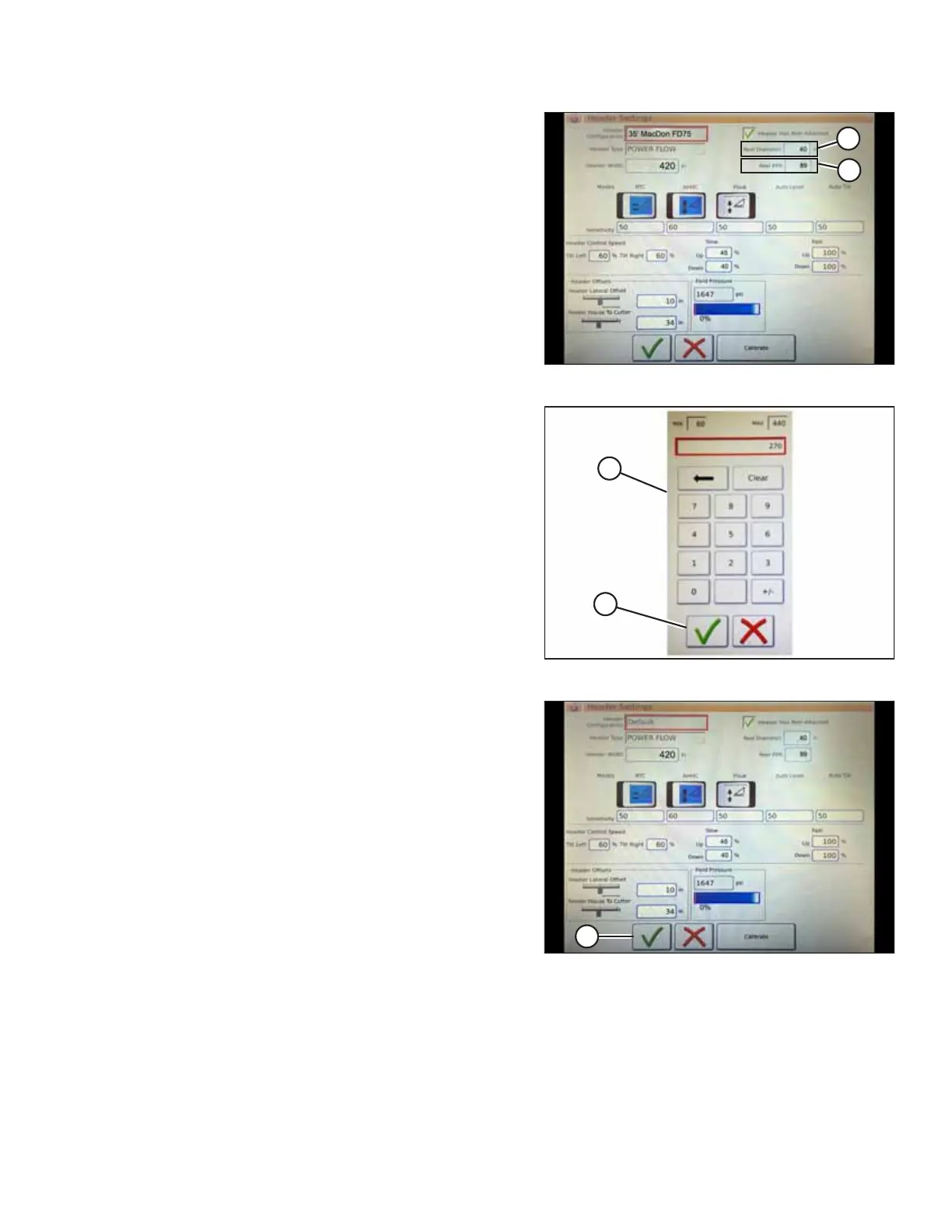
Figure 4.121: Header Settings
7. Touch REEL DIAMETER field (A) and a numeric keypad
appears. Enter 40 for the MacDon reel diameter.
8. Touch REEL PPR (speed pulses per revolution) field (B) and
enter 30 as the PPR value for your MacDon header.
NOTE:
PPR is the number of teeth on the reel speed sprocket.
AGCO-configured MacDon headers have 30 teeth on the
sensor pick-up reel.
Figure 4.122: Numeric Keypad
9. Touch green check mark (B) at the bottom of numeric
keypad (A) when complete, or the red X to cancel.
Figure 4.123: Header Settings Page
10. When your entries are complete, touch green check
mark (A) at the bottom of the HEADER SETTINGS page.
4.10.2 Setting up Automatic Header Controls – Gleaner
®®
S9 Series
The auto header height control (AHHC) functions are configured on the Gleaner
®
S9 series’ HEADER SETTINGS page.
NOTE:
Changes may have been made to the combine controls or the display since this document was published. For instructions,
refer to the combine operator’s manual for updated information.
AUTO HEADER HEIGHT CONTROL



 To Next Page