215575 226 Revision B
$
%
&
'
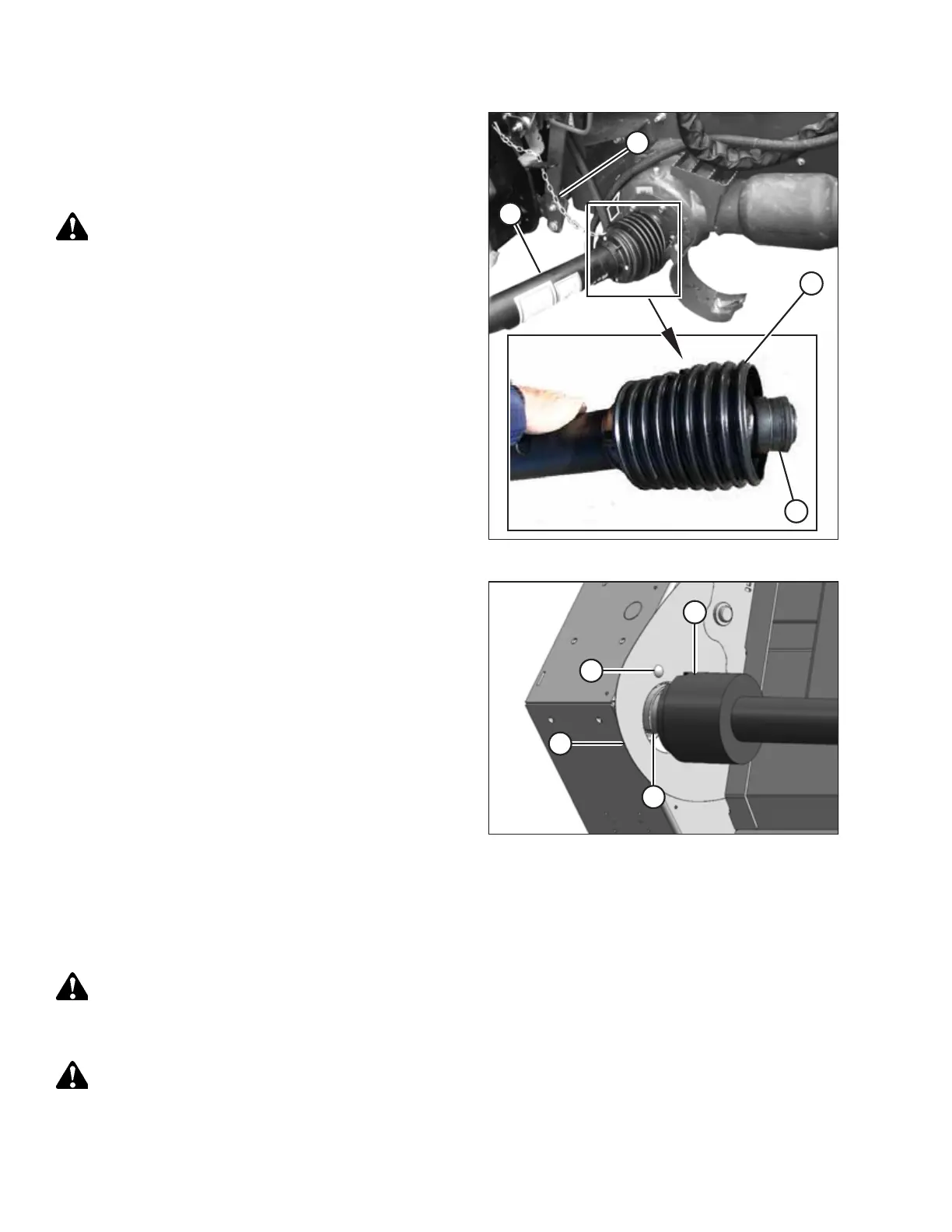
Figure 5.9: Combine End of Driveline
3. Disconnect tethers (A) securing the driveline guard to the
header.
4. Pull back guard (B) to expose collar (C) at the combine end
of the driveline.
CAUTION
To prevent injury, or damage to the driveline, hold the driveline
so that it doesn’t fall to the ground.
5. Pull back collar (C) and pull driveline (D) off the feeder
house shaft while supporting the end of the driveline.
$
%
&
'
Figure 5.10: Header End of Driveline
6. Pull back guard (A) to expose collar (B) at the header end of
the driveline. If necessary, loosen bolt (C) and move
plate (D) to release the guard.
7. Pull back collar (B), and pull the driveline off of the header
driveshaft.
Installing Header Driveline
Ensure that the header’s driveshaft is well-greased before installing the driveline. Be sure to secure the driveline boot with
the chain tether.
DANGER
To avoid injury or death from unexpected start-up of the machine, always stop the engine and remove the key from
the ignition before leaving the operator’s seat for any reason.
CAUTION
To prevent injury, or damage to the driveline, hold the driveline so that it doesn’t fall to the floor.
1. Lower the header to the ground, shut down the combine, and remove the key from the ignition.
MAINTENANCE AND SERVICING



 To Next Page