215575 175 Revision B
4.11 John Deere 60 Series Combines
To make your header’s auto header height control (AHHC) system compatible with John Deere 60 series combines, you
must check the height sensor voltage range, adjust the header height response rate and drop settings, and calibrate the
AHHC system to ensure that it is working correctly.
4.11.1 Checking Voltage Range from Combine Cab (John Deere 60 Series)
To ensure that the auto header height control (AHHC) system on your header works correctly with your John Deere 60
series combine, the output voltage from the header height control sensors must be verified.
The auto header height sensor output must fall within a specific range, or this feature will not work properly.
NOTE:
Changes may have been made to the combine controls or the display since this document was published. For instructions,
refer to the combine operator’s manual for updated information.
DANGER
Check to be sure all bystanders have cleared the area.
1. Raise the header until its wheels are 150 mm (6 in.) above the ground.
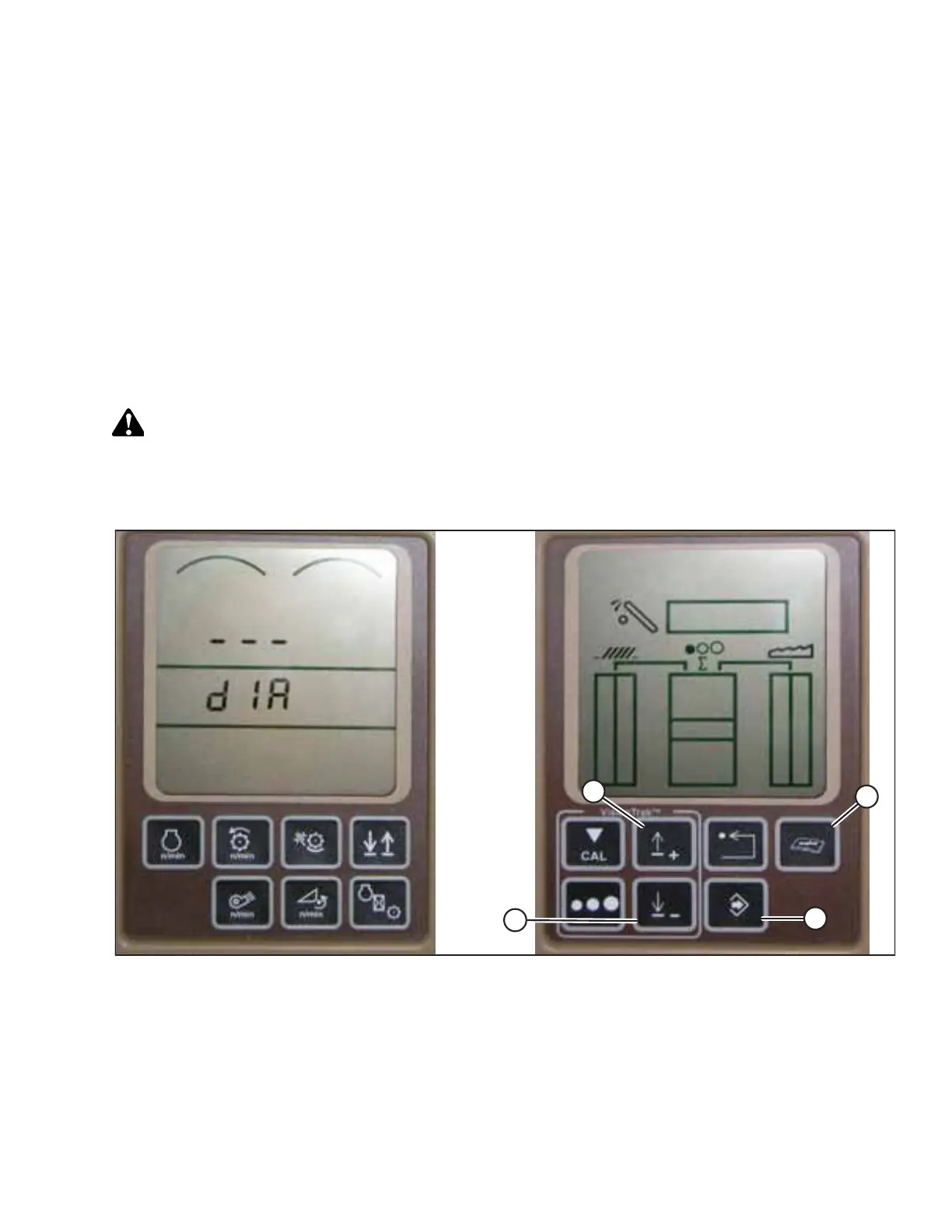
Figure 4.144: John Deere Combine Display
2. Press diagnostic button (D) (the button with open book with wrench on top of it) on the HHS monitor . dIA appears on
the monitor.
3. Press up button (A) until EO1 appears on the monitor. This is the header adjustment setting.
4. Press ENTER button (C).
5. Press up (A) or down (B) until 22 is displayed on the top portion of monitor. This is the voltage reading from the height
sensor.
AUTO HEADER HEIGHT CONTROL



 To Next Page